10+ macOS Tahoe Features You Might Have Missed - MacRumors
Skip to Content

10+ macOS Tahoe Features You Might Have Missed

Apple's new Liquid Glass design has received most of the attention in news about macOS Tahoe, but there are quite a few new features that make the Mac better than ever, including some that are not super obvious. We've rounded up 10 useful ‌macOS Tahoe‌ features that you should know about.

macOS Tahoe 26 Thumb

Customize the Menu Bar

With ‌macOS Tahoe‌, you have more control over the layout of your menu bar. You can rearrange the menu bar, remove things you're not using, and add Control Center widgets for quick access to your most used settings.

menu bar control center items macos
To customize your menu bar, go to System Settings > Menu Bar > Menu Bar Controls, or open Control Center, click on Edit Controls, and click on the "+" in the menu bar. You can uncheck boxes to remove items, and use the Add Controls option to add new options from both first and third-party apps.

Customize Your Mac's Lock Screen Font

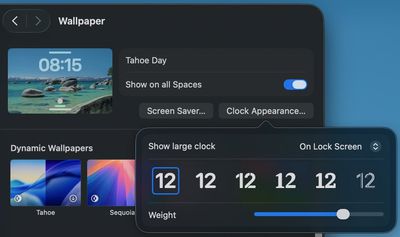
‌macOS Tahoe‌ lets you customize the clock that appears on your Mac's Lock Screen. You can't adjust size like you can in iOS 26, but you can change the font style and thickness.
tahoe clock lock screen
To adjust your clock, go to System Settings > Wallpaper > Clock Appearance. You can choose from six different font styles, and adjust the weight with a slider. You can opt to have the clock show on your Lock Screen or on the Lock Screen and Screen Saver.

Live Activities

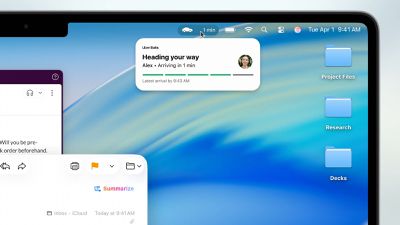
If you have an iPhone and a Mac, Live Activities can now sync between your devices. When you have an active Live Activity on your iPhone, like an in-progress flight, an upcoming Uber ride, or a live sports game, it will automatically show up in your Mac's menu bar through the iPhone Mirroring feature.
live activities macos
Live Activities sync automatically with iPhone Mirroring enabled, and you can turn it on with the iPhone Mirroring Mac. You can click on any Live Activity to open the associated iPhone app through iPhone Mirroring.

See Your Clipboard History

Spotlight now incorporates clipboard history, tracking what you copy and paste. It's erased every eight hours so nothing is saved longterm, but it's useful if you need to find something you copied earlier in the day.

spotlight clipboard macos
To get to your clipboard, press Command + Spacebar to open Spotlight, then press Command + 4 to swap over to the clipboard view. Click on any item to copy it.

Clipboard history is off by default, so you do need to turn it on in the Spotlight section of System Settings before you can use it.

Streamline Spotlight Search Results

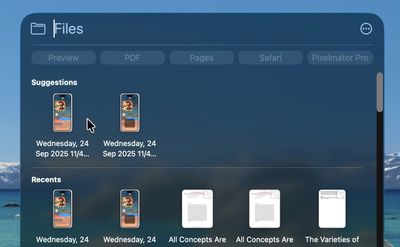
When you're using Spotlight to search for something in an app, ‌macOS Tahoe‌ lets you add filters directly in the search bar. Open up Spotlight, type in a search term, and then click on a filter at the top to narrow down the results. If you want to find PDFs you've been sent in the Mail app, for example, you can type in PDF and then click on Mail.
spotlight search files macos
A quicker way to search is to type in the app name, like Mail, press the tab key, and then type in your second filter term like PDF.

Search Websites Faster

You can use Spotlight to perform searches on websites without having to open up Safari and navigate to the site first. Just type a website name like Etsy or Amazon, press Tab, and type what you want to search for.

Search Your Tabs

When you search in Spotlight, the results include the Safari tabs that you have open. If you tend to have dozens of tabs open at once, it can be a good way to find the specific tab you're looking for rather than clicking through them one-by-one. Open tabs show up at the top of the list when you enter a relevant search term.

Use Quick Keys

Quick Keys are shortcuts that let you perform actions in Spotlight using just a few characters. With a Quick Key, you can type in a couple of letters to do a task that you repeat often, such as sending someone a message or opening up an app.

spotlight quick keys
To use it, open up Spotlight by pressing Command + Spacebar, then press Command + 3 to get to Actions. Type in the action that you want, like Open ChatGPT, and then when it appears, click on the Add Quick Key option.

From there, you can type between 1 and 12 letters as your shortcut, such as "gpt." The next time you want to execute that action, just type the Quick Key phrase.

Create Automations

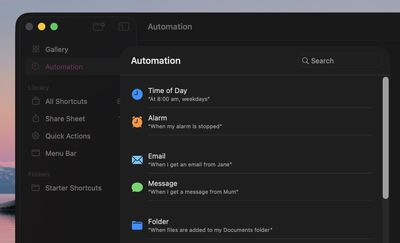
‌macOS Tahoe‌ has iOS-style Shortcut automations that can run automatically based on time, system events, or other triggers, which is functionality that was not previously available.
shortcuts automations
Open the Shortcuts app, click on the Automation option in the side bar, and then click on the "+" button to create an automation. Triggers include time of day, when an app opens, when a display or accessory is connected, when a Focus mode activates, when the battery gets to a certain level, when you save a file to a specific folder, and more.

Safari Picture in Picture

Picture-in-picture has been available in Safari for several years, but ‌macOS Tahoe‌ brings easier activation, new controls, and customization options.

safari picture in picture
In an article where there's a video, click on the Page Menu icon in the left side of the URL bar to enter picture-in-picture mode. You can now access playback controls for skipping forward and backward, and you can skip ads directly from the picture-in-picture window.

See Your Spotlight History

You can see your past Spotlight searches and actions in ‌macOS Tahoe‌, which makes it easy to get back to something that you did before.

macos 26 spotlight history
With Spotlight open, press on the up arrow to scroll through your past queries.

Gaming Low Power Mode

‌macOS Tahoe‌ updates Low Power Mode so that it's optimized for gaming, giving you a way to extend your gameplay sessions. You can set Low Power Mode to turn on automatically when your Mac is not plugged in, or let your Mac manage its power intelligently.

Whenever Low Power Mode is activated, it won't impact gameplay by lowering game performance.

Game Overlay

When you're playing a game in ‌macOS Tahoe‌, you can tap Command + ESC to bring up a new Game Overlay. From the Game Overlay, you can view achievements and leaderboards, connect with friends, and adjust settings like brightness and volume.
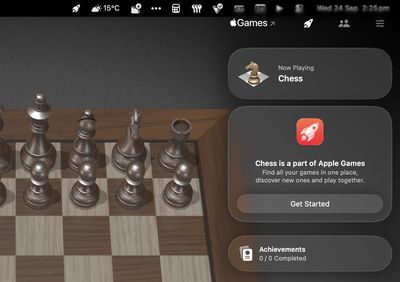
macos game overlay
‌macOS Tahoe‌ packs these useful features alongside its eye-catching visual redesign. Whether you're customizing your workspace, streamlining your workflow with Quick Keys, or automating repetitive tasks, these features can make your Mac experience significantly more productive. Take some time to explore these capabilities--you might find your new favorite Mac feature hiding in plain sight.

Read More

For more on what's new in ‌macOS Tahoe‌, check out our dedicated roundup.

Related Roundup: macOS Tahoe
Related Forum: macOS Tahoe

Popular Stories

macos tahoe

Apple Releases macOS Tahoe 26.7 and macOS Sequoia 15.8

Monday September 14, 2026 10:40 am PDT by
Alongside macOS Golden Gate, Apple today released new versions of macOS Tahoe and macOS Sequoia. macOS Tahoe 26.7 and macOS Sequoia 15.8 are available for users with older Macs or those who don't yet want to update to Golden Gate. The updates can be downloaded through the Software Update section of the System Settings app. On Macs eligible to install macOS Golden Gate, users will see both...


macOS 27 next to MacBook Pro Running macOS 27

Apple Announces 'Full Disk Access' Changes on macOS Due to AI Agents

Friday October 2, 2026 12:59 pm PDT by
In a post on its developer news website today, Apple announced that it will be introducing "additional controls" for the "Full Disk Access" setting on macOS due to new risks posed by AI agents. This announcement comes amid the rise of always-on AI agents like Meta's Muse and OpenAI's Dots, which have prompted privacy concerns. "Some developers are using Full Disk Access in ways that could...
iPhone 18 Pro Max Glacier Camera

Apple Says iPhone 18 Pro Max Users With AT&T Cellular Issue Need to Have Device Replaced

Friday October 2, 2026 8:21 pm PDT by
Apple today confirmed that a "small number" of iPhone 18 Pro Max users on the AT&T network have experienced an issue that causes the device to lose cellular service, thereby preventing phone calls, text messages, and data from working. Thousands of users complained about the issue across the Apple Support Community and other platforms. Apple said it released iOS 27.0.1 earlier this week and...

Top Rated Comments

13 months ago
And if you don’t like any of these I found out if you factory erase your Mac via recovery assistant it will reinstall Sequoia by default not Tahoe.
Score: 20 Votes (Like | Disagree)
13 months ago
Fugly OS. Hard pass. About to throw my new iPhone across the room in frustration with the laggy, low contrast, unnecessary ornaments and effects that clutter the screen and take up far too much real estate. Not gonna do that to my daily driver, no way.
Score: 13 Votes (Like | Disagree)
ThomasJL Avatar
13 months ago
What a mess! It can be summarized in one word: unintuitive.
Score: 12 Votes (Like | Disagree)
kagharaht Avatar
13 months ago
The TV App has an awesome feature. Search from your library and when the results shows up, you select it and TV App crashes...so you can report it to Apple for me.
Score: 11 Votes (Like | Disagree)
turbineseaplane Avatar
13 months ago

I just want to access the ability to bookmark in one click... PLEASE!!!
Sorry that requires an M5 chip and a new neural processor

-Tim
Score: 10 Votes (Like | Disagree)
13 months ago
After reading this article: whoop-dee-do... 🥱
Score: 10 Votes (Like | Disagree)
Latest Stories
Apple's New CEO John Ternus is Making Product Design a 'Major Priority'
1 hour ago
Apple Hiring 'iCup' Specialist
1 hour ago
MacBook Pro With OLED Display Rumored to Be 'Significantly Lighter'
2 hours ago
Apple Event Reportedly Planned for October 13
4 hours ago
Amazon Launches Early Prime Day Discounts on AirPods, iPad, MacBook Air, and More
11 hours ago
AirPods Pro 3 Hit Record Low $179 Price During Early Prime Day Sale
12 hours ago
Top Stories: Apple Smart Home Launch on October 13, iPhone Duo Production Issues, and More
2 days ago
Apple Says iPhone 18 Pro Max Users With AT&T Cellular Issue Need to Have Device Replaced
2 days ago
Apple Announces 'Full Disk Access' Changes on macOS Due to AI Agents
2 days ago
AT&T and Apple Just Took Steps Toward Fixing iPhone 18 Pro Max Issue
2 days ago
AT&T on iPhone 18 Pro Max Issues: 'We Are Working With Apple'
2 days ago
Upgrading From an Older Apple Watch? Here's How the New Features Stack Up
3 days ago
Beats 360 Cushion Kits and Apple Accessories See Early Prime Day Price Drops
3 days ago
Apple Store in UK Reopening on iPhone Duo Launch Day
3 days ago
AT&T Acknowledges iPhone 18 Pro Max Issues: Update 'Immediately'
3 days ago
New 'AirFly Drive' Accessory Turns Wired CarPlay Into Wireless CarPlay
3 days ago
Apple Shares Photos Shot on iPhone Duo
3 days ago
Apple Says iPhone Duo Has Replaceable 'Cover Layer'
3 days ago
Apple's Smart Home Camera Will Apparently Have 'No Video Recording'
3 days ago
Apple TV Just Updated Its Selection of 'Bonus' Movies
4 days ago
iPhone 18 Pro Colors Buyer's Guide: Which Should You Choose?
4 days ago
Early Prime Big Deal Days: Best Discounts on Accessories, TVs, and More at Amazon
4 days ago
MacBook Pro With OLED Touch Screen Rumored to Launch in October or November
4 days ago
Apple's All-New Home Hub Rumored to Launch in These Four Colors
4 days ago
iPhone 18 Pro Aperture Control Goes Fully Manual in Halide 3.2
4 days ago
Apple Stores Receive 'Do Not Open' Boxes Ahead of Smart Home Products Launch
4 days ago
iPhone 18 Pro Sales Jump in China Ahead of iPhone Duo Launch
4 days ago
Apple TV Still Down for Some Users Following Apple Services Outage
4 days ago
Microsoft 365 Work Accounts May Stop Syncing in Apple Mail
3 days ago
Apple's Smart Home Hub: Everything We Know So Far
4 days ago