

iOS 27 Wallet App Gets 7 New Features - MacRumors
Skip to Content

iOS 27 Wallet App Gets 7 New Features

Apple is making more of an effort to turn the iPhone into a physical wallet replacement in iOS 27, and there are several upgrades to the Wallet app.
iOS 27 Adds These New Features to Your iPhones Wallet Feature

Pass Upgrades

Apple upgraded airline boarding passes in the Wallet app with iOS 26, and in ‌iOS 27‌, upgrades are coming to additional types of passes. Memberships, gift cards, loyalty cards, and rewards cards can use a bolder "Poster Generic" card style with full background images, primary logo, header fields, footer field, primary fields, and an optional barcode.
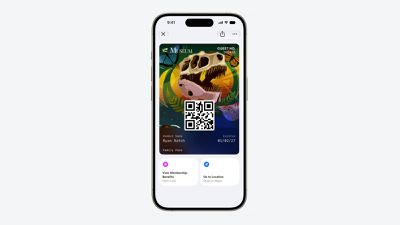
Apple Wallet Enhanced Pass iOS 27
Each pass is able to include up to two actions that can be tapped from the bottom of the pass, such as getting directions to a venue or checking a rewards point balance.

Apple is also allowing users to check the pass issuer certificate to ensure that a digital pass is legitimate (not applicable to Create a Pass), and there are four new barcode types supported, including EAN–13, Code 39, Codabar, and ITF.

There is a new Pass Designer Mac app for developers that makes it easier to create a pass using a WYSIWYG editor.

Create a Pass

There's a "Create a Pass" feature in the Wallet app for adding tickets, memberships, and more using Visual Intelligence. If you have a ticket for an event and there's not a digital version available for the Wallet app already, you can create one using the physical pass.
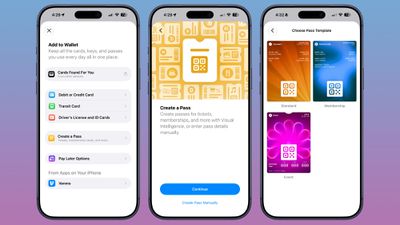
ios 27 wallet create pass

You can scan a pass and add it with Visual Intelligence if there's a barcode or QR code, or a pass can be added manually. Pass templates include Standard, Membership, and Event.

Each type includes relevant information like name, location, or admission type, along with a scannable code drawn from an included barcode or QR code that you take a photo of. There are 12 background colors to choose from with different texture options, or seven custom backgrounds for categories like theater, music, sports, and movies.

Fields can be added or removed as needed when creating a custom pass, with options like label, date, membership, contact, coupon code, VIN, insurance, and more, so most physical cards are able to be stored digitally.

Hotel Keys

When you add a digital hotel key from a participating hotel to the Wallet app, you can now view more details about the trip. Hotels can provide updates on booked activities and allow access to different services.

AI Bill Splitting

Using the new Siri Mode in the Camera app, or a feature in the Messages and Wallet apps, you can take a photo of a bill and use Apple Intelligence to figure out what each person owes. ‌Visual Intelligence‌ scans the receipt and makes a digital copy of everything on the list, and each person can select what they consumed. Tax and tip portions are also calculated automatically.

Payments can be made using Apple Cash, which is a U.S.-only feature.

Insights

‌iOS 27‌ includes an "Insights" feature where you can add financial accounts to the Wallet app to monitor spending.
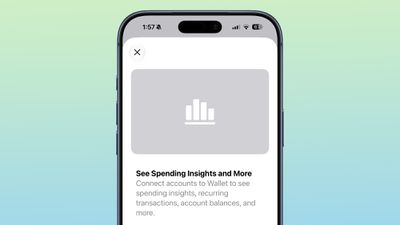
wallet app insights

Insights is an expansion of the Connected Accounts feature in earlier versions of iOS, and it includes spending, recurring transactions, account balances, and more. It works for financial institutions that have implemented Connected Cards support, including several UK banks.

Order Tracking

Order tracking in the Wallet app is expanding to Australia and Canada in ‌iOS 27‌. In ‌iOS 26‌, it was limited to the United States and UK.

Tap to Share

Tap to Share is an ‌iOS 27‌ feature that lets customers connect to a participating merchant's iPhone for quicker digital checkout.

Device Requirements

‌Visual Intelligence‌ is an ‌Apple Intelligence‌ feature requiring an iPhone 15 Pro or newer. Many of the other features should work on all iPhones.

Related Roundups: iOS 27, iPadOS 27

Popular Stories

Everything New Your iPhone Can Do on iOS 27 Feature 1

12 New Things Your iPhone Can Do in iOS 27

Friday July 3, 2026 7:25 am PDT by
Apple will release iOS 27 in September, and despite the company's focus this year on refining its flagship operating system and nixing bugs, there are still many additional features on the way, not least of which is Apple's new context-aware Siri, re-tooled for the generative AI era. This year's major iPhone software update isn't all about AI, though, as the following feature list...
iCloud iPhone 17 Pro

iPhone Users Who Pay for iCloud Storage Get Two New Perks on iOS 27

Thursday July 2, 2026 6:10 am PDT by
If you pay for certain iCloud+ storage plans beyond the 5GB that Apple offers for free, you will receive two more perks on iOS 27 at no additional cost. A summary of the two new iCloud+ perks on iOS 27:Increased daily usage limits for some new Apple Intelligence features, including image generation in the revamped Image Playground app. HomeKit Secure Video cameras receive generated video...
iOS 27 Feature Dark

Apple Seeds iOS 27 and iPadOS 27 Second Betas to Developers

Monday June 22, 2026 10:08 am PDT by
Apple today seeded the second betas of iOS 27 and iPadOS 27 to developers for testing purposes, with the update coming two weeks after Apple released the first betas following the WWDC 2026 keynote. Registered developers can download the betas from the Settings app on the iPhone or iPad by going to the General section and selecting Software Update. iOS 27 introduces Apple's smarter...

Top Rated Comments

dontwalkhand Avatar
4 weeks ago

On the complete opposite, I'm eagerly waiting for the day I don't have to carry a physical wallet in my pockets anymore.
Which is fine, but my physical wallet isn't trying to show me my finances etc either. If they want the Wallet app to behave like a physical wallet, it should do one thing good and that is, allow me to store cards in it. Leave it to other apps for those financial insights etc.


Score: 5 Votes (Like | Disagree)
PsykX Avatar
4 weeks ago

All I want is secure payments, all these other things just increase the attack surface and make the wallet App bloated and unreliable just like Apple's other Apps.
On the complete opposite, I'm eagerly waiting for the day I don't have to carry a physical wallet in my pockets anymore.
Score: 5 Votes (Like | Disagree)
Elyzien Avatar
4 weeks ago
I am down for more color saturation and warmer/darker tones. I'm a bit stretched on seeing pastel-ish/like wispy colors.
Score: 4 Votes (Like | Disagree)
4 weeks ago
I just want a way to customize cards so I can differentiate them..... (I got several Business ramp cards)
Score: 3 Votes (Like | Disagree)
CarlJ Avatar
3 weeks ago

Apple is also allowing users to check the pass issuer certificate to ensure that a digital pass is legitimate (not applicable to Create a Pass), and there are four new barcode types supported, including EAN–13, Code 39, Codabar, and ITF.
I'm pleased to see they're adding additional barcode types (including Codabar, which is used by many library systems, apparently), but they really need to add a system to support QR/bar codes that update based on time - lots of places, like Target and Costco, and some transit systems, use codes that update every minute or so, so that you can't just share a screenshot to other people. Which is fine, I guess, except it means you have to open that app every time,minstead of using Wallet.

So, add an API that app developers for the various store apps can use to register a callback - so you can have the pass in Apple Wallet, and when you bring up that card, Wallet asks the app "what's the right code for right now?". It preserves their security (no one can screenshot your card to use), but makes it just as frictionless as other cards in Wallet (just idly checked, and to get to my Target barcode in the Target app took 9 actions plus a bit of waiting, from a locked iPhone, while getting to my IKEA card in Apple Wallet took 3).
Score: 2 Votes (Like | Disagree)
d-klumpp Avatar
4 weeks ago
I hope I'm never so cheap or desperate that I need an AI tool to split a tab so precisely. Have some grace, people!
Score: 2 Votes (Like | Disagree)






































