Visual Intelligence is getting a big upgrade in iOS 27. It's now easier to find than it was before, and there are new Visual Intelligence capabilities. Apple also expanded it to the iPad and the Mac, so you can use the same features across devices.

Camera App
Apple moved Visual Intelligence to the Camera app in iOS 27, and it's accessible through a new Siri Mode that lives with the Photo, Video, and other camera mode options. You can swipe over to Siri Mode and take a picture so Siri can see what you see.
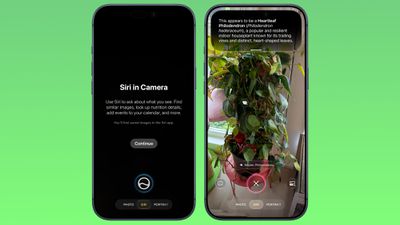
Siri will give you details about whatever you're looking at when you swipe down, and you can ask follow-up questions.
Siri Mode replaces Camera Control as the primary method for accessing Visual Intelligence, but you can still get to it by holding down the Camera Control button.
Smart Suggestions
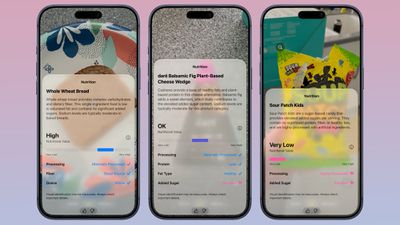
Siri Mode will suggest relevant actions based on what you're taking a photo of. If you take a photo of a plant, Siri will offer to identify it. If you take a photo of a plate of food, Siri can give you the nutritional information.
Siri Integration
Visual Intelligence is integrated with Siri AI, and Siri can answer questions about what you're looking at. Complex questions were previously handed off to ChatGPT, but that's no longer necessary.
The smarter, more capable version of Siri can do much of what ChatGPT can do, pulling information from the web to answer questions.
New iOS 27 Visual Intelligence Features
- Nutritional Insights - You can take a picture of a meal or a food item to check its nutritional value. Siri doesn't tell you specific calories in an item, but it can tell you if what you're eating has nutritional value and what's good or bad about it.
- Bill Splitting (U.S. only) - If you take a photo of a restaurant bill, you can split out what you ate and then send money via Apple Cash. Or calculate what everyone owes and request money.
- Import Multiple Events - You can import multiple events into the Calendar or Reminders app at one time from a schedule or list.
- Import Contacts - You can import contacts from a photo of a business card.
- Wallet Passes - You can turn a photo of a barcode from a membership or pass into a Wallet pass.
Visual Intelligence is much more powerful than before because of Siri's ability to search the web for answers. It can read laundry labels and give you clear instructions, look up items and find reviews on the web, identify odd devices or cables and tell you what they're for, scale recipes, read ingredient lists for you to check for allergens, transcribe messy written notes or lists into text, decipher confusing parking signs, offer plant care advice, solve math problems on a worksheet, and whatever else you can think to ask AI to do.
Other Visual Intelligence Capabilities
Visual Intelligence has a long list of things it can be used for, and these options have been available in earlier versions of iOS.
- Identify plants, animals, insects, landmarks, art, sculptures, books, and more.
- Add items to your calendar from a piece of paper like an event poster or flyer.
- Use Google Image Search to find similar images.
- Search Etsy, Amazon, Anthropologie, and other apps for an item that you capture with the camera.
- Provide details about a business in front of you, like hours of operation.
- Translate, summarize, and read text aloud.
Siri App Integration
All of your Visual Intelligence Siri requests are saved in the Siri app so you can revisit them later. The Siri app can be set to retain conversations for a month, a year, or forever.
Visual Intelligence on Other Platforms
Apple expanded Visual Intelligence to iPadOS 27, macOS Golden Gate, and visionOS 27. On Mac, you can use a Command-Shift-Space keyboard shortcut to access Visual Intelligence and select a part of your display to ask a question about. On iPad, you can access Visual Intelligence by taking a screenshot or swiping up from the lower left corner with Apple Pencil.
On Vision Pro, you can use Visual Intelligence just by looking at something, including physical items around you.
Device Requirements
Visual Intelligence in iOS 27 requires an iPhone 15 Pro or later. For Mac, you need an Apple silicon chip, and on the iPad, you need an Apple silicon chip or the A17 Pro iPad mini.
Availability
iOS 27 is available to developers and public beta testers, so you can try it out now ahead of its September launch.