iOS 27 Brings These Five New Features to Your iPhone Lock Screen - MacRumors
Skip to Content

iOS 27 Brings These Five New Features to Your iPhone Lock Screen

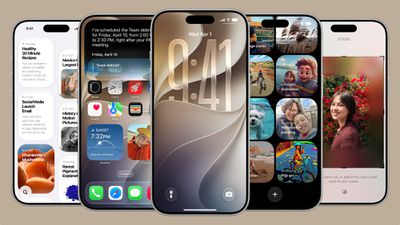
Apple released iOS 27 on Monday, September 14, and while the headline-grabbing Siri overhaul has received the most attention, the Lock Screen has picked up several refinements that you may not have heard about.
ios 27
Some are brand-new additions, while others are tweaks to features Apple introduced in iOS 26, but together they give you more control over how your Lock Screen looks and behaves.

Here are five to try right after you update your iPhone (supported models) to iOS 27. You can download the update now in the Settings app, via General ➝ Software Update.

Extend Your Wallpaper
extend wallpaper ios 27
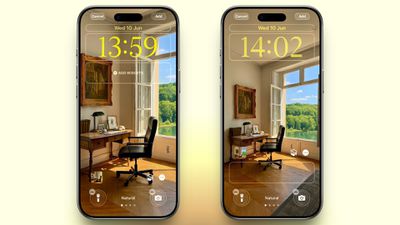
A new wallpaper extension feature in iOS 27 uses Apple Intelligence to automatically expand a photo beyond its original boundaries so it fills the entire Lock Screen more naturally. If a photo is cropped too tightly, doesn't match your iPhone's aspect ratio, or it leaves empty space when positioned on the Lock Screen, iOS 27 can generate additional image content around the edges with the "Extend" option. It will analyze the existing image and create matching background details that blend with the original photo, so there's no need for aggressive cropping. The Extend option can also be found in the Photos app.

Make the Clock Tiny
lock screen
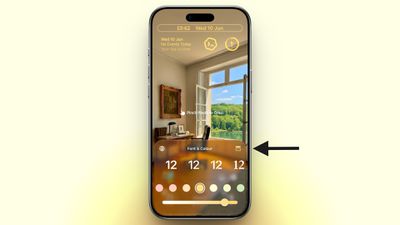
A new compact clock mode is available as a new Lock Screen layout option in iOS 27. Found in the top-right corner of the Font & Color panel, the option moves the time from its traditional large, centered position to a much smaller format alongside the date and widgets at the top of the screen. It's a nice option to have if you like a cleaner Lock Screen look that shows off your wallpaper more fully, and it's the complete opposite effect introduced in iOS 26 that stretches the clock down the screen.

Generate Wallpapers With AI
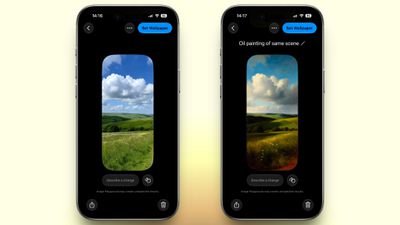
playground
iOS 27 also expands Image Playground with support for AI-generated Lock Screen wallpapers. You can create custom backgrounds using text descriptions, and the app will generate entirely new images tailored to your preferred style, subject matter, or aesthetic, allowing you to set it directly as your Lock Screen wallpaper.

Change Liquid Glass Opacity
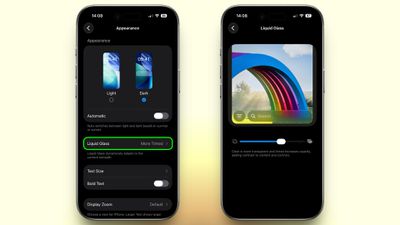
settings
In iOS 27, Apple added a full Liquid Glass slider under Settings ➝ Appearance ➝ Liquid Glass. It changes the translucency of Liquid Glass elements, and you can choose a clear version of Liquid Glass that allows some of the background to show through, select a more opaque, tinted version that improves the legibility of text, or choose something in between. Granted, it's more of a system-wide customization feature than a Lock Screen-exclusive feature, but it directly impacts the look of your clock setup, buttons, widgets, and notifications.

New Siri Interface
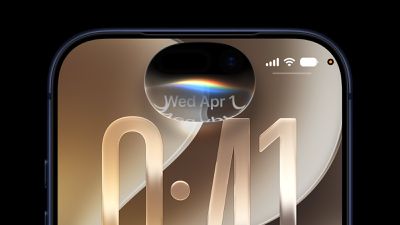
ios 27 siri animation
To go with Apple's tentpole "Siri AI" chatbot-style overhaul, iOS 27 introduces a redesigned Siri experience. Instead of the glowing light effect that previously traced the edges of the display, a swirling Siri orb now expands and animates within the Dynamic Island. Siri requests and responses are also now presented in a more compact interface surrounding the Dynamic Island, so interactions should feel more focused rather than completely taking over your Lock Screen.


Related Roundups: iOS 27, iPadOS 27
Related Forum: iOS 27

Popular Stories

iOS 27

Apple Releases iOS 27.2 Release Candidate

Monday October 19, 2026 10:26 am PDT by
Apple today seeded the release candidate of an upcoming iOS 27.2 update to developers for testing purposes, with the update coming a week after Apple released the fourth iOS 27.2 beta. Apple also seeded the iPadOS 27.2 RC. Registered developers can download the beta updates by opting in under Settings > General > Software Update and selecting the iOS 27 developer beta. The beta was used...
Face ID iPhone 18 Pro

Apple Releases iOS 27.0.1 With Face ID Bug Fix

Monday September 28, 2026 10:09 am PDT by
Apple today released iOS 27.0.1, the first update for the iOS 27 update that came out two weeks ago. iOS 27.0.1 can be downloaded over the air by going to Settings > General > Software Update. Apple has also released iPadOS 27.0.1 and visionOS 27.0.1 updates, as well as iOS and iPadOS 26.7.1 updates for devices not updated to iOS and iPadOS 27. According to Apple's release notes, iOS...
iPhone 18 Pro Max ATT

AT&T and Apple Just Took Steps Toward Fixing iPhone 18 Pro Max Issue

Friday October 2, 2026 12:29 pm PDT by
AT&T and Apple are taking action today as they try to resolve iPhone 18 Pro Max cellular issues, according to MacRumors contributor Aaron Perris. Thousands of iPhone 18 Pro Max users have been unable to connect to the AT&T network for phone calls, text messages, and data. The underlying cause has yet to be disclosed, but AT&T and Apple continue to work toward a resolution. First, Apple...

Top Rated Comments

19 weeks ago
Only 2 out of 5 features are genuine lock screen enhancements. The other 3 are either wallpaper tools (which already exist in the Photos app) or system-wide customisation features.

Score: 7 Votes (Like | Disagree)
19 weeks ago
How about displaying the time with seconds. Much more useful than the rubbish on offer.
Score: 6 Votes (Like | Disagree)
sw1tcher Avatar
19 weeks ago

Anyone manage to extract this image, would make a nice watchOS background!
No need to extract it when you can just go to Tim Cook's tweet about it from September 9, 2024 and get it there.


View post on X

https://pbs.twimg.com/media/GW-RG4QbQAAfihG.jpg


A wider (desktop?) version can be found here:

https://www.macrumors.com/2026/03/29/apples-50th-anniversary-finale-revealed/
Score: 3 Votes (Like | Disagree)
Dr McKay Avatar
19 weeks ago
I wish I could make it more closely match the font for the date. Also I can’t measure because I’m not at my computer but I feel like the clock is a few pixels higher than the date 😅

Hoping that’s not the case and it’s just the difference in font type playing tricks on me.


Attachment Image
Score: 2 Votes (Like | Disagree)
19 weeks ago
A feature to change just the current wallpaper would be great. I've setup my lock screen widgets the way I want them, but having to redo them just to pick a new wallpaper is annoying.

I hope I'm not missing a setting somewhere, but even the settings pane have that little animation switching between lock screens. I don't want an entire lock screen just to change the wallpaper.
Score: 2 Votes (Like | Disagree)
Small White Car Avatar
19 weeks ago
What I really want is the ability to pick a photo album as a source of backgrounds and have my lock screen reference it as I make changes in the future.

I can do this on my Apple TV screensaver. I have an album on my phone and I can add or remove photos at any point and the screensaver will reflect that in the future.

But for some reason on my iPhone lock screen it’s a big hassle to add and remove photos from my rotating photo gallery. It’s a completely separate process and it never checks photo albums again after you import the photos.

This would be far more useful than anything listed in this article.
Score: 2 Votes (Like | Disagree)
Latest Stories
'Arguably Better Than Face ID': the iPhone Duo Touch ID Tip to Try
35 minutes ago
Verizon Apologizes for iPhone Duo Pre-Order Delays, Giving Customers $100 Gift Card
6 hours ago
Skip the Touch ID Scan: Unlock iPhone Duo With Apple Watch
6 hours ago
iPhone Duo Fails JerryRigEverything's Dusty Durability Test
6 hours ago
Make iPhone Duo Volume Buttons Follow Screen Rotation
8 hours ago
iPhone Duo Teardowns Reveal Two Batteries and More
9 hours ago
M5 MacBook Air Returns to Prime Day Low With $200 Amazon Discount
10 hours ago
Top Stories: Apple 'Pro and Tell' Debut, iPhone Duo Launch, and More
11 hours ago
Apple Store Pickup System for iPhone Duo Just Went Live Again in U.S. and Canada
12 hours ago
Apple Closes French Stores Ahead of Further Protests
20 hours ago
Apple Pushes Back on DOJ Request for More Evidence
20 hours ago
The iPhone Duo Can Be a Tiny Mac, a Toaster, and a Nintendo DS
1 day ago
Using an Apple Pencil With the iPhone Duo: What to Know
1 day ago
Apple Store Pickup for iPhone Duo Starting to Resume But Very Limited
1 day ago
iPhone Duo Jailbroken on Launch Day
1 day ago
Apple Seeds Updated watchOS 27.2 Release Candidate
1 day ago
Apple Store in UK Reopens With New Design on iPhone Duo Launch Day
1 day ago
Crackgate? iPhone Duo Owners Report Screens Breaking Along the Hinge
1 day ago
iPhone Duo Brings Back Long Lines at Apple Stores
1 day ago
The MacRumors Show: iPhone Duo Arrives, Touchscreen MacBooks Next
1 day ago
Apple Released iOS 27.1 for iPhone Duo Only
1 day ago
iPhone Duo: Open Two Apps Side by Side and Lock Them As an App Pair
1 day ago
iPhone Duo Launches With Carrier and Accessory Discounts Available
1 day ago
Apple Music Has a Hidden iPod You Can Play With
1 day ago
iPhone Duo Says 'Hello' to You Personally
1 day ago
iPhone Duo: How to Skip the Swipe Up After Touch ID
1 day ago
Where to Buy iPhone Duo Today: Stores, Pickup, and Wait Times
2 days ago
MacBook Neo Helps Apple Outpace Rivals as Market Declines
2 days ago
Happy 25th Anniversary, iPod
2 days ago
iPhone Duo Demand Reportedly Exceeds Apple's Expectations
2 days ago