iOS 17 Music App Features: Crossfade, Collaborative Playlists, Song Credits and More

Apple Music in iOS 17 includes several long-requested features, such as collaborative playlists and an option to enable crossfade for a non-stop music experience. This guide highlights everything new that Apple added to the ‌Apple Music‌ app in iOS 17.

iOS 17 Apple Music Feature

Crossfade

Crossfade allows songs that are playing to smoothly transition into one another, eliminating any dead air time between songs.
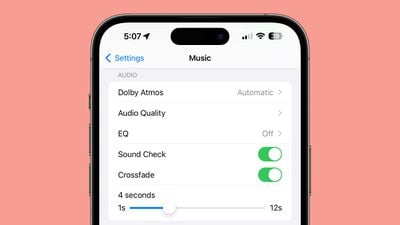
apple music crossfade length

Collaborative Playlists

With collaborative playlists, friends and family members can add to, reorder, and remove songs from a single ‌Apple Music‌ playlist. You can set up a playlist with several people, and each person can contribute songs and react to songs in the playlist with emoji.
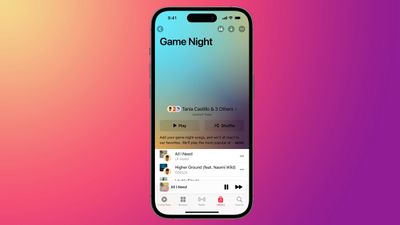
apple music collaborative playlist
Collaborative playlists are not yet implemented and will be coming to an iOS 17 update a bit later this year.

Apple Music SharePlay for CarPlay

iOS 17 brings an ‌Apple Music‌ SharePlay experience to CarPlay, so everyone in the car can play their favorite songs and contribute music. The car owner that has their iPhone connected to the car needs to have an ‌Apple Music‌ subscription for this feature to work, but passengers do not.
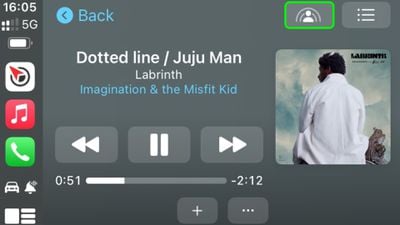
shareplay carplay
The ‌Apple Music‌ interface provides a QR code that each person can scan to get access to a playlist where songs can be added to the in-car ‌Apple Music‌ queue.

Interface Updates

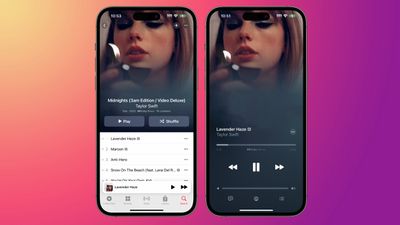
Full-screen animated artwork is available for albums that support the option, and album art is also now designed to blend seamlessly into the music player where the controls are located.
apple music ios 17
When the music player is minimized, there is now a hovering effect that adds depth.

Non-synced Lyrics

Song lyrics that are not synced to the music that's playing are shown in a larger, more legible font. This brings the lyric size in line with the lyrics that are synced to an ‌Apple Music‌ song.

Song Credits

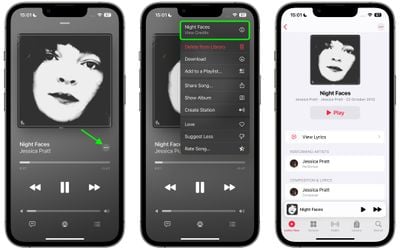
Tapping on the three-dot icon next to a song that is playing or in a playlist shows song credits. The credits show the performing artists, composition artists, and those who were involved in production and engineering.
song credits apple music

Apple Music Sing on Apple TV

With an ‌iPhone‌ running iOS 17 and an Apple TV 4K running tvOS 17, the ‌iPhone‌ can serve as a camera for the ‌Apple TV‌, showing you on the screen as you perform. You can also do this with an iPad, and it is the same feature that enables FaceTime on ‌Apple TV‌.

apple music sing continuity camera
‌Apple Music‌ Sing is integrated into ‌Apple Music‌. It uses the built-in follow-along lyrics and turns down vocals so you can sing along with your favorite songs.

Read More

More on all of the new features in iOS 17 can be found in our in-depth iOS 17 roundup.

Related Forums: iOS 17, iPadOS 17

Popular Stories

iOS 26

iOS 26.2 Coming Soon With These 8 New Features on Your iPhone

Thursday December 11, 2025 8:49 am PST by
Apple seeded the second iOS 26.2 Release Candidate to developers earlier this week, meaning the update will be released to the general public very soon. Apple confirmed iOS 26.2 would be released in December, but it did not provide a specific date. We expect the update to be released by early next week. iOS 26.2 includes a handful of new features and changes on the iPhone, such as a new...

AirPods Pro Firmware Feature

Apple Releases New Firmware for AirPods Pro 2 and AirPods Pro 3

Thursday December 11, 2025 11:28 am PST by
Apple today released new firmware designed for the AirPods Pro 3 and the prior-generation AirPods Pro 2. The AirPods Pro 3 firmware is 8B30, up from 8B25, while the AirPods Pro 2 firmware is 8B28, up from 8B21. There's no word on what's include in the updated firmware, but the AirPods Pro 2 and AirPods Pro 3 are getting expanded support for Live Translation in the European Union in iOS...
Google maps feaure

Google Maps Quietly Added This Long-Overdue Feature for Drivers

Wednesday December 10, 2025 2:52 am PST by
Google Maps on iOS quietly gained a new feature recently that automatically recognizes where you've parked your vehicle and saves the location for you. Announced on LinkedIn by Rio Akasaka, Google Maps' senior product manager, the new feature auto-detects your parked location even if you don't use the parking pin function, saves it for up to 48 hours, and then automatically removes it once...
iOS 26

iOS 26.4 and iOS 27 Features Revealed in New Leak

Friday December 12, 2025 10:56 am PST by
Macworld's Filipe Espósito today revealed a handful of features that Apple is allegedly planning for iOS 26.4, iOS 27, and even iOS 28. The report said the features are referenced within the code for a leaked internal build of iOS 26 that is not meant to be seen by the public. However, it appears that Espósito and/or his sources managed to gain access to it, providing us with a sneak peek...
iOS 26

Apple Releases iOS 26.2 With Alarms for Reminders, Lock Screen Changes, Enhanced Safety Alerts and More

Friday December 12, 2025 10:10 am PST by
Apple today released iOS 26.2, the second major update to the iOS 26 operating system that came out in September, iOS 26.2 comes a little over a month after iOS 26.1 launched. ‌iOS 26‌.2 is compatible with the ‌iPhone‌ 11 series and later, as well as the second-generation ‌iPhone‌ SE. The new software can be downloaded on eligible iPhones over-the-air by going to Settings >...
Foldable iPhone 2023 Feature 1

Apple to Make More Foldable iPhones Than Expected [Updated]

Tuesday December 9, 2025 9:59 am PST by
Apple has ordered 22 million OLED panels from Samsung Display for the first foldable iPhone, signaling a significantly larger production target than the display industry had previously anticipated, ET News reports. In the now-seemingly deleted report, ET News claimed that Samsung plans to mass-produce 11 million inward-folding OLED displays for Apple next year, as well as 11 million...
AirTag 2 Mock Feature

Apple AirTag 2: Four New Features Found in iOS 26 Code

Thursday December 11, 2025 10:31 am PST by
The AirTag 2 will include a handful of new features that will improve tracking capabilities, according to a new report from Macworld. The site says that it was able to access an internal build of iOS 26, which includes references to multiple unreleased products. Here's what's supposedly coming: An improved pairing process, though no details were provided. AirTag pairing is already...
iOS 26

15 New Things Your iPhone Can Do in iOS 26.2

Friday December 5, 2025 9:40 am PST by
Apple is about to release iOS 26.2, the second major point update for iPhones since iOS 26 was rolled out in September, and there are at least 15 notable changes and improvements worth checking out. We've rounded them up below. Apple is expected to roll out iOS 26.2 to compatible devices sometime between December 8 and December 16. When the update drops, you can check Apple's servers for the ...
macOS Tahoe 26 Thumb

Apple Releases macOS Tahoe 26.2 With Edge Light

Friday December 12, 2025 10:08 am PST by
Apple today released macOS Tahoe 26.2, the second major update to the macOS Tahoe operating system that came out in September. macOS Tahoe 26.2 comes five weeks after Apple released macOS Tahoe 26.1. Mac users can download the macOS Tahoe update by using the Software Update section of System Settings. macOS Tahoe 26.2 includes Edge Light, a feature that illuminates your face with soft...

Top Rated Comments

Wilson1313 Avatar
30 months ago
Still an atrocious interface. Needs a ground-up UI redesign.

Edit: Reasons why (no particular order)

* Adding to library or playlist should be a one-click action vs needing to click the 3 dot menu
* No device handoff or memory for last playing if app is restarted
* Random glitches and stability issues (such as now playing not always reflecting current song playing)
* Song radios repeating songs and not as good at curating as Spotify
Score: 30 Votes (Like | Disagree)
eicca Avatar
30 months ago
But: did they fix the bug where music copied from my computer shows up as each track being its own album?

That bug has been there for SIX YEARS NOW.
Score: 18 Votes (Like | Disagree)
AJTC Avatar
30 months ago

Still an atrocious interface. Needs a ground-up UI redesign.

Edit: Reasons why (no particular order)

* Adding to library or playlist should be a one-click action vs needing to click the 3 dot menu
* No device handoff or memory for last playing if app is restarted
* Random glitches and stability issues (such as now playing not always reflecting current song playing)
* Song radios repeating songs and not as good at curating as Spotify

I’d add in that the Listen Now, Browse and Search needs to be faster/native instead of a web app wrapped in an app container. Those tabs are so slow compared to Spotify.
Score: 17 Votes (Like | Disagree)
lazyrighteye Avatar
30 months ago
Song Credits!
I’ll have to see it in action, but it’s a step toward complete liner notes that include all musicians, instruments played, producer, studio, etc. Can go a long way toward facilitating deeper connection to the music. Has been my main request of the platform. Excited to finally see some attention in that regard.
Score: 12 Votes (Like | Disagree)
dynAdZ Avatar
30 months ago
While these are decent features, what the app really needs is a complete rework from scratch. It should get a whole new UI and coding framework to make it at least as fast and stable as Spotify‘s app is. It is hard to believe how fast you can navigate and search in Spotify compared to Apple Music. They really should start all over.
Score: 12 Votes (Like | Disagree)
cgs1xx Avatar
30 months ago
how many years till we get an equalizer? :rolleyes::rolleyes:
come on Apple... you can do it!

Also I'd love to be able to switch off anything "curated" like Listen Now, Radio, Browse etc
Score: 11 Votes (Like | Disagree)