

Apple's Secret Siri Interface Buried in macOS 27 Beta: How to Enable - MacRumors
Skip to Content

Apple's Secret Siri Interface Buried in macOS 27 Beta: How to Enable

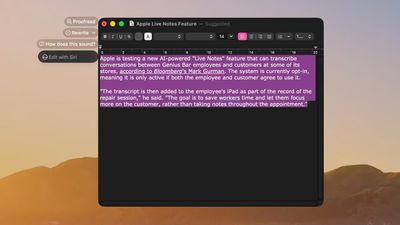
Apple appears to be testing a hidden popover interface for Siri AI in the macOS 27 Golden Gate beta that surfaces Writing Tools and contextual actions whenever the user selects some text.
siri popover macos 27%402x scaled
Spotted by a member of Reddit's r/MacOSBeta community, the floating icon appears at the top-left of the selected text, expanding when the pointer hovers over it to a compact popover of the tools and actions.

Currently, the popover offers the tools Rewrite, Proofread, "How does this sound?" and "Edit with Siri," plus options for creating key points and summarizing text. The contextual actions are based on the content selected, including things like adding contact details, composing a message or email, creating a calendar event, showing a location in Maps, and tracking flights or packages.

The Siri popover is disabled by default in macOS 27 developer beta 3 and public beta 1. Beta testers found it can be switched on through a private feature flag, but the feature is clearly unfinished. Some of the actions don't respond, suggesting Apple is still building out the underlying functionality.

Adventurous beta users can try it with the following Terminal command, followed by a restart:
sudo mkdir -p /Library/Preferences/FeatureFlags/Domain && sudo defaults write /Library/Preferences/FeatureFlags/Domain/WritingTools LightweightUI_macOS -dict Enabled -bool true

And to disable the interface, use this command followed by a restart:
sudo defaults write /Library/Preferences/FeatureFlags/Domain/WritingTools LightweightUI_macOS -dict Enabled -bool false

Note that the UI's behavior is inconsistent, and there's no guarantee the interface will make it to the final release of macOS 27 Golden Gate this fall.

Popular Stories

apple intelligence black

Apple Briefly Posts China Guide for Connecting Siri to Qwen AI

Monday August 10, 2026 5:21 am PDT by
Apple briefly published a support guide in China explaining how Mac users can connect Alibaba's Qwen AI to Siri and Writing Tools, before pulling it entirely less than a day later. Reuters first spotted the Chinese-language guide on Apple's support site on August 8, which explained how eligible Mac users in mainland China could connect Qwen, Alibaba's family of generative AI models, to Siri...
ios 27 siri voice

Latest iOS 27 Beta Expands Siri AI Voice Customization

Monday August 10, 2026 11:57 am PDT by
With the fifth beta of iOS 27, Apple has expanded the voice customization options for Siri AI. Pace and Expressivity can now be adjusted for more of the available voice options instead of just the two American voices. There are seven American voice options and four British voices to choose from, all of which can be customized with different Pace and Expressivity settings. Pace changes...
ios 27 b5 icons

iOS 27 Beta 5 Brings New Icons for Siri, Safari, Settings and More

Monday August 10, 2026 12:18 pm PDT by
In the fifth beta of iOS 27, Apple is continuing to make design tweaks. There are updated Liquid Glass icons for Safari, the Siri app, Settings, Remote, App Store, and Preview. The Safari icon is a brighter blue with more detailed compass lines and arrows, while the Siri icon looks more like the actual Siri bubble that's displayed when Siri is activated. The App Store app icon is more...

Top Rated Comments

somethingelsefl Avatar
7 weeks ago

The fact that anybody is ok with this level of intrusion and opportunity for abuse, no matter how amazing, is simply a signpost at how far humanity has fallen.
“How far humanity has fallen” Dramatic much? I’m sure you just use pencil and paper for everything and have zero reliance on any form networking risk. The fact that you are so overdramatic to emphasize a belabored talking point hypocritically in an online social forum is simply a signpost of how far humanity fallen.
Score: 6 Votes (Like | Disagree)

PBG4 Dude Avatar
7 weeks ago

Clippy. People are upset that they hid Clippy.
Score: 4 Votes (Like | Disagree)
Apple Knowledge Navigator Avatar
7 weeks ago
Looks like an improvement over the current feature. Good stuff.
Score: 4 Votes (Like | Disagree)
MrWeenus Avatar
7 weeks ago
I was wondering where the "Writing Tools" feature has disappeared from the context menu. Guess this is it.
Score: 3 Votes (Like | Disagree)
7 weeks ago

For a test, I scanned in 6 months of checking statements and generated jpeg files for each page.

Siri wouldn’t recognize the text directly, so I told Siri to open each file in Preview and recognize the text.

This worked (the first time), and after the text was recognized, I told Siri to generate a table, which I then copy/pasted into Numbers.

Oddly enough, the second time I told Siri to open the files in Preview and recognize the text, Siri said it couldn’t do that which was kind of a headscratcher.

Still, the new Siri is much more capable than existing Siri. I’ve been surprised multiple times at what Siri can do now.


Oh yeah, almost forgot. Was watching some DOOM: The Dark Ages gameplay video and was talking about garbage trucks for some reason. Siri activated and heard me talking about garbage trucks and responded to the effect “I can find no references to garbage trucks in DOOM: The Dark Ages”. So it was able to figure out the gameplay was from DOOM and somehow looked online for garbage truck references related to the game.
The fact that anybody is ok with this level of intrusion and opportunity for abuse, no matter how amazing, is simply a signpost at how far humanity has fallen.
Score: 2 Votes (Like | Disagree)
7 weeks ago
Interesting to see this. Think it will be released as a part of future version of Golden Gate, maybe around few months after the public launch.
Score: 1 Votes (Like | Disagree)








































