

Skip to Content

Vivaldi 7.9 for Desktop Adds Auto-Hide UI for Distraction-Free Browsing

Vivaldi this week released version 7.9 of its desktop browser, which includes a new UI Auto-hide feature that clears the entire browser interface from view while you read, watch, or work.
vivaldi auto hide ui
When enabled, UI Auto-hide removes the tab bar, address bar, toolbars, and status indicators from the screen entirely, and moving the cursor to any edge of the window brings everything back instantly.

The feature can be configured to hide only specific elements like the tab bar, the address bar, or the full set of chrome all at once. UI Auto-hide can be toggled via the keyboard shortcut Command-F10, or through a new icon in the status bar. All available options live under Settings ➝ Appearance ➝ UI Auto-hide.

This update also introduces Follower Tab, which is designed to let users explore links without losing their place on the current page.
7
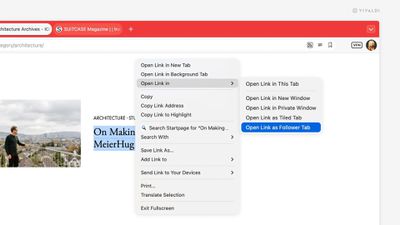
Right-clicking a link gives you the option to open it as a tiled Follower Tab, which loads the linked page side by side with the original. Subsequent links clicked in the original tab continue opening in the follower pane, while the source page stays pinned in place.

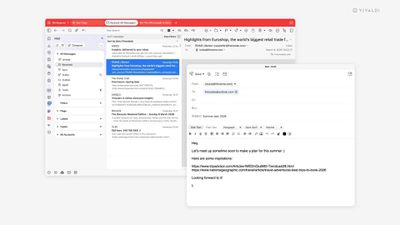
Vivaldi's built-in email client also gains several improvements in the v7.9. The mail composer can now be popped out into its own independent window, making it easier to draft messages alongside the inbox or on a second monitor.

Meanwhile, a new toggle lets you switch between rich text and plain text within the composer. Vivaldi says memory usage in the mail list has also been reduced, which should help performance on larger inboxes. Mailing list reply routing has apparently been improved as well, and users can now save selected messages directly to disk.
7
Vivaldi 7.9 is a free download for Mac, Windows, and Linux from the Vivaldi website. As with previous versions, the browser ships with built-in ad and tracker blocking, extensive tab management tools, and support for Chrome extensions.


Tag: Vivaldi

Popular Stories

AirPods Max 2 Feature

Apple Announces AirPods Max 2 With H2 Chip and More

Monday March 16, 2026 6:12 am PDT by
Apple today unveiled AirPods Max 2, with key upgrades including the H2 chip, increased active noise cancellation, improved sound quality, and features such as Adaptive Audio, Conversation Awareness, Voice Isolation, and Live Translation. The new AirPods Max have the same overall design as the previous generation, with most of the new features coming from the upgrade to the H2 chip:- Adaptive ...
Apple Logo Sketch Feature

Apple Unveiled a Surprise New Product Today

Monday March 16, 2026 10:50 am PDT by
Surprise! Apple today unveiled the AirPods Max 2, despite no rumors suggesting that a new version of Apple's over-ear headphones were imminent. Key upgrades compared to the previous AirPods Max include Apple's H2 chip, increased active noise cancellation, improved sound quality, and features such as Adaptive Audio, Conversation Awareness, Voice Isolation, and Live Translation. AirPods Max ...
apple design award 2025

Apple Announces 2025 Design Award Winners Ahead of WWDC 2025

Tuesday June 3, 2025 10:14 am PDT by
As we wait for WWDC to kick off next Monday, Apple today announced the winners of its annual Apple Design Awards, recognizing apps and games for their innovation, ingenuity, and technical achievement. The 2025 Apple Design Award winners are listed below, with one app and one game selected per category: Delight and Fun - CapWords (App) and Balatro (Game) Innovation - Play (App) and PBJ -...

Top Rated Comments

embraceware Avatar
58 minutes ago at 09:28 am
It's worth noting that Safari can already provide part of this experience. In full-screen mode, if you turn off "Always Show Toolbar in Full Screen," the UI will auto-hide, which fits nicely with the whole distraction-free idea. Of course, I understand the other browser offers many additional features beyond that.
Score: 2 Votes (Like | Disagree)
swm Avatar
1 hour ago at 09:23 am
probably it's just me, but I think the term "window manager" implies the existence of windows, that might be dragged around. now, FWIW I can't understand why a 8-10mm window header is so disruptive that certain browsers either omit it completely or force the tab bar to double as window header - making it close to impossible to move w/o switching to a different tab or trying to aim into those few pixels between some flat UI elements.
if I'd want to have no distractions, I might just run the app in full screen - but this is a computer and not an entertainment device with some level of multitasking capabilities.
so if we have windows, we might just keep the window control surfaces in case some wants to move them.
Score: 1 Votes (Like | Disagree)
34 minutes ago at 09:52 am
I'm envisioning a modern nightmare web page full of blinking ads and popovers everywhere... but no toolbar at the top...

"Ah, now I can really focus on the content"
Score: 1 Votes (Like | Disagree)
knappeduivel Avatar
18 minutes ago at 10:08 am

Stop with new browsers, we stay with safari !
I stick with Netscape Navigator thank you
Score: 1 Votes (Like | Disagree)
mazz0 Avatar
11 minutes ago at 10:15 am

probably it's just me, but I think the term "window manager" implies the existence of windows, that might be dragged around. now, FWIW I can't understand why a 8-10mm window header is so disruptive that certain browsers either omit it completely or force the tab bar to double as window header - making it close to impossible to move w/o switching to a different tab or trying to aim into those few pixels between some flat UI elements.
if I'd want to have no distractions, I might just run the app in full screen - but this is a computer and not an entertainment device with some level of multitasking capabilities.
so if we have windows, we might just keep the window control surfaces in case some wants to move them.
Yep, I don't get this obsession with hiding window Chrome. Apple themselves do it sometimes - eg either the iPhone Mirroring app.

I also hate the modern trend towards UI elements that appear on mouse-over. The number of times I've attached an emoji to a message in Teams because I was trying to select text in the message above it...
Score: 1 Votes (Like | Disagree)










