Apple Brings iPhone-Style Battery Charge Limits to the Mac in macOS Tahoe 26.4
The macOS Tahoe 26.4 beta that Apple released today includes a Charge Limit feature for the Mac. There is a new slider bar that lets Mac users select a charge level from 80 percent to 100 percent.
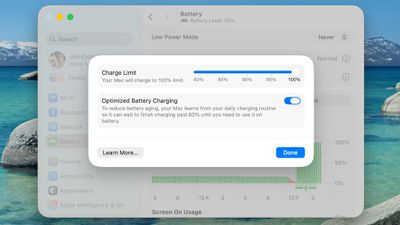
The Charge Limit is a setting that's available in addition to Optimized Battery Charging, and it can prevent a Mac from ever charging to 100 percent.
Apple's existing Optimized Battery Charging feature keeps a Mac from charging to 100 percent until it's needed for use, with the option using your daily charging routine to determine when to charge to full. While Optimized Battery Charging can help preserve battery life, it still regularly allows a Mac to charge to 100 percent.
The new Charge Limit feature is a hard restriction that keeps a Mac's battery at 80 percent, 85 percent, 90 percent, 95 percent, or 100 percent, giving users more control over the Mac's maximum charging level. Keeping a Mac's battery at 80 percent could increase battery longevity by preserving battery health over time.
Charge Limit can be enabled by opening up the System Settings app, going to Battery, and clicking on the "i" button next to Charging.
Apple's iPhones have had a charge limit feature since the iPhone 15 lineup launched in 2023.
Popular Stories
Alongside macOS Golden Gate, Apple today released new versions of macOS Tahoe and macOS Sequoia. macOS Tahoe 26.7 and macOS Sequoia 15.8 are available for users with older Macs or those who don't yet want to update to Golden Gate.
The updates can be downloaded through the Software Update section of the System Settings app. On Macs eligible to install macOS Golden Gate, users will see both...
Since 2023, Apple's newer iPhones have had an 80 percent charge limit for those who want to extend battery lifespan. Charging to 80 percent instead of 100 percent is supposed to put less stress on the battery, improving longevity.
For the last three years, I've used that setting on my iPhone. I started with the iPhone 15 Pro Max, then did the iPhone 16 Pro Max, and most recently, the iPhone...
For the first time since February 2023, Apple has released a firmware update for the MagSafe 3 charging cable for the MacBook Pro and MacBook Air.
Specifically, Apple last week released firmware version 3.2.0 for the USB-C to MagSafe 3 Cable. The previous firmware version for the cable was 3.1.12.
It is unclear what is included in the latest firmware, as Apple does not publish release...