iOS 26.4 Enables Stolen Device Protection by Default for All iPhones - MacRumors
Skip to Content

iOS 26.4 Enables Stolen Device Protection by Default for All iPhones

Starting with iOS 26.4, Stolen Device Protection will be enabled by default and turned on for all iPhone users. Stolen Device Protection adds extra security in case of physical iPhone theft.
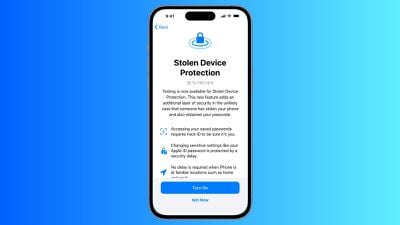
ios stolen device protection
Apple implemented Stolen Device Protection back in 2023 after reports about a new iPhone theft method. Thieves would spy on an intended victim to learn their passcode, then steal the target's iPhone. With the passcode, criminals were able to empty bank accounts, access passwords, and turn off Find My.

Stolen Device Protection requires additional authentication through Face ID or Touch ID to access certain iPhone features like the Passwords app, Lost mode in ‌Find My‌, Safari purchases, and more. Some features are disabled entirely without authentication, while others have a one-hour security delay.

Actions requiring ‌Face ID‌ or ‌Touch ID‌ to complete:

  • Viewing/using passwords or passkeys saved in iCloud Keychain
  • Applying for a new Apple Card
  • Viewing an ‌Apple Card‌ virtual card
  • Turning off Lost Mode
  • Erasing all content and settings
  • Taking certain Apple Cash and Savings actions in Wallet
  • Using payment methods saved in Safari
  • Using your iPhone to set up a new device

These actions do not have a passcode backup, so you can't use a passcode to avoid using ‌Face ID‌ or ‌Touch ID‌.

Actions that have a 1-hour security delay, and require two biometric authentications:

  • Changing your Apple ID password
  • Updating select ‌Apple ID‌ account security settings, including adding or removing a trusted device, trusted phone number, Recovery Key, or Recovery Contact
  • Changing your iPhone passcode
  • Adding or removing ‌Face ID‌ or ‌Touch ID‌
  • Turning off ‌Find My‌
  • Turning off Stolen Device Protection

Prior to iOS 26.4, Stolen Device Protection had to be enabled manually in the ‌Face ID‌ and Passcode section of the Settings app. There is an option to remove security delays when the iPhone is in a familiar location, which allows full functionality at home but protection when out and about.

iOS 26.4 is limited to developers at the current time, but a public beta will be coming in the near future. Apple plans to release the update in the spring.

Related Roundups: iOS 26, iPadOS 26
Related Forum: iOS 26

Popular Stories

iOS 26 6 1 iPhone

Apple Testing iOS 26.6.1 Update for iPhones

Friday August 7, 2026 7:17 am PDT by
Apple's software engineers are internally testing iOS 26.6.1, according to the MacRumors visitor logs. Apple already released macOS 26.6.1 yesterday with a fix for a security vulnerability affecting the Screen Sharing app. iOS 26.6.1 would likely include bug fixes and/or security fixes as well, should Apple move forward with releasing the update in the coming days. For example, iOS 26.6...
dopamine

iOS 26 Gets First Jailbreak Thanks to Dopamine

Friday August 7, 2026 1:56 pm PDT by
After 326 days, iOS 26 has received its first jailbreak, thanks to the developers behind the popular Dopamine jailbreak. Lars Fröder, better known as opa334, today released Dopamine 3.0, which adds support for a number of newer firmware versions, including iOS 26.0 and iOS 26.0.1 on devices with A12 or A13 chips. Another major addition in today's release is support for all devices running...
iOS 26 6 1 iPhone

Apple Releases iOS 26.6.1 and iPadOS 26.6.1 Betas With Security Fixes

Monday August 10, 2026 10:23 am PDT by
Apple today released new betas of iOS 26.6.1 and iPadOS 26.6.1, which are available to developers and public beta testers. The iOS and iPadOS 26.6.1 betas come two weeks after the launch of iOS 26.6, an update that added Spotlight optimizations ahead of iOS 27. iOS 26.6.1 and iPadOS 26.6.1 can be downloaded on eligible iPhones and iPads over-the-air by going to Settings > General > Software...

Top Rated Comments

ProbablyDylan Avatar
7 months ago

This is going to be a disaster for device trade-ins/upgrades and repairs. Apple has put the cart before the horse by not developing a system that doesn’t require the 1-hr delay in these situations.
They're going to need to lean into the Bar part of the Genius Bar.
Score: 14 Votes (Like | Disagree)
contacos Avatar
7 months ago
Oh dear, my mother can hardly remember her Apple Account password and that her passcode and sim pin aren't the same thing.
Score: 11 Votes (Like | Disagree)
7 months ago

TURN THIS POOP OFF!!!
You can turn it off anytime. I don't quite understand what's the problem. Could you elaborate?
Score: 10 Votes (Like | Disagree)
7 months ago

This is going to be a disaster for device trade-ins/upgrades and repairs. Apple has put the cart before the horse by not developing a system that doesn’t require the 1-hr delay in these situations.
Perhaps this is all part of Apple's plan to make their Stores familiar locations...
Score: 10 Votes (Like | Disagree)
7 months ago

It doesnt protect from devices getting stolen
Duh.
What it does protect from is your data being stolen, *if* your device happens to be stolen.
Score: 9 Votes (Like | Disagree)
7 months ago

TURN THIS POOP OFF!!!
It doesnt protect from devices getting stolen, it causes major headaches. It should honestly be called "How to annoy you when I need to get a new phone detection"

This made me be stuck for a long time with my family when upgrading them to 17's.

Now if this turns back on after they update, I will he furious that I have to go through trouble.

This feature is a family IT guy nightmare.
It isn't advertised to keep your device from getting stolen! It's to protect YOU and YOUR MONEY should your device get stolen. If this is a default, thieves might realize it's not worth the effort to steal your device in the first place!

But feel free to keep your family's iPhones all unlocked, PIN-less and all security measures OFF.
Score: 8 Votes (Like | Disagree)