iOS 26.2 Adds Temporary AirDrop Access With Shareable Codes
iOS 26.2 beta 3 includes new iPhone AirDrop functionality, providing a way for two people to share files temporarily without having to add each other as contacts.
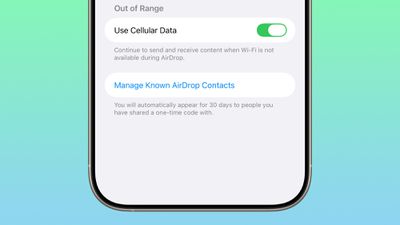
There is a new option to get an AirDrop code, which can then be shared with someone who is not in your contacts list. The code provides AirDrop access for a 30-day period, with options to remove access in the Settings app.
Share a secure code with people not in your contacts to use AirDrop. You will be able to find each other for the next 30 days. You can manage access in Settings.
When you generate a code, the person that you're planning to use AirDrop with can input that code so that your devices can communicate with one another.
There are already options to turn AirDrop off entirely, limit AirDrop to contacts only, or turn AirDrop on for everyone for 10 minutes. The code-based option provides a way to create a connection with someone you don't want to create a contact card for, while avoiding having to turn AirDrop on for all people nearby.
People you have shared a one-time code with can be managed by opening up the Settings app, selecting the General section, choosing AirDrop, and tapping on "Manage Known AirDrop Contacts."
Popular Stories
The all-new MacBook Neo has been such a hit that Apple is facing a "massive dilemma," according to Taiwan-based tech columnist and former Bloomberg reporter Tim Culpan.
In the iPhone 16 Pro models, the A18 Pro chip has a 6-core GPU. During the chip manufacturing process, however, sometimes a CPU or GPU core can turn out to be faulty. Rather than discarding the leftover A18 Pro chips with...
Apple today announced it will be permanently closing three retail stores in the U.S. in June, including Apple Trumbull in Trumbull, Connecticut, Apple North County in Escondido, California, and Apple Towson Town Center in Towson, Maryland.
Apple Towson Town Center in Maryland
Apple issued the following statement to MacRumors:At Apple, we are constantly striving to deliver exceptional service...
Apple today released a minor iOS 26.4.1 update for the iPhone 11 and newer. While the release notes for the update only mention unspecified "bug fixes," we have since learned about two specific changes that are included in it.
First, 9to5Mac spotted an Apple Developer Forums thread suggesting that iOS 26.4.1 fixes an iOS 26.4 bug that affected iCloud syncing in some apps.
Second, an...
Popular Stories
Apple has released iOS 26.4, the fourth major point update for iPhones since iOS 26 was released in September, and there are at least 14 notable changes and improvements worth checking out. We've rounded them up below.
The update doesn't have the enhanced Siri feature set we were hoping for – that's likely to arrive in iOS 27 – but there are quite a few other new additions included. They ...
Apple today released a minor iOS 26.4.1 update for the iPhone 11 and newer. While the release notes for the update only mention unspecified "bug fixes," we have since learned about two specific changes that are included in it.
First, 9to5Mac spotted an Apple Developer Forums thread suggesting that iOS 26.4.1 fixes an iOS 26.4 bug that affected iCloud syncing in some apps.
Second, an...
Apple today released minor iOS 26.4.1 and iPadOS 26.4.1 software updates for the iPhone and iPad, respectively. The updates have a build number of 23E254, and they arrive a little more than two weeks after Apple released iOS 26.4 and iPadOS 26.4.
According to Apple's release notes, the software updates contain unspecified "bug fixes."
The updates do not include any security fixes,...