Must-Try tvOS 26 Features

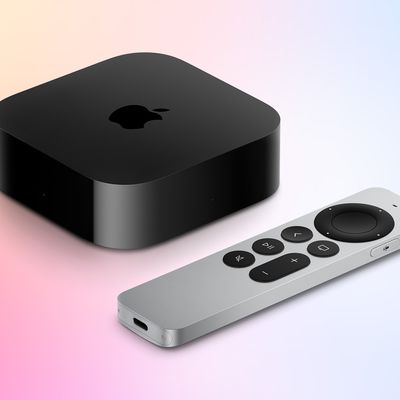
Alongside iOS 26, Apple introduced a new tvOS 26 update for the Apple TV. tvOS updates aren't as feature rich as iOS updates and often go under the radar, so we thought we'd highlight some of the useful new features that you should check out.

  • Liquid Glass - Liquid Glass has a subtle presence in tvOS 26, with Apple adding Liquid Glass buttons, interface elements, and Control Center. It's not as extensive as Liquid Glass in ‌iOS 26‌, and it blends in well with the tvOS operating system.
  • Apple TV app - The ‌Apple TV‌ app has been overhauled and it displays more TV shows and movies on the screen at one time.
  • Profiles - It's much easier to switch profiles in tvOS 26, so you can keep the content that you like separate from the content that other people in the family prefer. You can choose a profile whenever you wake your ‌Apple TV‌ up from sleep. You'll get better suggestions on a per-person basis, and it's a great way to separate kid content from adult content.

  • Karaoke - When using Apple Music Sing, you can use your iPhone as a microphone. The ‌iPhone‌ can show you real-time lyrics, lyric translations, and lyrics pronunciation.
  • AirPlay - If you use third-party speakers with the ‌Apple TV‌, you can now set them as the default AirPlay speakers. Your ‌Apple TV‌ will then automatically use those speakers and you won't have to select your speaker each time you use the device.

  • FaceTime - FaceTime has been supported on the ‌Apple TV‌ since last year with an ‌iPhone‌ as the camera, but now there's an updated, card-style interface and support for Live Translation with captions.

  • Screen Savers - You can pick your favorite screen saver categories, choosing cityscape, earth, landscapes, and more. Each person can choose their own screen savers if desired.

Have a favorite tvOS 26 feature? Let us know in the comments below, and check out our video for even more tvOS tips and tricks.

Related Roundup: Apple TV
Buyer's Guide: Apple TV (Don't Buy)

Popular Stories

m1 chip slide

Five Years of Apple Silicon: M1 to M5 Performance Comparison

Monday November 10, 2025 1:08 pm PST by
Today marks the fifth anniversary of the Apple silicon chip that replaced Intel chips in Apple's Mac lineup. The first Apple silicon chip, the M1, was unveiled on November 10, 2020. The M1 debuted in the MacBook Air, Mac mini, and 13-inch MacBook Pro. The M1 chip was impressive when it launched, featuring the "world's fastest CPU core" and industry-leading performance per watt, and it's only ...
Early Black Friday Deals 1

The Best Early Black Friday Apple Deals on AirPods, Apple Watch, iPad, and More

Saturday November 8, 2025 6:16 am PST by
We're officially in the month of Black Friday, which will take place on Friday, November 28 in 2025. As always, this will be the best time of the year to shop for great deals, including popular Apple products like AirPods, iPad, Apple Watch, and more. In this article, the majority of the discounts will be found on Amazon. Note: MacRumors is an affiliate partner with some of these vendors. When ...
All Screen iPhone 2027 Feature 1

Apple to Hide Selfie Camera Under Display of 20th Anniversary iPhone

Monday November 10, 2025 1:55 am PST by
Apple will conceal the front-facing camera under the screen of its 2027 iPhone, a Chinese leaker said today, corroborating reports that Apple's 20th anniversary iPhone will have no visible cutouts in the display. Weibo-based account Digital Chat Station said Apple's development of under-screen camera technology was progressing as planned for adoption in 2027, one year after it will...
2024 iPhone Boxes Feature

Apple Adjusts Trade-In Values for iPhones, iPads, Macs, and More

Thursday November 6, 2025 11:12 am PST by
Apple today updated its trade-in values for select iPhone, iPad, Mac, and Apple Watch models. Trade-ins can be completed on Apple's website, or at an Apple Store. The charts below provide an overview of Apple's current and previous trade-in values in the U.S., according to its website. Maximum values for most devices either decreased or saw no change, but the iPad Air received a slight bump. ...
Apple fitness plus feature

Future of Apple Fitness+ 'Under Review'

Sunday November 9, 2025 5:30 am PST by
The future of Apple Fitness+ is "under review" amid a reorganization of the service, according to Bloomberg's Mark Gurman. In the latest edition of his "Power On" newsletter, Gurman said that Apple Fitness+ remains one of the company's "weakest digital offerings." The service apparently suffers from high churn and little revenue. Nevertheless, Fitness+ has a small, loyal fanbase that...
iphone air thinness

iPhone Air Sales Are So Bad That Apple's Delaying the Next-Generation Version

Monday November 10, 2025 11:41 am PST by
The thin, light iPhone Air sold so poorly that Apple has decided to delay the launch of the next-generation iPhone Air that was scheduled to come out alongside the iPhone 18 Pro, reports The Information. Apple initially planned to release a new iPhone Air in fall 2026, but now that's not going to happen. Since the iPhone Air launched in September, there have been reports of poor sales...
Liquid Glass General Feature

Apple Shares Liquid Glass Design Gallery

Thursday November 6, 2025 2:45 pm PST by
Apple is promoting the new Liquid Glass design in iOS 26, showing off the ways that third-party developers are embracing the aesthetic in their apps. On its developer website, Apple is featuring a visual gallery that demonstrates how "teams of all sizes" are creating Liquid Glass experiences. The gallery features examples of Liquid Glass in apps for iPhone, iPad, Apple Watch, and Mac. Apple...
iOS 26

iOS 26.1 Available Now With These 8 New Features

Monday November 3, 2025 5:54 am PST by
Following more than a month of beta testing, Apple released iOS 26.1 on Monday, November 3. The update includes a handful of new features and changes, including the ability to adjust the look of Liquid Glass and more. Below, we outline iOS 26.1's key new features. Liquid Glass Toggle iOS 26.1 lets you choose your preferred look for Liquid Glass. In the Settings app, under Display...
iPhone Satellite Feature

Apple Developing These 5 New Satellite Features for iPhone

Sunday November 9, 2025 6:07 am PST by
Apple is working on a series of new satellite connectivity features for the iPhone, Bloomberg's Mark Gurman reports. In this week's "Power On" newsletter, Gurman revealed that the new features in development include: Apple Maps via satellite: Navigation in Apple Maps without cellular or Wi-Fi connectivity. Photos in Messages via satellite: Support for sending photos in the Messages...
maxresdefault

In-Depth iPhone Battery Experiment Pits Slow Charging Against Fast Charging

Friday November 7, 2025 1:19 pm PST by
HTX Studio this week shared the results from a six-month battery test that compared how fast charging and slow charging can affect battery life over time. Using six iPhone 12 models, the channel set up a system to drain the batteries from five percent and charge them to 100 percent over and over again. Three were fast charged, and three were slow charged. Another set of iPhones underwent...

Top Rated Comments

sandler77 Avatar
5 weeks ago
Profiles are useless if you have young kids and want to protect them from viewing adult content. Profiles mean nothing on the appletv. The entire device is either open to all content, or locked down to specific ratings. So either my kids can't watch PG-13/R content, or I'm stuck watching G/PG content. How does this make sense? The concept of profiles works on MacOS and iOS, yet somehow Apple after all of these years can't get this right on AppleTV.

If I set up restrictions, anyone can easily simply just change profiles, and the restrictions are still there. Or, no restrictions and same thing - my kids can easily change profiles and view any adult content they find. This is just killing me Apple...
Score: 18 Votes (Like | Disagree)
turbineseaplane Avatar
5 weeks ago

Liquid Glass
One of our many ATVs got auto updated and I noticed this straight away, because the "control center" (or w/e we call the top right menu on ATV) looked horrible.

I immediately turned off auto-updates on all the other ATVs for now.
Score: 9 Votes (Like | Disagree)
zula Avatar
5 weeks ago
FINALLY! THE AUDIO OUTPUT IS FIXED!!!!!!!!!!!!!!!!!

ᶦ'ᵐ ˢᵒ ʰᵃᵖᵖʸ...
Score: 7 Votes (Like | Disagree)
Plutonius Avatar
5 weeks ago
Why are these a must try ?
Score: 6 Votes (Like | Disagree)
k1121j Avatar
5 weeks ago
Am i the only one with issues when using the remote app to type on the apple tv the text disappears in the middle of typing. Started three updates ago super annoying.
Score: 5 Votes (Like | Disagree)
dustin_ Avatar
5 weeks ago
profiles & the ability to choose an airplay speaker as default at the only meaningful updates. liquid glass works well on apple tv, but i certainly wouldn’t consider it a big feature worth upgrading for.
Score: 5 Votes (Like | Disagree)