Logitech's New MX Master 4 Mouse Features Haptic Feedback - MacRumors
Skip to Content

Logitech's New MX Master 4 Mouse Features Haptic Feedback

Logitech today announced an updated version of its MX Master series mouse, the MX Master 4, which features haptic feedback and introduces a few other changes while remaining largely faithful to the original design.
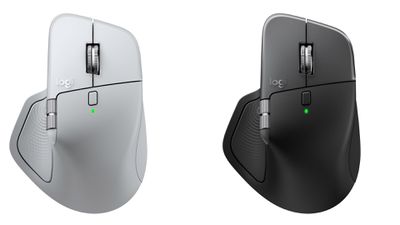
logitech mx 4 mouse
Apart from cleaner-looking frosted buttons and a more minimalist bottom, the MX Master 4 looks very similar to the S3. The feel is, however, slightly different – the new model swaps its predecessor's soft, ribbed finish for a smooth, hard-plastic body and buttons, although there is some softer material around the right-hand side and on the surface where you rest your thumb.

The new haptic feedback delivers subtle vibrations near the thumb for scrolling, navigation, and selection. Haptics also accompany gestures and shortcuts accessed via the Actions Ring feature (now with a dedicated button under the thumb), which can be set up via Logitech's Options+ software. You also get vibrations with a low battery warning or Bluetooth pairing.

Logitech has also updated the MX Master 4's connectivity. The mouse now ships with a USB-C Bolt receiver for lower-latency wireless connections and improved security, while still supporting Bluetooth for multi-device pairing. Battery life is still claimed at up to 70 days on a full charge, and fast charging via USB-C can deliver three hours of use in just one minute.

mx master 4 life white silver connect 1
Other improvements include quieter, more precise clicks, double the connectivity strength, and an updated MagSpeed scroll wheel that promises smoother transitions between ratchet and free-spin modes.

The MX Master 4 is available to order from Logitech's website for $119.99 in Black and Graphite Charcoal color options, with a Mac version available in White Silver and Space Black. Shipping starts early October.


Top Rated Comments

26 weeks ago
Definite buy for me! The biggest irritation with the last iteration was the soft plastic shell - great for a year, but anything longer and the plastic starts to break down. 5 years later, it's in bad need of replacement. I expect the hard plastic will survive for many years longer.
Score: 12 Votes (Like | Disagree)
MacAddict1978 Avatar
26 weeks ago

Did I just get transported back to 1998? Very retro and not in a good way.
Yeah, this looks nothing like that and you’ve never used the MX series have you?

It’s the mouse that no one can live without after they use it. It’s freaking fantastic. Now the Apple magic mouse still looks exactly like it did 20 years ago, so there is that.
Score: 11 Votes (Like | Disagree)
East India Company Avatar
26 weeks ago
Wonderful! If only a new MX Vertical could follow.
Score: 7 Votes (Like | Disagree)
NightFox Avatar
26 weeks ago

Did I just get transported back to 1998? Very retro and not in a good way.
This is the mouse Apple should have made. I never thought anything would take me away from my Apple Magic Touchpad, but got an MX3 just for 3D modelling about a year ago and haven’t used my touchpad for anything since.
Score: 6 Votes (Like | Disagree)
26 weeks ago
Nice to see Tim's favorite mouse get an update!
Score: 5 Votes (Like | Disagree)
TumbleDryer Avatar
26 weeks ago

Definite buy for me! The biggest irritation with the last iteration was the soft plastic shell - great for a year, but anything longer and the plastic starts to break down. 5 years later, it's in bad need of replacement. I expect the hard plastic will survive for many years longer.
I bought the 3s for Mac last year and not noticed any degradation. I have to say it's easy the best mouse I've ever owned. I do wish they could implement a scroll ball of some sort for true 360 scrolling but other than that I can't fault it.
Score: 5 Votes (Like | Disagree)