iOS 26 Breaks Calendar Search for Some iPhone Users
iOS 26 breaks search functionality in the Calendar app for some iPhone users, according to comments from affected users across the Apple Support Community, Reddit, X, Facebook, and other online discussion platforms.
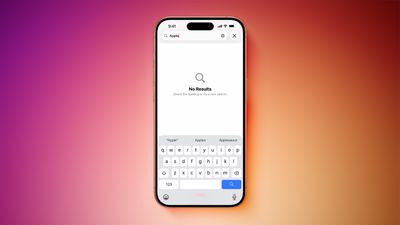
The issue is affecting many iPhone models, ranging from the iPhone 13 mini to the iPhone 17 Pro, and it has not been fixed in the first iOS 26.1 beta version.
Affected users attempt to search for an existing calendar event, but no results are found.
The problem does not impact all iPhone users, and certain search phrases may still yield results, so it appears to be a bit of a hit-or-miss situation.
The first complaints about the issue surfaced during iOS 26 beta testing, but the problem has gained more attention since the update was released last week.
Apple's support representatives have informed customers that the company is aware of the issue and will be implementing a fix in a future software update, so keep your iPhone up to date. It is unclear if the fix will arrive in iOS 26.0.1 or iOS 26.1.
(Thanks, Mark!)
Popular Stories
Starting today, iPhone users still running iOS 26 will see iOS 27.0.1 as the prominent software update in the Settings app under General → Software Update, with iOS 26.7.1 now relegated to a smaller "Also Available" section at the bottom.
iOS 27 was released on September 14, but until now that update and later iOS 27.0.1 were shown under the "Also Available" section, with iOS 26.7 and...
iOS 26.7.1, iPadOS 26.7.1, macOS Tahoe 26.7.1, and macOS Sequoia 15.8.1 address a major vulnerability that Apple believes was used against a small number of people.
Apple's security support pages say there was a CoreGraphics out-of-bounds write issue that could be exploited with a maliciously crafted file, allowing for arbitrary code execution. It has been fixed with improved bounds...
Among the flurry of iOS 27.2 releases on Monday, Apple also pushed a wave of software updates for its older operating systems, including a fix for a CoreGraphics vulnerability that Apple says may have been exploited in targeted attacks.
The releases include iOS 26.7.2, iPadOS 26.7.2, iOS 18.7.11, iPadOS 18.7.11, macOS Tahoe 26.7.2, macOS Sequoia 15.8.2, and tvOS 26.6.1.
iOS 18.7.11 and...