MacRumors Giveaway: Win iPad Air M3 Bundle to Use With Astropad's New Daily Planner App

For this week's giveaway, we've teamed up with Astropad to offer MacRumors readers a chance to win an M3 iPad Air, an Apple Pencil Pro, and a Rock Paper Pencil kit to go along with it. Astropad has a range of useful hardware and software like the Studio, Luna Display, and Rock Paper Pencil, but the company just recently launched a new planning app, the Rock Daily Planner.
rock daily planner main
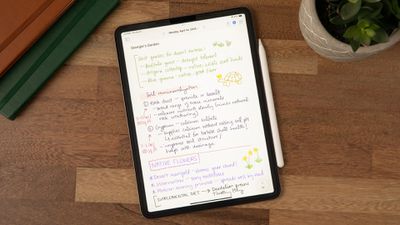
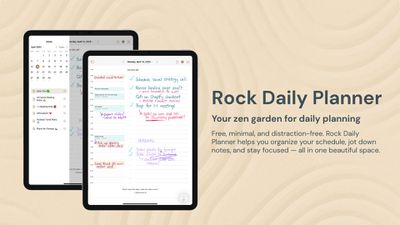
The Rock Daily Planner was built for the iPad with full ‌Apple Pencil‌ integration, and it's clear that a lot of thought went into how people use planning apps on their tablets. The app has a clean design that minimizes distractions and puts maximum focus on events and tasks.
rock daily planner info
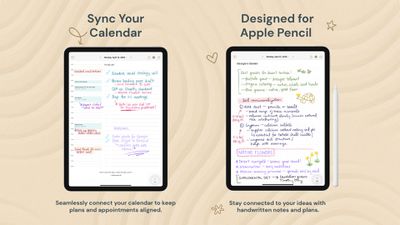
There's a side bar with a full calendar, but the most useful view is the daily interface. Each day gets a dedicated page, with an organized hourly timeline and a separate to-do list. A Daily Plan summarizes everything that you have going on.
rock daily planner info 2
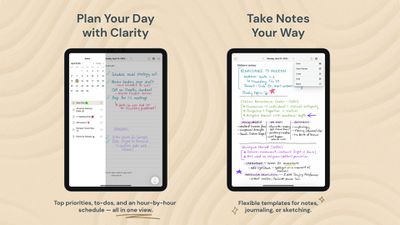
The default view shows an hourly timeline and to-do list, but there are customization options for adding note-taking pages. You can create a page with dots, lines, a grid, or a to-do list, or opt for a blank page. You can import your calendar, so you can see your hour-by-hour schedule, important notes, and to-do list all in a single view.
rock daily planner info 3
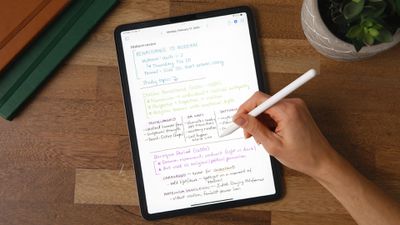
The Rock Daily Planner is meant to be used with an ‌Apple Pencil‌, so you can handwrite your calendar events, to-dos, and take notes. Notes can be customized with emoji labels, and can be pinned to the side bar so you can keep what's most needed front and center.
rock paper pencil v3 screen protector
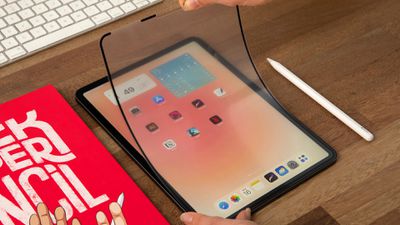
Rock Daily Planner was designed for Astropad's $45 Rock Paper Pencil, and it's free to download and use. Rock Paper Pencil is a screen protector and ‌Apple Pencil‌ tip kit that's designed to provide ‌iPad‌ users with a paper-like writing experience.
rock daily planner pencil
There's a microtexture screen protector that goes on the ‌iPad‌, and it has a thin, papery feel. Since it's removable, you can put it on when you need it and then take it off later if you want to play a game. The screen protector is combined with a 1mm stainless steel ‌Apple Pencil‌ tip that feels like writing with a pencil when combined with the screen protector. If you dislike the feel of writing on smooth glass, the Rock Paper Pencil is a useful solution. There are options for most ‌iPad‌ models.

Astropad is providing one lucky MacRumors reader with an 11-inch M3 ‌iPad Air‌, an ‌Apple Pencil‌ Pro, and a Rock Paper Pencil kit to use with the Rock Daily Planner. To enter to win, use the widget below and enter an email address. Email addresses will be used solely for contact purposes to reach the winner(s) and send the prize(s). You can earn additional entries by subscribing to our weekly newsletter, subscribing to our YouTube channel, following us on Twitter, following us on Instagram, following us on Threads, or visiting the MacRumors Facebook page.

Due to the complexities of international laws regarding giveaways, only U.S. residents who are 18 years or older, UK residents who are 18 years or older, and Canadian residents who have reached the age of majority in their province or territory are eligible to enter. All federal, state, provincial, and/or local taxes, fees, and surcharges are the sole responsibility of the prize winner. To offer feedback or get more information on the giveaway restrictions, please refer to our Site Feedback section, as that is where discussion of the rules will be redirected.

The contest will run from today (August 15) at 9:00 a.m. Pacific Time through 9:00 a.m. Pacific Time on August 22. The winner will be chosen randomly on or shortly after August 22 and will be contacted by email. The winner will have 48 hours to respond and provide a shipping address before a new winner is chosen.


Popular Stories

iOS 26

iOS 26.2 Coming Soon With These 8 New Features on Your iPhone

Thursday December 11, 2025 8:49 am PST by
Apple seeded the second iOS 26.2 Release Candidate to developers earlier this week, meaning the update will be released to the general public very soon. Apple confirmed iOS 26.2 would be released in December, but it did not provide a specific date. We expect the update to be released by early next week. iOS 26.2 includes a handful of new features and changes on the iPhone, such as a new...
iOS 26

iOS 26.4 and iOS 27 Features Revealed in New Leak

Friday December 12, 2025 10:56 am PST by
Macworld's Filipe Espósito today revealed a handful of features that Apple is allegedly planning for iOS 26.4, iOS 27, and even iOS 28. The report said the features are referenced within the code for a leaked internal build of iOS 26 that is not meant to be seen by the public. However, it appears that Espósito and/or his sources managed to gain access to it, providing us with a sneak peek...
AirPods Pro Firmware Feature

Apple Releases New Firmware for AirPods Pro 2 and AirPods Pro 3

Thursday December 11, 2025 11:28 am PST by
Apple today released new firmware designed for the AirPods Pro 3 and the prior-generation AirPods Pro 2. The AirPods Pro 3 firmware is 8B30, up from 8B25, while the AirPods Pro 2 firmware is 8B28, up from 8B21. There's no word on what's include in the updated firmware, but the AirPods Pro 2 and AirPods Pro 3 are getting expanded support for Live Translation in the European Union in iOS...
iOS 26

Apple Releases iOS 26.2 With Alarms for Reminders, Lock Screen Changes, Enhanced Safety Alerts and More

Friday December 12, 2025 10:10 am PST by
Apple today released iOS 26.2, the second major update to the iOS 26 operating system that came out in September, iOS 26.2 comes a little over a month after iOS 26.1 launched. ‌iOS 26‌.2 is compatible with the ‌iPhone‌ 11 series and later, as well as the second-generation ‌iPhone‌ SE. The new software can be downloaded on eligible iPhones over-the-air by going to Settings >...
Google maps feaure

Google Maps Quietly Added This Long-Overdue Feature for Drivers

Wednesday December 10, 2025 2:52 am PST by
Google Maps on iOS quietly gained a new feature recently that automatically recognizes where you've parked your vehicle and saves the location for you. Announced on LinkedIn by Rio Akasaka, Google Maps' senior product manager, the new feature auto-detects your parked location even if you don't use the parking pin function, saves it for up to 48 hours, and then automatically removes it once...
AirTag 2 Mock Feature

Apple AirTag 2: Four New Features Found in iOS 26 Code

Thursday December 11, 2025 10:31 am PST by
The AirTag 2 will include a handful of new features that will improve tracking capabilities, according to a new report from Macworld. The site says that it was able to access an internal build of iOS 26, which includes references to multiple unreleased products. Here's what's supposedly coming: An improved pairing process, though no details were provided. AirTag pairing is already...
macOS Tahoe 26 Thumb

Apple Releases macOS Tahoe 26.2 With Edge Light

Friday December 12, 2025 10:08 am PST by
Apple today released macOS Tahoe 26.2, the second major update to the macOS Tahoe operating system that came out in September. macOS Tahoe 26.2 comes five weeks after Apple released macOS Tahoe 26.1. Mac users can download the macOS Tahoe update by using the Software Update section of System Settings. macOS Tahoe 26.2 includes Edge Light, a feature that illuminates your face with soft...
iOS 26

15 New Things Your iPhone Can Do in iOS 26.2

Friday December 5, 2025 9:40 am PST by
Apple is about to release iOS 26.2, the second major point update for iPhones since iOS 26 was rolled out in September, and there are at least 15 notable changes and improvements worth checking out. We've rounded them up below. Apple is expected to roll out iOS 26.2 to compatible devices sometime between December 8 and December 16. When the update drops, you can check Apple's servers for the ...

Top Rated Comments

Baywatchboy Avatar
17 weeks ago
I entered and would buy the Rock Paper Pencil, but apparently it's not compatible with my 5th generation 12.9" Pro. I know y'all care, that's why I told you.
Score: 3 Votes (Like | Disagree)

Westside guy Avatar
17 weeks ago
Oh you guys have made some rather annoying changes to the submission form. For example, even if I already follow MacRumors on Twitter ("X") - which I have, for years - I still have to click through multiple steps; sign in again even though I'm already signed in; and "follow" again. Even though, behind the "follow" pop-up, it already shows "Following".

What exactly is the point in that?


Follow-up: It appears the "point" is to give Gleam.io full access to my accocunt. No thank you, MacRumors.

Attachment Image
Score: 3 Votes (Like | Disagree)
dss33k Avatar
17 weeks ago

No love for those of us who follow MacRumors on Bluesky rather than X The Everything App formerly known as Twitter
Same. I guess I'm a rarity who only uses Bluesky and Reddit regularly. Nothing else.
Score: 2 Votes (Like | Disagree)
BenTrovato Avatar
17 weeks ago

No love for those of us who follow MacRumors on Bluesky rather than X The Everything App formerly known as Twitter
We love you come back to the everything app!
Score: 2 Votes (Like | Disagree)
Weaselboy Avatar
16 weeks ago

Hi, will the results be released to the public? Thank you!
No, for privacy reasons the winners are not announced publicly.

If you search previous threads like this, you will fiind several forum members mentioning they won MR contests.
Score: 1 Votes (Like | Disagree)
phrehdd Avatar
17 weeks ago
Whether you enter this contest of sorts or not..should check out Astropad. They are an interesting company with great product. I know as I use a couple of their items.
Score: 1 Votes (Like | Disagree)