With iOS 26, Apple is bringing several new features to the AirPods, making them more useful than before. The added functionality will be available this fall when Apple releases iOS 26 and updated AirPods firmware, but you can test everything new right now.
Camera Remote
The AirPods can be used as a camera remote for the Camera app or third-party iOS camera apps. You'll need to enable the feature if you want to use it, and you can do so by connecting your AirPods to your iPhone, opening up the AirPods section in the Settings app, and then choosing the Camera Remote option.
Once the feature is turned on, using it is as simple as popping in your AirPods, opening the camera app, and then pressing and holding on the AirPods stem to take a photo or start a video recording.
When you're finished, a second press and hold gesture will stop the recording. If you have an Apple Watch, you can already control your iPhone remotely from your wrist, but the AirPods have the potential to be even quicker since it's a one-press physical gesture rather than a series of steps that include opening an Apple Watch app.
Studio-Quality Recording
The AirPods 4 and the AirPods Pro 2 now offer recording studio-quality audio for interviews, podcasts, songs, videos, and more. Apple says that the feature can be used to record high-quality vocals while on the go, with background sounds filtered out thanks to Voice Isolation.
You can record higher-quality audio when making videos or using your devices to do things like record a podcast.
Improved Call Quality
The H2 chip in the AirPods 4 and AirPods Pro 2 brings more natural vocal texture and clarity to iPhone calls, FaceTime calls, and all CallKit-enabled apps like Zoom.
Studio-quality audio recording and improved call quality are available across iPhone, iPad, and Mac, and support the Camera app, Voice Memos, Messages dictation, third-party camera apps, and video conferencing apps.
Pause Audio for Sleep
If you're listening to music, a podcast, or a book while you're in bed and you're wearing AirPods, the AirPods will pause your audio when you fall asleep if you toggle on the new "Pause Media When Falling Asleep" option.
You'll find it in the AirPods settings after connecting your AirPods to your iPhone, but you'll need the new AirPods firmware and iOS 26. In addition to saving your spot in an audiobook or podcast, it will also preserve battery by turning your AirPods off so they're not running all night.
This feature also works with Beats earbuds.
Keep Audio in Headphones
iOS 26 addresses an irritating issue that happens with CarPlay and AirPods. There's a "Keep Audio in Headphones" option that prevents audio from switching to car speakers or Bluetooth speakers when you're listening to music through the AirPods.
With the option on, your music will continue playing in your AirPods when you get in the car. You can turn it on in iOS 26 by going to Settings > General > AirPlay and Continuity.
Charging Reminders
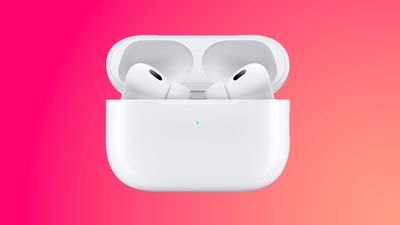
Apple improved AirPods charging in iOS 26, and the AirPods Charging case will now more clearly indicate charging status. You'll also see reminders when it's time to charge your AirPods so you're less likely to run out of battery.
There's a green light when the AirPods are fully charged, a pulsing amber light when they're charging, and a darker amber light that lets you know that it's time for a charge because the battery is getting low.
Beta Updates
With iOS 26, Apple is adding an option to more easily install beta updates on AirPods. There's a new update interface when you connect your AirPods to your iPhone and tap into them in the Settings app.
How to Get the New AirPods Features Now
To try out the new iOS 26 AirPods features, you'll need to install the iOS 26 public beta or the iOS 26 developer beta. The developer beta requires a free developer account, but anyone can sign up for the iOS 26 public beta.
Just go to Apple's beta website and follow the steps.
Once you have iOS 26 installed, you can connect your AirPods and then open up the AirPods section of the Settings app. From there, scroll down to AirPods Beta Updates and toggle on beta firmware.
Put the AirPods in the charging case and put them near your iPhone to trigger the beta firmware to be downloaded on the AirPods. Once your AirPods are running the beta firmware, you'll see settings for the new options in the AirPods section of the Settings app.
Read More
We have a dedicated iOS 26 roundup that goes into detail on all of the new features that are available in the update.