

We've been seeing signs of an upcoming chatbot-based support feature in the Apple Support app, and it turns out it's already in testing. Some iPhone users have access to an early preview of the feature.
In the Apple Support app, the Support Assistant early preview can be accessed by tapping on a dedicated "Chat" button that's been added to the navigation bar. Only a select number of iPhone users will see the chat option at this time.
Tapping on the Chat button launches the new Support Assistant. It opens with a splash screen that gives you insight into how to use it. The Support Assistant is able to answer questions about your Apple products and services, providing troubleshooting information, answering questions about device features, and more.
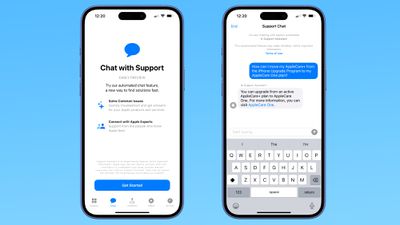
The chatbot will not answer questions that are not related to Apple support, so you can't ask it details about upcoming products.
If the AI can't solve your issue, there is an option to escalate a chat to one of Apple's support staff for additional help.
Apple warns that the Support Assistant is an experimental feature that "may make mistakes." The company recommends that users verify important information.
It is not clear how long the early preview will last, and Apple hasn't provided details on when the Support Assistant will launch for all users.
Thursday November 6, 2025 11:12 am PST by Joe Rossignol
Apple today updated its trade-in values for select iPhone, iPad, Mac, and Apple Watch models. Trade-ins can be completed on Apple's website, or at an Apple Store.
The charts below provide an overview of Apple's current and previous trade-in values in the U.S., according to its website. Maximum values for most devices either decreased or saw no change, but the iPad Air received a slight bump.
...
Thursday November 6, 2025 2:45 pm PST by Juli Clover
Apple is promoting the new Liquid Glass design in iOS 26, showing off the ways that third-party developers are embracing the aesthetic in their apps. On its developer website, Apple is featuring a visual gallery that demonstrates how "teams of all sizes" are creating Liquid Glass experiences.
The gallery features examples of Liquid Glass in apps for iPhone, iPad, Apple Watch, and Mac. Apple...
Friday November 7, 2025 6:40 am PST by Joe Rossignol
Apple's online store in the U.S. is suddenly offering a pack of four AirTags for just $29, which is the same price as a single AirTag.
This is likely a pricing error, and it is unclear if orders will be fulfilled. Apple has not discounted the AirTag four-pack in any other countries that we checked.
Delivery estimates are already pushing into late November to early December, suggesting...
We're officially in the month of Black Friday, which will take place on Friday, November 28 in 2025. As always, this will be the best time of the year to shop for great deals, including popular Apple products like AirPods, iPad, Apple Watch, and more. In this article, the majority of the discounts will be found on Amazon.
Note: MacRumors is an affiliate partner with some of these vendors. When ...
Monday November 3, 2025 5:54 am PST by Joe Rossignol
Following more than a month of beta testing, Apple released iOS 26.1 on Monday, November 3. The update includes a handful of new features and changes, including the ability to adjust the look of Liquid Glass and more.
Below, we outline iOS 26.1's key new features.
Liquid Glass Toggle
iOS 26.1 lets you choose your preferred look for Liquid Glass.
In the Settings app, under Display...
Thursday November 6, 2025 4:08 pm PST by Juli Clover
IKEA today announced the upcoming launch of 21 new Matter-compatible smart home products that will be able to interface with HomeKit and the Apple Home app. There are sensors, lights, and control options, all of which will be reasonably priced. Some of the products are new, while some are updates to existing lines that IKEA previously offered.
There are a series of new smart bulbs that are...
The future of Apple Fitness+ is "under review" amid a reorganization of the service, according to Bloomberg's Mark Gurman.
In the latest edition of his "Power On" newsletter, Gurman said that Apple Fitness+ remains one of the company's "weakest digital offerings." The service apparently suffers from high churn and little revenue.
Nevertheless, Fitness+ has a small, loyal fanbase that...
Monday November 10, 2025 1:55 am PST by Tim Hardwick
Apple will conceal the front-facing camera under the screen of its 2027 iPhone, a Chinese leaker said today, corroborating reports that Apple's 20th anniversary iPhone will have no visible cutouts in the display.
Weibo-based account Digital Chat Station said Apple's development of under-screen camera technology was progressing as planned for adoption in 2027, one year after it will...
Friday November 7, 2025 1:19 pm PST by Juli Clover
HTX Studio this week shared the results from a six-month battery test that compared how fast charging and slow charging can affect battery life over time.
Using six iPhone 12 models, the channel set up a system to drain the batteries from five percent and charge them to 100 percent over and over again. Three were fast charged, and three were slow charged.
Another set of iPhones underwent...
I'm sure this will work as well as the other AI slop chat agents every company is trying to use instead of paying a human who can actually assist you with the matter at hand.
Wooo, it’s time to get stoked for the best-in-class Support app taking things to a whole new level with a game-changing integration with Apple Intelligence. Now customers can access the Apple Support Standard Operating Procedure without ever having to pick-up the phone:
1. Restart you device. 2. Force reboot your device. 3. Reset Network Settings. 4. Reset All Settings. 5. Erase and Set Up as New 6. Collect screen recordings and logs for an RTA to Engineering by a Senior Advisor 7. Senior Advisor submits RTA to Engineering 8. Within 48 hr, receive a response that Engineering is aware of the issue, keep your device up to date, and no further troubleshooting will be provided 9. Thank you for contacting Apple Support. Have a nice day.
Apple warns that the Support Assistant is an experimental feature that "may make mistakes." The company recommends that users verify important information.
What exactly qualifies as “important information”? And how is this information supposed to be verified by the user?











































