Vision Pro Hands-On: Reviewers Comment on Weight, Disney+ Experience, Virtual Keyboard and More

Apple this week invited members of the media to New York City for another round of testing the Vision Pro ahead of its launch, and sites that were able to try out the device are now sharing their impressions.
Apple Vision Pro Dual Loop Band Purple Feature 2
As a recap, Apple first allowed media to use the Vision Pro following its debut at the Worldwide Developers Conference, but it was still under development at the time and features were limited. Now the headset is nearing release, so testers are able to experience the Vision Pro as consumers will.

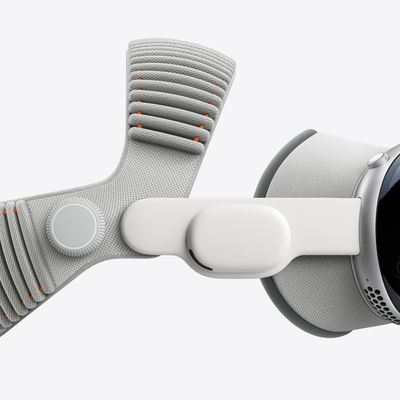
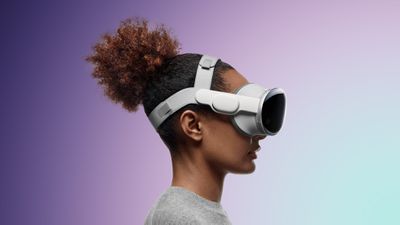
Engadget's Cherlynn Low wore the headset for just 20 minutes with the standard strap and "was in pain" due to the weight of the device. Apple swapped her over to the Dual Loop Band, which "felt much better for weight distribution."

Dana Wollman from Engadget had to experiment with Light Seals in order to get the right fit against the face, and when it was too loose, the headset's lettering did not look sharp. Both testers preferred the Dual Loop version of the band, which was more comfortable, and they said there were a lot of options for fit. Joanna Stern from The Wall Street Journal said that the Dual Loop, which she was able to try for the first time, was much more comfortable than the single band option.


The Verge's Victoria Song didn't comment in detail on the weight, but said that you can feel it sitting on your head "wrecking your hairdo," and that those with long hair can feel it bunch up at the back.

Immersive video was part of the demonstration, which Low said showed impressive levels of texture. Wollman felt immersed in the scene, but "also excluded" because it's lifelike, but no one in the immersive videos "sees you or interacts with you." Disney+ for Vision Pro was described as "like playing a video game" because you can select a Disney-esque background for watching content. Wollman described it as a "Disney-themed drive-in." From Low:

As a big Marvel fangirl, I really geeked out when the Avengers Tower environment came on. I looked around and saw all kinds of easter eggs, including a takeout container from Shawarma Grill on the table next to me. It feels a little silly to gush about the realism of the images, but I saw no pixels. Instead, I looked at a little handwritten note that Tony Stark had clearly left behind and felt like I was almost able to pick it up. When we switched over to the Tattooine environment, I was placed in the cockpit of Luke Skywalker's landspeeder, and when I reached out to grab the steering controls, I was able to see my own hands in front of me.

Song described the experience of watching spatial videos shot on the iPhone, and she felt "some familiar VR motion queasiness" from the camera shake.

While the floating keyboard has been described by Bloomberg's Mark Gurman as a "complete write-off," Low said that it worked "fairly well," while Wollman said that it was "one of the more frustrating" parts of the demo because none of the typing options worked for extended use. Song said it worked, but it was clunky. "You look at a letter and pinch your fingers to select it," she described.

Reviewers were also able to test out the meditation feature and the Encounter Dinosaurs app, and their full thoughts on the device can be read over at Engadget and The Verge. Additional accounts of in-person experiences will be coming out later this week, and Apple is giving some of the media that visit New York this week headsets to test out for full reviews. More in-depth reviews will be available ahead of when the Vision Pro launches on February 2.


Related Roundup: Apple Vision Pro
Buyer's Guide: Vision Pro (Buy Now)
Related Forum: Apple Vision Pro

Popular Stories

iOS 26

iOS 26.4 and iOS 27 Features Revealed in New Leak

Friday December 12, 2025 10:56 am PST by
Macworld's Filipe Espósito today revealed a handful of features that Apple is allegedly planning for iOS 26.4, iOS 27, and even iOS 28. The report said the features are referenced within the code for a leaked internal build of iOS 26 that is not meant to be seen by the public. However, it appears that Espósito and/or his sources managed to gain access to it, providing us with a sneak peek...
iOS 26

iOS 26.2 Coming Soon With These 8 New Features on Your iPhone

Thursday December 11, 2025 8:49 am PST by
Apple seeded the second iOS 26.2 Release Candidate to developers earlier this week, meaning the update will be released to the general public very soon. Apple confirmed iOS 26.2 would be released in December, but it did not provide a specific date. We expect the update to be released by early next week. iOS 26.2 includes a handful of new features and changes on the iPhone, such as a new...
iOS 26

Apple Releases iOS 26.2 With Alarms for Reminders, Lock Screen Changes, Enhanced Safety Alerts and More

Friday December 12, 2025 10:10 am PST by
Apple today released iOS 26.2, the second major update to the iOS 26 operating system that came out in September, iOS 26.2 comes a little over a month after iOS 26.1 launched. ‌iOS 26‌.2 is compatible with the ‌iPhone‌ 11 series and later, as well as the second-generation ‌iPhone‌ SE. The new software can be downloaded on eligible iPhones over-the-air by going to Settings >...
AirPods Pro Firmware Feature

Apple Releases New Firmware for AirPods Pro 2 and AirPods Pro 3

Thursday December 11, 2025 11:28 am PST by
Apple today released new firmware designed for the AirPods Pro 3 and the prior-generation AirPods Pro 2. The AirPods Pro 3 firmware is 8B30, up from 8B25, while the AirPods Pro 2 firmware is 8B28, up from 8B21. There's no word on what's include in the updated firmware, but the AirPods Pro 2 and AirPods Pro 3 are getting expanded support for Live Translation in the European Union in iOS...
macOS Tahoe 26 Thumb

Apple Releases macOS Tahoe 26.2 With Edge Light

Friday December 12, 2025 10:08 am PST by
Apple today released macOS Tahoe 26.2, the second major update to the macOS Tahoe operating system that came out in September. macOS Tahoe 26.2 comes five weeks after Apple released macOS Tahoe 26.1. Mac users can download the macOS Tahoe update by using the Software Update section of System Settings. macOS Tahoe 26.2 includes Edge Light, a feature that illuminates your face with soft...
AirTag 2 Mock Feature

Apple AirTag 2: Four New Features Found in iOS 26 Code

Thursday December 11, 2025 10:31 am PST by
The AirTag 2 will include a handful of new features that will improve tracking capabilities, according to a new report from Macworld. The site says that it was able to access an internal build of iOS 26, which includes references to multiple unreleased products. Here's what's supposedly coming: An improved pairing process, though no details were provided. AirTag pairing is already...
ipados 26 1 slide over

Apple Releases iPadOS 26.2 With Multitasking Improvements

Friday December 12, 2025 10:09 am PST by
Apple today released iPadOS 26.2, the second major update to the iPadOS 26 operating system released in September. iPadOS 26.2 comes a month after iPadOS 26.1. The new software can be downloaded on eligible iPads over-the-air by going to Settings > General > Software Update. iPadOS 26.2 continues with the multitasking improvements that were added with iPadOS 26.1. You can now drag and...
bug security vulnerability issue fix larry

Update Now: iOS 26.2 Fixes 20+ Security Vulnerabilities

Friday December 12, 2025 11:11 am PST by
Apple today released iOS 26.2, iPadOS 26.2, and macOS 26.2, all of which introduce new features, bug fixes, and security improvements. Apple says that the updates address over 20 vulnerabilities, including two bugs that are known to have been actively exploited. There are a pair of WebKit vulnerabilities that could allow maliciously crafted web content to execute code or cause memory...

Top Rated Comments

erikkfi Avatar
25 months ago
Not exactly a glowing set of hands-on first impressions.
Score: 46 Votes (Like | Disagree)
vegetassj4 Avatar
25 months ago

Engadget ('https://www.engadget.com/apple-vision-pro-hands-on-redux-immersive-video-disney-app-floating-keyboard-and-a-little-screaming-180006222.html?src=rss')'s Cherlynn Low wore the headset for just 20 minutes with the standard strap and "was in pain" due to the weight of the device.
Personal Trainers hate this one simple trick:


Attachment Image
Score: 44 Votes (Like | Disagree)
jonnyb098 Avatar
25 months ago
Nothing like meditating with a giant set of heavy goggles on your head.….
Score: 35 Votes (Like | Disagree)
klasma Avatar
25 months ago

"You look at a letter and pinch your fingers to select it," she described.
This gives me a totally unrelated idea: Apple should implement sign language detection in its devices (via camera) for dictation.
Score: 26 Votes (Like | Disagree)
decypher44 Avatar
25 months ago
From The Verge. I think this says a lot:

“This is all well and good, but it’s strange to wear the headset and not actually know what’s happening on that front display — to not really have a sense of your appearance. And it’s even stranger that looking at people in the real world can cause them to appear, apparition-like, in the virtual world. The social cues of this thing are going to take a long while to sort out. Admittedly, it was all a whirlwind. I spent a half-hour like a kid gawping at an alien planet — even though I’d never left the couch. But by the end of my demo, I started to feel the weight of the headset bring me back to the real world. I’d been furrowing my brow, concentrating so hard, I felt the beginnings of a mild headache. That tension dissipated as soon as I took the headset off, but walking back out into Manhattan, I kept replaying the demo over in my head. I know what I just saw. I’m just still trying to see where it fits in the real world.”
Score: 23 Votes (Like | Disagree)
DMG35 Avatar
25 months ago
So a $3500 immersive movie machine??
Score: 22 Votes (Like | Disagree)