Apple Seeds Fourth Beta of watchOS 10.2 to Developers

Apple today seeded the fourth beta of an upcoming watchOS 10.2 update to developers for testing purposes, with the beta coming two weeks after Apple seeded the third watchOS 10.2 beta.
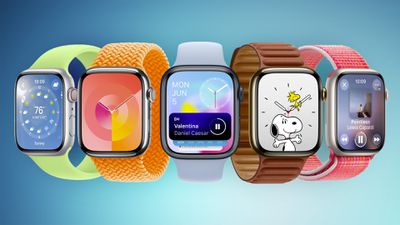
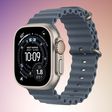
Apple Watch Faces watchOS 10 Feature Blue
To install the ‌watchOS 10.2‌ update, developers will need to open the Apple Watch app, go to the Software Update section under "General" in Settings, and toggle on the ‌watchOS 10‌ Developer Beta. An Apple ID linked to a developer account is required.

Once beta updates have been activated, ‌watchOS 10‌ can be downloaded under the same Software Update section. To install software, an Apple Watch needs to have 50 percent battery life and it must be placed on an Apple Watch charger.

watchOS 10.2 adds support for iMessage Contact Key Verification, a feature designed for those who face "extraordinary digital threats," such as journalists, human rights activists, and government officials.

Users can ensure that there is no "man in the middle" snooping on iMessage conversations, and there is a Contact Verification Code so that iMessage users can verify that they're speaking to the correct individual during in-person meetings or on FaceTime calls.

The update also reintroduces an option to change watch faces by swiping left and right.

Related Roundup: watchOS 26
Related Forum: Apple Watch

Popular Stories

maxresdefault

Apple Shows Off a Key Reason to Upgrade to the iPhone 17

Saturday February 7, 2026 9:26 am PST by
Apple today shared an ad that shows how the upgraded Center Stage front camera on the latest iPhones improves the process of taking a group selfie. "Watch how the new front facing camera on iPhone 17 Pro takes group selfies that automatically expand and rotate as more people come into frame," says Apple. While the ad is focused on the iPhone 17 Pro and iPhone 17 Pro Max, the regular iPhone...
m5 macbook pro deal

Why You Shouldn't Buy the Next MacBook Pro

Tuesday February 10, 2026 4:27 pm PST by
Apple is planning to launch new MacBook Pro models as soon as early March, but if you can, this is one generation you should skip because there's something much better in the works. We're waiting on 14-inch and 16-inch MacBook Pro models with M5 Pro and M5 Max chips, with few changes other than the processor upgrade. There won't be any tweaks to the design or the display, but later this...

apple wallet drivers license feature iPhone 15 pro

Apple Says These 7 U.S. States Plan to Offer iPhone Driver's Licenses
Monday February 9, 2026 6:24 am PST by
In select U.S. states, residents can add their driver's license or state ID to the Apple Wallet app on the iPhone and Apple Watch, and then use it to display proof of identity or age at select airports and businesses, and in select apps. The feature is currently available in 13 U.S. states and Puerto Rico, and it is expected to launch in at least seven more in the future. To set up the...
iOS 26

Apple Releases iOS 26.3 and iPadOS 26.3

Wednesday February 11, 2026 10:07 am PST by
Apple today released iOS 26.3 and iPadOS 26.3, the latest updates to the iOS 26 and iPadOS 26 operating systems that came out in September. The new software comes almost two months after Apple released iOS 26.2 and iPadOS 26.2. The new software can be downloaded on eligible iPhones and iPads over-the-air by going to Settings > General > Software Update. According to Apple's release notes, ...
Apple Logo Zoomed

Apple Expected to Launch These 10+ Products Over the Coming Months

Tuesday February 10, 2026 6:33 am PST by
It has been a slow start to 2026 for Apple product launches, with only a new AirTag and a special Apple Watch band released so far. We are still waiting for MacBook Pro models with M5 Pro and M5 Max chips, the iPhone 17e, a lower-cost MacBook with an iPhone chip, long-rumored updates to the Apple TV and HomePod mini, and much more. Apple is expected to release/update the following products...

Top Rated Comments

29 months ago
Please Apple, for the love of God, give us the ability to adjust the brightness on the Apple watch in a dark room. I can't read the notifications on my Ultra 2 because the screen is so dark/dim. I have to use a mini flashlight to light up my Ultra 2 just to be able to read a notification in the dark. It's pathetic that it is like this for an $800 watch. My Ultra 1 did not have this behavior. I could read it just fine in a dark room.
Score: 8 Votes (Like | Disagree)
realphilan Avatar
29 months ago
Let’s see what the battery draining does… but I almost give up hope.
Score: 7 Votes (Like | Disagree)
29 months ago
What is crazy is that sites like this one and other YouTubers are ignoring the dark/dim room situation and not being able to adjust brightness (as mentioned above). We can't even talk about these public betas on Apple Discussion boards or Apple will delete the posts. Amazing how nobody at MacRumors or any other site is even talking about this...
Score: 5 Votes (Like | Disagree)
29 months ago
Watch10 has so many steps back. Why can’t I change my ring goals with the crown? Why is it now multiple screens? Why do I waste a button on the control center?
Score: 4 Votes (Like | Disagree)
groove-agent Avatar
29 months ago
I wish they would make some sort of "Watch Kit" or Watch Face Store where we can purchase 3rd party watch faces. The same old watch faces get pretty boring quick although I have to admit, I love the newer Snoopy watch face probably because they keep updating it with new animations.
Score: 3 Votes (Like | Disagree)
DocMultimedia Avatar
29 months ago
Swiping watch faces. The only thing I care about. Still can't believe they removed it.
Score: 2 Votes (Like | Disagree)