iOS 27 Lets You Hide the Messages Button Everyone Hits by Mistake - MacRumors
Skip to Content

iOS 27 Lets You Hide the Messages Button Everyone Hits by Mistake

by

If you accidentally press the dictation or voice icon after sending a text in Messages, your music may pause while your iPhone starts listening. It's a small annoyance, but a frequent one, since the dictation/audio icon sits so close to the send arrow that stray taps are almost inevitable. In iOS 27 and iPadOS 27, Apple has finally given you a way to get rid of it.
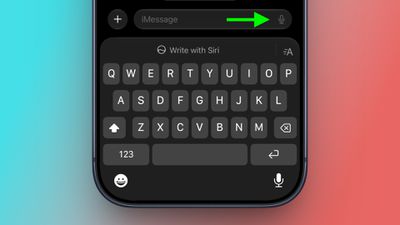
messages
The issue is one that popstar Justin Bieber publicly complained about, claiming that the send button shouldn't have multiple functions so close together. The post went viral, and in iOS 27, Apple has done something about it.

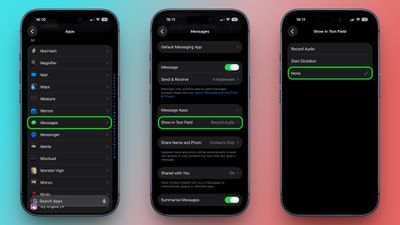
Quite simply, the message text field now has a new setting. You can choose whether it displays the audio waveform icon for recording a voice message, the microphone icon for dictation, or nothing at all. Here's how to find it:

  1. Open the Settings app on your iPhone or iPad.
  2. Tap Apps at the bottom of the list.
  3. Tap Messages.
  4. Tap Show in Text Field.
  5. Choose one of the three options: Record Audio, Start Dictation, or None.
    settings

If you keep tapping the text field icon by mistake, you'll want to choose None.

If you occasionally record voice messages, don't worry – you can still use the plus button to the left of the input field to enable Audio. If it's dictation you sometimes use, you'll find the microphone key at the bottom right of the iOS keyboard (if it's not there, go to Settings ➝ General ➝ Keyboard and turn on Enable Dictation.)

iOS 27 is remains in beta, with a public release expected sometime this September.

Related Roundups: iOS 27, iPadOS 27

Top Rated Comments

boswald Avatar
2 hours ago at 09:16 am
I hate that stupid button. I've hit it a couple of times.
Score: 6 Votes (Like | Disagree)
Attirex Avatar
2 hours ago at 09:14 am
It's a sad day when Justin Bieber is de facto head of UI/human interaction for Apple.
Score: 6 Votes (Like | Disagree)
2 hours ago at 09:18 am
This is unbelieberble.
Score: 5 Votes (Like | Disagree)
2 hours ago at 09:39 am

Darn. I. Was. Hoping. This. Would. Resolve. A. Different. Issue.
This. OMG this. Please.
Score: 4 Votes (Like | Disagree)
Devnul0 Avatar
2 hours ago at 09:39 am
Never liked the fact that screen has two separate microphone icons.
Score: 4 Votes (Like | Disagree)
erikkfi Avatar
2 hours ago at 09:29 am
I guess Apple doesn't notice UX issues until Justice Beaver points them out.
Score: 4 Votes (Like | Disagree)

Popular Stories

Everything New Your iPhone Can Do on iOS 27 Feature 1

20 New Things Your iPhone Can Do in iOS 27

Monday July 20, 2026 7:03 am PDT by
Apple will release iOS 27 in September, and despite the company's focus this year on refining its flagship operating system and nixing bugs, there are still many additional features on the way, not least of which is Apple's new context-aware Siri, re-tooled for the generative AI era. This year's major iPhone software update isn't all about AI, though, as the following feature list...
iCloud iPhone 17 Pro

iPhone Users Who Pay for iCloud Storage Get Two New Perks on iOS 27

Thursday July 2, 2026 6:10 am PDT by
If you pay for certain iCloud+ storage plans beyond the 5GB that Apple offers for free, you will receive two more perks on iOS 27 at no additional cost. A summary of the two new iCloud+ perks on iOS 27:Increased daily usage limits for some new Apple Intelligence features, including image generation in the revamped Image Playground app. HomeKit Secure Video cameras receive generated video...
ios 27

iOS 27 Brings These Five New Features to Your iPhone Lock Screen

Thursday July 23, 2026 4:05 am PDT by
Apple unveiled iOS 27 at WWDC this week, and while the headline-grabbing Siri overhaul has received the most attention, the Lock Screen has picked up several refinements that you may have missed. Some are brand-new additions, while others are tweaks to features Apple introduced in iOS 26, but together they give you more control over how your Lock Screen looks and behaves. Here are five...