The iOS 17.1 update that Apple is set to release in the near future addresses an issue that "may cause display image persistence," according to Apple's feature notes for the software.
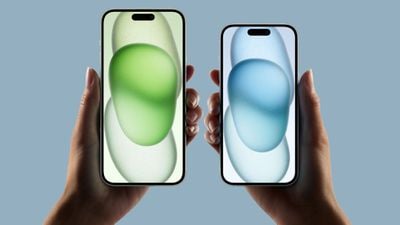
Since the launch of the iPhone 15 models, there have been sporadic reports of severe screen burn-in impacting the new devices. There was speculation that it might be a hardware issue with the OLED display, but based on the iOS 17.1 update, Apple has found and addressed a software problem that mimicked screen burn-in.
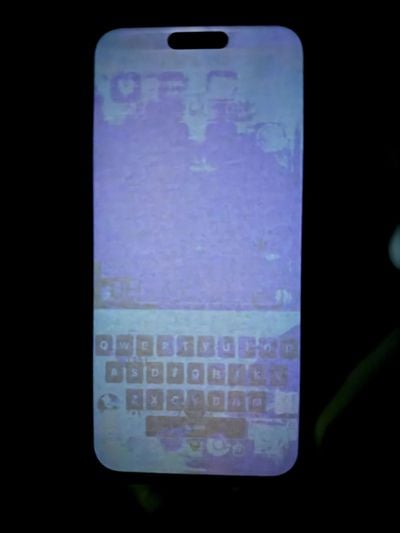
Image via MacRumors reader Josh
While most of the reports of display problems were coming from iPhone 15 users, there were also some users with iPhone 13 Pro and iPhone 12 Pro devices that saw similar issues, which is likely why Apple's release notes do not mention the iPhone 15 specifically.
Those who have noticed "burn-in" on their iPhones should update to iOS 17.1 to ensure that it solves the problem.
The iOS 17.1 update also addresses a number of other bugs. It fixes an issue that could cause the Significant Location privacy setting to reset when transferring or pairing an Apple Watch for the first time, plus it addresses a bug that could cause custom and purchased ringtones not to appear as options for a text tone.
There is a fix for an issue that could cause the iPhone keyboard to be less responsive, and Apple says that it has added crash detection optimizations for the iPhone 14 and iPhone 15 models to further refine how the iPhones respond when a vehicle crash event is detected.
Thursday December 11, 2025 8:49 am PST by Joe Rossignol
Apple seeded the second iOS 26.2 Release Candidate to developers earlier this week, meaning the update will be released to the general public very soon.
Apple confirmed iOS 26.2 would be released in December, but it did not provide a specific date. We expect the update to be released by early next week.
iOS 26.2 includes a handful of new features and changes on the iPhone, such as a new...
Friday December 12, 2025 10:56 am PST by Joe Rossignol
Macworld's Filipe Espósito today revealed a handful of features that Apple is allegedly planning for iOS 26.4, iOS 27, and even iOS 28.
The report said the features are referenced within the code for a leaked internal build of iOS 26 that is not meant to be seen by the public. However, it appears that Espósito and/or his sources managed to gain access to it, providing us with a sneak peek...
Friday December 12, 2025 10:10 am PST by Juli Clover
Apple today released iOS 26.2, the second major update to the iOS 26 operating system that came out in September, iOS 26.2 comes a little over a month after iOS 26.1 launched. iOS 26.2 is compatible with the iPhone 11 series and later, as well as the second-generation iPhone SE.
The new software can be downloaded on eligible iPhones over-the-air by going to Settings >...
Thursday December 11, 2025 11:28 am PST by Juli Clover
Apple today released new firmware designed for the AirPods Pro 3 and the prior-generation AirPods Pro 2. The AirPods Pro 3 firmware is 8B30, up from 8B25, while the AirPods Pro 2 firmware is 8B28, up from 8B21.
There's no word on what's include in the updated firmware, but the AirPods Pro 2 and AirPods Pro 3 are getting expanded support for Live Translation in the European Union in iOS...
Friday December 12, 2025 10:08 am PST by Juli Clover
Apple today released macOS Tahoe 26.2, the second major update to the macOS Tahoe operating system that came out in September. macOS Tahoe 26.2 comes five weeks after Apple released macOS Tahoe 26.1.
Mac users can download the macOS Tahoe update by using the Software Update section of System Settings.
macOS Tahoe 26.2 includes Edge Light, a feature that illuminates your face with soft...
Thursday December 11, 2025 10:31 am PST by Juli Clover
The AirTag 2 will include a handful of new features that will improve tracking capabilities, according to a new report from Macworld. The site says that it was able to access an internal build of iOS 26, which includes references to multiple unreleased products.
Here's what's supposedly coming:
An improved pairing process, though no details were provided. AirTag pairing is already...
Friday December 12, 2025 10:09 am PST by Juli Clover
Apple today released iPadOS 26.2, the second major update to the iPadOS 26 operating system released in September. iPadOS 26.2 comes a month after iPadOS 26.1.
The new software can be downloaded on eligible iPads over-the-air by going to Settings > General > Software Update.
iPadOS 26.2 continues with the multitasking improvements that were added with iPadOS 26.1. You can now drag and...
Friday December 12, 2025 11:11 am PST by Juli Clover
Apple today released iOS 26.2, iPadOS 26.2, and macOS 26.2, all of which introduce new features, bug fixes, and security improvements. Apple says that the updates address over 20 vulnerabilities, including two bugs that are known to have been actively exploited.
There are a pair of WebKit vulnerabilities that could allow maliciously crafted web content to execute code or cause memory...
Weird, I was assured by so many on these forums that this was an existential problem for Apple that would prompt a massive global recall and be the end of the company.
you can't fix "burn in" with a software update lmao. it's obviously an issue with the graphics processor (if it's really been fixed).
It could very well be a software bug that is not related to the graphics processor. Modern OLED displays utilize software algorithms to mitigate screen burn by essentially keeping track of how long individual sub-pixels are lit, and at what intensity. This allows them to adjust nearby pixel luminance to account for the degradation that the pixels have encountered from normal use, and continue to produce a clean image on a display that would otherwise have screen burn. My guess is that there was a bug in the display driver firmware that caused these algorithms to overcompensate for the amount of usage that these screens were seeing, essentially causing it to over adjust the luminance of certain pixels resulting in what looked like real screen burn when these compensation values were utilized by the display driver.