iPhone Features Interactive Widgets Starting With iOS 17
Starting with iOS 17, interactive widgets are now available on the iPhone across the Home Screen, Lock Screen, and the new StandBy mode. Apple gave some examples of what interactive widgets can be used for, including marking a reminder as completed, playing or pausing a song or podcast, and controlling accessories in the Home app, and there will be many more possibilities as third-party apps are updated with support.
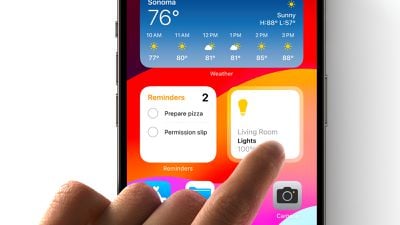
Introduced with iOS 14, Home Screen widgets offered limited functionality until now, as Apple did not allow developers to include interactive elements, such as scrolling, buttons, or animated transitions. Home Screen widgets were only allowed to present read-only information, and tapping on a widget would simply open the corresponding app. Now, users will be able to interact with widgets directly for some actions.
Interactive widgets are also available on the iPad's Home Screen and Lock Screen with iPadOS 17, and on the Mac's desktop with macOS Sonoma. All of the software updates are currently available in beta and will be released to the public later this year.
Popular Stories
While the iPhone 18 Pro and iPhone 18 Pro Max are not expected to launch for more than five more months, there are already plenty of rumors about the devices.
It was initially reported that the iPhone 18 Pro models would have fully under-screen Face ID, with only a front camera visible in the top-left corner of the screen. However, the latest rumors indicate that only one Face ID component...
We're long overdue for an Apple TV update, and there have been rumors about an imminent refresh since late last year. It's now sounding like we're not going to get a new version for several months because of Siri delays. If you're holding out for a new model, here's a recap on what to expect when it eventually comes out so you can decide whether to continue to wait, or buy now.
Design
Apple ...
Apple's CarPlay system for accessing iPhone apps on a vehicle's dashboard screen received three popular apps this week: ChatGPT, Google Meet, and Audiomack.
CarPlay Ultra in an Aston Martin
In addition, WhatsApp is beta testing a revamped CarPlay app that will improve upon the basic Siri-based functionality that was previously available.
Make sure you have the latest version of each app...
Popular Stories
While the iPhone 18 Pro and iPhone 18 Pro Max are not expected to launch for more than five more months, there are already plenty of rumors about the devices.
It was initially reported that the iPhone 18 Pro models would have fully under-screen Face ID, with only a front camera visible in the top-left corner of the screen. However, the latest rumors indicate that only one Face ID component...
We're long overdue for an Apple TV update, and there have been rumors about an imminent refresh since late last year. It's now sounding like we're not going to get a new version for several months because of Siri delays. If you're holding out for a new model, here's a recap on what to expect when it eventually comes out so you can decide whether to continue to wait, or buy now.
Design
Apple ...
Apple's CarPlay system for accessing iPhone apps on a vehicle's dashboard screen received three popular apps this week: ChatGPT, Google Meet, and Audiomack.
CarPlay Ultra in an Aston Martin
In addition, WhatsApp is beta testing a revamped CarPlay app that will improve upon the basic Siri-based functionality that was previously available.
Make sure you have the latest version of each app...