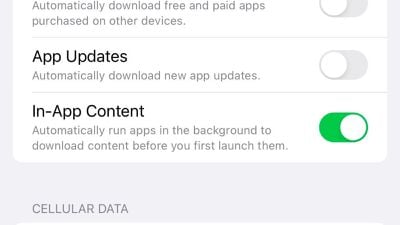
In the latest iOS 16.1 beta, Apple has added a new toggle to the App Store's settings that allows apps to automatically begin downloading their in-app content after they're downloaded and before a user launches them for the first time.
"Automatically run apps in the background to download content before you first launch them," the description of the toggle says. With the new option enabled, after a user installs an app from the App Store, it'll automatically begin running in the background to download their in-app content so that when the user opens the app for the first time, it's ready to go.
The new toggle was added in iOS 16.1 beta 3 and macOS Ventura beta 9. Also, in the latest macOS Ventura beta, Apple has a new dynamic version of its Ventura marketing wallpaper.
Saturday April 11, 2026 9:14 am PDT by Joe Rossignol
Last year, Apple launched CarPlay Ultra, the long-awaited next-generation version of its CarPlay software system for vehicles. Nearly a year later, CarPlay Ultra is still limited to Aston Martin's latest luxury vehicles, but that should change fairly soon.
In May 2025, Apple said many other vehicle brands planned to offer CarPlay Ultra, including Hyundai, Kia, and Genesis.
CarPlay Ultra...
As we wait for WWDC to kick off next Monday, Apple today announced the winners of its annual Apple Design Awards, recognizing apps and games for their innovation, ingenuity, and technical achievement.
The 2025 Apple Design Award winners are listed below, with one app and one game selected per category:
Delight and Fun - CapWords (App) and Balatro (Game)
Innovation - Play (App) and PBJ -...
Saturday April 11, 2026 9:07 am PDT by Joe Rossignol
While the AirPods Max 2 received more attention, Apple also released a second pair of headphones last month: Nike Powerbeats Pro 2.
Nike Powerbeats Pro 2 are the same as the regular Powerbeats Pro 2, except they have a two-tone design consisting of black and Nike's signature Volt neon green-yellow color. The headphones were released on March 20 in the U.S., Canada, Australia, the U.K., and a ...
Saturday April 11, 2026 9:14 am PDT by Joe Rossignol
Last year, Apple launched CarPlay Ultra, the long-awaited next-generation version of its CarPlay software system for vehicles. Nearly a year later, CarPlay Ultra is still limited to Aston Martin's latest luxury vehicles, but that should change fairly soon.
In May 2025, Apple said many other vehicle brands planned to offer CarPlay Ultra, including Hyundai, Kia, and Genesis.
CarPlay Ultra...
As we wait for WWDC to kick off next Monday, Apple today announced the winners of its annual Apple Design Awards, recognizing apps and games for their innovation, ingenuity, and technical achievement.
The 2025 Apple Design Award winners are listed below, with one app and one game selected per category:
Delight and Fun - CapWords (App) and Balatro (Game)
Innovation - Play (App) and PBJ -...
Saturday April 11, 2026 9:07 am PDT by Joe Rossignol
While the AirPods Max 2 received more attention, Apple also released a second pair of headphones last month: Nike Powerbeats Pro 2.
Nike Powerbeats Pro 2 are the same as the regular Powerbeats Pro 2, except they have a two-tone design consisting of black and Nike's signature Volt neon green-yellow color. The headphones were released on March 20 in the U.S., Canada, Australia, the U.K., and a ...
This is a sneaky way for us to enable Background App Refresh for new apps, considering most people turned BAR off a long time ago after realizing we only use it to track users and it provides the user nothing.
I can't recall the last time an app required an additional download after installing. Does anyone have any examples? The only ones I can think of are games.
Wow, those mobile games will definitely use this feature EXTENSIVELY after every month‘s maintenance. Aside from that, I dunno who will benefit too much from it. Just did a quick test and Genshin took advantage of that very well. O_O
I can't recall the last time an app required an additional download after installing. Does anyone have any examples? The only ones I can think of are games.
Content streaming apps. One of the first things I've had to do with a new phone is launch Spotify and let it start downloading the many GB of music I've saved to play offline. Same would apply to stuff like HBO Max that also lets you locally cache content for offline use. Could maybe apply to something like Dropbox to preload pinned files.
But yeah, even considering the above it's not like I'm getting a new phone every week and need to keep doing this. Whatever, might save some time at some point ¯\_(ツ)_/¯