

System Settings App in macOS Ventura Beta Still Riddled With UI Issues

It seems Apple's redesigned macOS Ventura System Settings app, which replaces the System Preferences found in macOS Monterey and earlier versions, is still not without its problems five betas in, as catalogued by developer Niki Tonsky on Twitter.
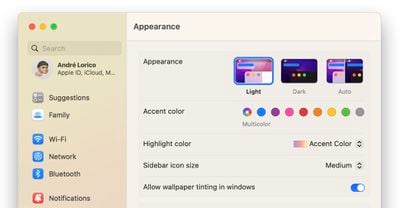
macos ventura system settings featured
For those unfamiliar with it, the new System Settings app looks more akin to the Settings app on the iPhone and iPad than it does to the earlier macOS preferences panels, with settings placed in a sidebar for supposedly easier access.

However, Tonsky's thread highlights several bugs and issues with the interface layout in developer betas 4 and 5 of macOS Ventura, including inconsistent use and erratic behavior of basic UI elements like dropdowns and buttons, misaligned text and poorly sized windows, menu titles that are cut off by menu windows, misplaced content, and more.

The System Settings app is built using SwiftUI, Apple's cross-platform user interface layer that works across iOS, macOS, tvOS, and watchOS. Another complex app written in SwiftUI, Shortcuts, has also drawn criticism for similar UI and performance bugs on both macOS and iOS.


Linking to and commenting on Tonsky's tweet thread on his own website, Daring Fireball's John Gruber said there is "something deeply wrong with SwiftUI that, even while in-progress, so many little layout details are apparently hard to get right."

There are buttons that are halfway cut off by their parent view. When has Apple ever shipped beta software with problems like that? Putting aside the philosophical issue of whether the Mac's system prefs/settings app should follow the basic model of Settings on iOS/iPadOS, no matter what style MacOS's System Settings is supposed to look like, there should be no question that it should look pixel-perfect.

In an interview with Gruber on The Talk Show Live at WWDC 2022, Craig Federighi said that despite what some may think, ‌macOS Ventura‌'s System Settings redesign was not largely inspired by iOS. Federighi insisted that the development team's main goal was consistency for users, and said System Settings on ‌macOS Ventura‌ is a "great interface."

Despite the lingering issues, there's still time for Apple to correct them, as macOS Ventura isn't likely to be scheduled for release until October, or perhaps even early November. Have you had similar experiences interacting with System Settings in the latest beta? What do you think of the new look? Let us know in the comments.


Related Forum: macOS Ventura

Popular Stories

iOS 26

iOS 26.2 Coming Soon With These 8 New Features on Your iPhone

Thursday December 11, 2025 8:49 am PST by
Apple seeded the second iOS 26.2 Release Candidate to developers earlier this week, meaning the update will be released to the general public very soon. Apple confirmed iOS 26.2 would be released in December, but it did not provide a specific date. We expect the update to be released by early next week. iOS 26.2 includes a handful of new features and changes on the iPhone, such as a new...
AirPods Pro Firmware Feature

Apple Releases New Firmware for AirPods Pro 2 and AirPods Pro 3

Thursday December 11, 2025 11:28 am PST by
Apple today released new firmware designed for the AirPods Pro 3 and the prior-generation AirPods Pro 2. The AirPods Pro 3 firmware is 8B30, up from 8B25, while the AirPods Pro 2 firmware is 8B28, up from 8B21. There's no word on what's include in the updated firmware, but the AirPods Pro 2 and AirPods Pro 3 are getting expanded support for Live Translation in the European Union in iOS...
Google maps feaure

Google Maps Quietly Added This Long-Overdue Feature for Drivers

Wednesday December 10, 2025 2:52 am PST by
Google Maps on iOS quietly gained a new feature recently that automatically recognizes where you've parked your vehicle and saves the location for you. Announced on LinkedIn by Rio Akasaka, Google Maps' senior product manager, the new feature auto-detects your parked location even if you don't use the parking pin function, saves it for up to 48 hours, and then automatically removes it once...
iOS 26

iOS 26.4 and iOS 27 Features Revealed in New Leak

Friday December 12, 2025 10:56 am PST by
Macworld's Filipe Espósito today revealed a handful of features that Apple is allegedly planning for iOS 26.4, iOS 27, and even iOS 28. The report said the features are referenced within the code for a leaked internal build of iOS 26 that is not meant to be seen by the public. However, it appears that Espósito and/or his sources managed to gain access to it, providing us with a sneak peek...
Foldable iPhone 2023 Feature 1

Apple to Make More Foldable iPhones Than Expected [Updated]

Tuesday December 9, 2025 9:59 am PST by
Apple has ordered 22 million OLED panels from Samsung Display for the first foldable iPhone, signaling a significantly larger production target than the display industry had previously anticipated, ET News reports. In the now-seemingly deleted report, ET News claimed that Samsung plans to mass-produce 11 million inward-folding OLED displays for Apple next year, as well as 11 million...
iOS 26

Apple Releases iOS 26.2 With Alarms for Reminders, Lock Screen Changes, Enhanced Safety Alerts and More

Friday December 12, 2025 10:10 am PST by
Apple today released iOS 26.2, the second major update to the iOS 26 operating system that came out in September, iOS 26.2 comes a little over a month after iOS 26.1 launched. ‌iOS 26‌.2 is compatible with the ‌iPhone‌ 11 series and later, as well as the second-generation ‌iPhone‌ SE. The new software can be downloaded on eligible iPhones over-the-air by going to Settings >...
AirTag 2 Mock Feature

Apple AirTag 2: Four New Features Found in iOS 26 Code

Thursday December 11, 2025 10:31 am PST by
The AirTag 2 will include a handful of new features that will improve tracking capabilities, according to a new report from Macworld. The site says that it was able to access an internal build of iOS 26, which includes references to multiple unreleased products. Here's what's supposedly coming: An improved pairing process, though no details were provided. AirTag pairing is already...
iOS 26

15 New Things Your iPhone Can Do in iOS 26.2

Friday December 5, 2025 9:40 am PST by
Apple is about to release iOS 26.2, the second major point update for iPhones since iOS 26 was rolled out in September, and there are at least 15 notable changes and improvements worth checking out. We've rounded them up below. Apple is expected to roll out iOS 26.2 to compatible devices sometime between December 8 and December 16. When the update drops, you can check Apple's servers for the ...
macOS Tahoe 26 Thumb

Apple Releases macOS Tahoe 26.2 With Edge Light

Friday December 12, 2025 10:08 am PST by
Apple today released macOS Tahoe 26.2, the second major update to the macOS Tahoe operating system that came out in September. macOS Tahoe 26.2 comes five weeks after Apple released macOS Tahoe 26.1. Mac users can download the macOS Tahoe update by using the Software Update section of System Settings. macOS Tahoe 26.2 includes Edge Light, a feature that illuminates your face with soft...

Top Rated Comments

jake.au Avatar
44 months ago
"How cool is that"

Attachment Image
Score: 51 Votes (Like | Disagree)
Andrew73875 Avatar
44 months ago
I remember when UI elements were a reason for a keynote:


"You spend months working on a button."

"We paid a lot of attention to dynamics. Not only how the things look but how do they move, how do they behave."
Score: 42 Votes (Like | Disagree)
Bokito Avatar
44 months ago
Long time Mac users: "We want more macOS on i(Pad)OS."
Apple: "We think iOS users want to see more of it on macOS, but we didn't ask anyone and we're gonna do it in a hurry"

I don't really understand why Apple wants to port iOS stuff to macOS. The (back then) refreshed Airport Utility is a complete disaster, lost functionality and is generally harder to use. And this has been with all the apps Apple is porting from iOS. Yes, we have apps like Stocks now, but does it behave and act like a truly native Mac app? Well, after all those years it's getting close, but we're still not there yet. The Music app is still a native Mac app from the core, but all functionality that Apple didn't have to change from iTunes was changed and vice versa.

But the new Settings app is setting a new example for total awkwardness. macOS isn't a vertical system, yet they introduce a vertical UI (as it comes from iOS). It doesn't feel like a Mac app and doesn't behave like one. System Preferences isn't perfect, but at least everything is clear. macOS isn't iOS, but Apple doesn't understand that while they do say so. I generally hope they don't ship it and avoid another discoveryd ('https://www.macrumors.com/2015/05/26/apple-discoveryd-replaced-with-mdnsresponder/') fiasco.


Breaking news: Beta software isn't 100% perfect.
This isn't just beta software. It's completely broken and will be almost impossible to properly fix. A few issues can certainly arise when something goes into beta, but this is just a disaster.
Score: 31 Votes (Like | Disagree)
damienbutt Avatar
44 months ago
I hate the new System Settings app on macOS Ventura. I will be sticking with Monterey for a while I think. I don't see why they had to change it. There is nothing wrong with how it functions now. It feels like they are trying to dumb it down to an iPad level.
Score: 27 Votes (Like | Disagree)
icanhazmac Avatar
44 months ago
Ug, record profits but a fading software experience and the specter of ads in all the base apps?
Score: 25 Votes (Like | Disagree)
randolorian Avatar
44 months ago
Hopefully, the new System Settings will be pulled before release, similar to last year's Safari fiasco.
Score: 23 Votes (Like | Disagree)















