VMware Fusion Tech Preview Brings Windows 11 to Apple Silicon Macs - MacRumors
Skip to Content

VMware Fusion Tech Preview Brings Windows 11 to Apple Silicon Macs

VMware this week announced that its latest VMware Fusion update brings Windows 11 support to both Intel and Apple silicon Macs. Available as a free tech preview, the 2H22 version of Fusion will finally allow Apple silicon Mac users to download and use Windows on their machines through virtualization.
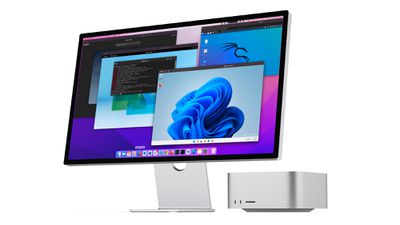
vmware fusion windows
Features include Windows 11 support with 2D GFX and networking, VMtools installation for Windows on Apple silicon machines, improved Linux support on Apple silicon machines, and more.

  • Windows 11 on Intel and Apple Silicon with 2D GFX and Networking
  • VMtools installation for Windows 11 GOS on M1
  • Improved Linux support on ‌M1‌
  • 3D Graphics HW Acceleration and OpenGL 4.3 in Linux VMs* (Requires Linux 5.19+ & Mesa 22.1.3+)
  • Virtual TPM Device
  • Fast Encryption
  • Universal Binary

While the new functionality was designed with Windows 11 in mind, VMware says the tools can be used with other VMs too. At the current time, Fusion on Apple silicon devices is "still a work in progress" and there are some limitations to be aware of.

  • Fusion will not support running VMs across different architectures. (I.e. no x86_64 VMs on ‌M1‌ Macs).
  • macOS virtual machines are out of scope for this release, but it's something we're looking into.
  • Ubuntu 20.04.4 and 22.04 for arm64 are not currently booting (Ubuntu 20.04.4 builds from July 5 and onward) We are working to resolve this.

VMware says that it is looking for feedback from users in order to iron out kinks and add new capabilities in preparation for more formal support later this year. While in the testing period, VMware Fusion will be free to use. The VMware Fusion Tech Preview can be downloaded from the VMware website.
Tag: VMware

Popular Stories

iOS 26

iOS 26.4 Adds Two New Features to CarPlay

Tuesday March 24, 2026 1:55 pm PDT by
iOS 26.4 was released today, and it includes a couple of new features for CarPlay: an Ambient Music widget and support for voice-based chatbot apps. To update your iPhone 11 or newer to iOS 26.4, open the Settings app and tap on General → Software Update. CarPlay will automatically offer the new features so long as the iPhone connected to your vehicle is running iOS 26.4 or later....
Apple Business hero

Apple Unveils 'Apple Business' All-in-One Platform

Tuesday March 24, 2026 8:53 am PDT by
Apple today announced Apple Business, a new all-in-one platform that unifies device management, productivity tools, and customer outreach features. The service is designed to be a consolidated replacement for several of Apple's existing business-focused offerings, including Apple Business Essentials, Apple Business Manager, and Apple Business Connect. It provides organizations with a single...
AirPods Pro Firmware Feature

Apple Releases New Firmware for AirPods Pro 3, AirPods Pro 2 and AirPods 4

Tuesday March 24, 2026 12:31 pm PDT by
Apple today released new firmware for the AirPods Pro 2, AirPods Pro 3, and the AirPods 4. The firmware has a version number of 8B39, up from 8B34 on the AirPods Pro 3, 8B28 on the AirPods Pro 2, and 8B21 on the AirPods 4. There is no word on what's included in the firmware, but Apple has a support document with limited notes. Most updates are limited to bug fixes and performance...

Top Rated Comments

Yebubbleman Avatar
48 months ago

So no x64 Windows on M1 still.
Bro, that was never in the cards. That requires an emulator. VMware Fusion and Parallels Desktop are not emulator products the way Connectix/Microsoft Virtual PC was for PowerPC; they're Hypervisors.
Score: 27 Votes (Like | Disagree)
dysamoria Avatar
48 months ago

Windows 11 has an x64 emulator out of the box.

https://blogs.windows.com/windows-insider/2020/12/10/introducing-x64-emulation-in-preview-for-windows-10-on-arm-pcs-to-the-windows-insider-program/
Oh boy, alpha software on a beta OS.
Score: 24 Votes (Like | Disagree)
randomthoughts Avatar
48 months ago

So what’s the point of running Windows 11 if you can’t run x86 apps?
You can. Just like Rosetta 2, Windows 11 has an out of the box emulator to launch and run the apps transparently.
Score: 22 Votes (Like | Disagree)
48 months ago

Then why does the article state:

“Fusion will not support running VMs across different architectures. (I.e. no x86_64 VMs on M1 Macs).”
You can't run x64 windows, but you can run ARM windows, and ARM windows can run x64 windows apps/binaries via its equivalent to Rosetta 2
Score: 15 Votes (Like | Disagree)
jonnysods Avatar
48 months ago
It's kind of dead out of the gate without the x86 W11 capability. I know that the limitations and difficulties aren't VMware's fault - its a huge downside for me of the AS platform as Windows VMs were so handy for my line of work. I moved ahead anyway as I couldn't stand the noise of those i9s any longer.
Score: 14 Votes (Like | Disagree)
randomthoughts Avatar
48 months ago

Likely not going to happen. As long as there is Windows on Arm this will be the focus.
Windows 11 has an x64 emulator out of the box.

https://blogs.windows.com/windows-insider/2020/12/10/introducing-x64-emulation-in-preview-for-windows-10-on-arm-pcs-to-the-windows-insider-program/
Score: 13 Votes (Like | Disagree)