More iOS 16 Tidbits: New FaceTime Video Call UI, Redesigned Video Player, and More

Apple this week announced iOS 16, a major release filled with significant customization features for the Lock Screen, new features for Focus mode, the ability to edit and retract iMessages, and so much more.
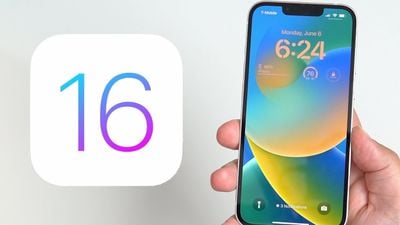
ios 16 lock screen
While Apple showcased some of iOS 16's major features during its jam-packed WWDC keynote, there are dozens, if not hundreds, of smaller features and changes left for users to discover. Below, we've compiled a list of six changes and new features you may not have known about.

Transparent FaceTime Video Call UI
ios 16 transparent video call ui
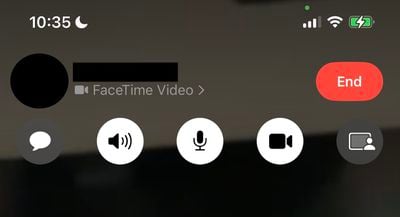
During a FaceTime video call, Apple has updated the UI in iOS 16 to be fully transparent, with buttons for camera, microphone, message, speaker, and SharePlay now larger and easier to tap.

iMessage Mention Suggestions Now Include Contact Images
ios 16 imessage mentions
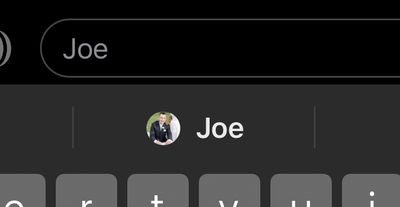
When mentioning a contact on iMessage, mention suggestions now include a contact image in the Quick Tap bar. This can be particularly helpful in group chats where multiple people may share a first name.

Entirely Redesigned Video Player UI
ios 16 updated vidoe player ui
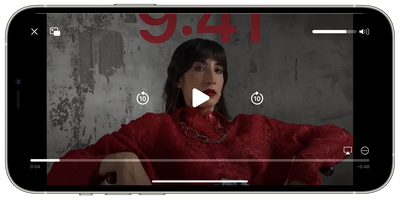
Apple has redesigned the stock video player UI in iOS 16, making it cleaner by getting rid of unnecessary clutter while highlighting basic controls such as volume, play/pause, and Picture in Picture.

Redesigned Voice Messaging Experience in iMessage
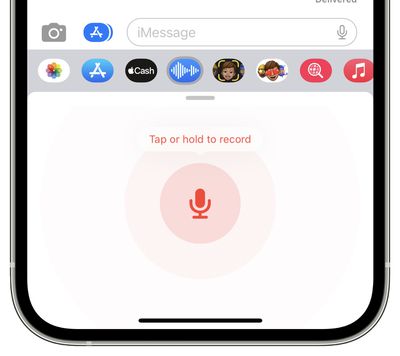
ios 16 new audio recording imessage
Apple has redesigned the voice messaging experience on iMessage with iOS 16, making it its own separate iMessage app that lives in the app bar.

The app lets users tap, hold, and record messages more quickly. Apple has replaced the previous hold and swipe-up gesture to record voice messages with a new Dictation button. On a related note, users can now skim through voice messages on iOS 16.

Privacy Access History
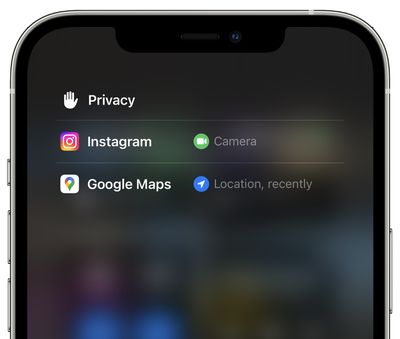
ios 16 privacy access history
On iOS 16 Apple is adding a neat trick that lets users check which apps have recently accessed their camera, microphone, location, and other sensitive sensors on their iPhone. The new view can be accessed by tapping on the top of Control Center shortly after an app has used access.


Related Forum: iOS 16

Popular Stories

Apple Logo Black

Apple Just Made Its Second-Biggest Acquisition Ever After Beats

Thursday January 29, 2026 10:07 am PST by
Apple today confirmed to Reuters that it has acquired Q.ai, an Israeli startup that is working on artificial intelligence technology for audio. Apple paid close to $2 billion for Q.ai, according to sources cited by the Financial Times. That would make this Apple's second-biggest acquisition ever, after it paid $3 billion for the popular headphone and audio brand Beats in 2014. Q.ai has...
Aston Martin CarPlay Ultra Screen

Apple's CarPlay Ultra to Expand to These Vehicle Brands Later This Year

Sunday February 1, 2026 10:08 am PST by
Last year, Apple launched CarPlay Ultra, the long-awaited next-generation version of its CarPlay software system for vehicles. Nearly nine months later, CarPlay Ultra is still limited to Aston Martin's latest luxury vehicles, but that should change fairly soon. In May 2025, Apple said many other vehicle brands planned to offer CarPlay Ultra, including Hyundai, Kia, and Genesis. In his Powe...
14 inch MacBook Pro Keyboard

Apple Changes How You Order a Mac

Saturday January 31, 2026 10:51 am PST by
Apple recently updated its online store with a new ordering process for Macs, including the MacBook Air, MacBook Pro, iMac, Mac mini, Mac Studio, and Mac Pro. There used to be a handful of standard configurations available for each Mac, but now you must configure a Mac entirely from scratch on a feature-by-feature basis. In other words, ordering a new Mac now works much like ordering an...
imac video apple feature

Apple Unveils First New Products of 2026

Monday January 26, 2026 1:55 pm PST by
Apple today introduced its first two physical products of 2026: a second-generation AirTag and the Black Unity Connection Braided Solo Loop for the Apple Watch. Read our coverage of each announcement to learn more:Apple Unveils New AirTag With Longer Range, Louder Speaker, and More Apple Introduces New Black Unity Apple Watch BandBoth the new AirTag and the Black Unity Connection Braided...
apple unsold web store

Retail Accessories Apple Won't Sell You Now Available via New Site

Friday January 30, 2026 8:46 am PST by
A newly surfaced resale operation is seemingly offering Apple Store–exclusive display accessories to the public for the first time, potentially giving consumers access to Apple-designed hardware that the company has historically kept confined to its retail environments. Apple designs a range of premium MagSafe charging stands, display trays, and hardware systems exclusively for displays in ...

Top Rated Comments

a104375 Avatar
48 months ago
I hate that the new video controls dim the screen and are needlessly in the middle. What was wrong with having them off to the side out of the main content area?
Score: 6 Votes (Like | Disagree)
Reeneman Avatar
48 months ago
These are some very welcome small features :)
Score: 5 Votes (Like | Disagree)
Kylo83 Avatar
48 months ago

These are some very welcome small features :)
None will really change anything, we need the batt % number back at the top and the home bar gone that would make a big change
Score: 3 Votes (Like | Disagree)
BJMRamage Avatar
48 months ago

None will really change anything, we need the batt % number back at the top and the home bar gone that would make a big change
I'd even go as far as the Battery is shown but once it hits 20% you instead get a Percentage to better track things.
Score: 1 Votes (Like | Disagree)
Mousse Avatar
48 months ago

The native iOS video player STILL does not have a rotation button, or play videos in landscape by default. I had a jailbreak tweak for this literally over a decade ago. What gives?
That's because the average person records video in the vertical orientation. It's one of the few things that triggers me when I see the way most people record videos on their smartphones. Record in landscape orientation ya Philistines.?

Anyhow, I only use my iPhone for games. I used my android phone for watching videos because it's ten billion percent ('//www.youtube.com/watch?v=HlUBIM_6oUI') easier to get movies on and off via microSD. And the video players on Android are superior to those on iOS.
Score: 1 Votes (Like | Disagree)
trost Avatar
48 months ago

I hate that the new video controls dim the screen and are needlessly in the middle. What was wrong with having them off to the side out of the main content area?
I thought I was the only one! The new video controls would be fine if they didn’t have to dim the entire video to change volume or scrub video track..
Score: 1 Votes (Like | Disagree)