Plex Launches 'Discover' and 'Universal Watchlist' Features to Help Users Find and Watch Content Across Streaming Services - MacRumors
Skip to Content

Plex Launches 'Discover' and 'Universal Watchlist' Features to Help Users Find and Watch Content Across Streaming Services

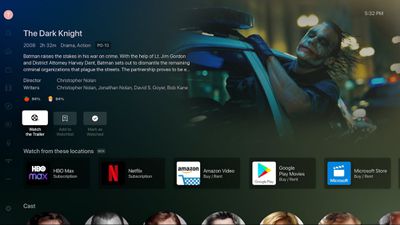
Media management platform Plex today announced a new "Discover" feature that's designed to make it easier for people to find what they want to watch across different streaming services. With Discover, customers can add any TV show or movie into their Plex Watchlist, and receive information on where to find it.
plex discover
The feature will inform users which streaming service has the content that they want to watch, and if the user has a subscription to that service, the content can be watched directly from Plex. It's similar to how the Apple TV app works, but it is more universal because it does not require an Apple device, and it also works with all streaming services, Netflix included.

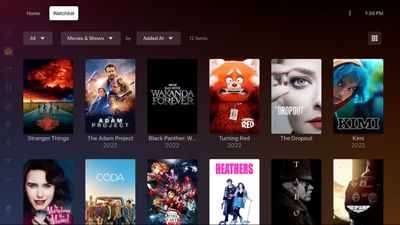
To go along with Discover, Plex is debuting the Plex Universal Watchlist, which is an all-in-one watchlist that lets customers keep track of anything that they want to watch. The Universal Watchlist will display newly available titles from shows that are still airing, and it will let users know where the content they want to watch is available.
plex watchlist
Plex says that its new feature set is meant to turn Plex into a one-stop shop for all media content. In addition to supporting watchlists and content from streaming services, Plex offers a selection of free, ad-supported TV shows and movies, plus it supports personal media libraries and live content.

More information about Discover and Universal Watchlist can be found on the Plex website. Plex is free to use, but upgraded personal media management features require the $4.99 per month Plex Premium package.


Tag: Plex

Popular Stories

iPhone 18 Pro Deep Red Feature

iPhone 18 Pro Launching Later This Year With These 12 New Features

Wednesday March 18, 2026 7:39 am PDT by
While the iPhone 18 Pro and iPhone 18 Pro Max are not expected to launch for another six months or so, there are already plenty of rumors about the devices. It was initially reported that the iPhone 18 Pro models would have fully under-screen Face ID, with only a front camera visible in the top-left corner of the screen. However, the latest rumors indicate that only one Face ID component...
Apple Logo Sketch Feature

Apple Has Now Unveiled Eight New Products This Month

Tuesday March 17, 2026 9:25 am PDT by
Apple has unveiled a whopping eight new products so far this March, including an iPhone 17e, iPad Air models with the M4 chip, MacBook Air models with the M5 chip, MacBook Pro models with M5 Pro and M5 Max chips, an updated Studio Display, a higher-end Studio Display XDR, and now the AirPods Max 2 this week. iPhone 17e features the same overall design as the iPhone 16e, but it gains Apple's...
ios 26 4 yellow

Here Are Apple's Release Notes for iOS 26.4

Wednesday March 18, 2026 11:56 am PDT by
Apple provided developers and public beta testers with the release candidate versions of iOS 26.4 and iPadOS 26.4, which means we're going to see a public launch as soon as next week. The RC versions of the software include Apple's official release notes, giving us final details on what's included in the update. Apple Music - Playlist Playground (beta) generates a playlist from your...

Top Rated Comments

52 months ago

Plex still cannot play 4K content locally, without buffering, this involves no streaming over internet. SSD drive inside iMac running Plex on that same iMac.

I heard Plex is not designed to do this, Plex is maybe intentionally not focused on playing 4K content.

Just hoping against hope that one day, Plex will suddenly add “plays 4K content“ as a brand new feature.
I play 4K content via Plex every weekend. Works just fine for me. Streams from a NUC pulling the media files of a NAS... and plays on Apple TV's throughout my house over WiFi. 4K content does need quite a bit more CPU than 1080 content does though.

I am even able to stream it over the internet when I travel... though that is heavily dependent on wherever I am having a fast enough download bandwidth to handle it.... which is rare.
Score: 14 Votes (Like | Disagree)
pi=e=3 Avatar
52 months ago

Plex still cannot play 4K content locally, without buffering, this involves no streaming over internet. SSD drive inside iMac running Plex on that same iMac.

I heard Plex is not designed to do this, Plex is maybe intentionally not focused on playing 4K content.

Just hoping against hope that one day, Plex will suddenly add “plays 4K content“ as a brand new feature.
No idea what you're talking about, I stream 4K HDR from my NAS (off a standard 10TB HDD, no SSD here) to my ATV Plex client all the time.
Score: 13 Votes (Like | Disagree)
52 months ago

Plex still cannot play 4K content locally, without buffering, this involves no streaming over internet. SSD drive inside iMac running Plex on that same iMac.

I heard Plex is not designed to do this, Plex is maybe intentionally not focused on playing 4K content.

Just hoping against hope that one day, Plex will suddenly add “plays 4K content“ as a brand new feature.
plex plays 4k content locally just fine. Been doing it for years. Nor does it need an SSD. In fact I can stream multiple 4k streams on my local network and outside my home to friends and family simultaneously without issue.
It direct plays on my local network and to some of my friends/family who have supported devices. No transcoding needed and it uses no CPU for that.

If you're buffering then there's a problem with your network, or it's trying to transcode with a weak CPU/GPU due to a client not supporting the codecs it needs. But that's easy to see.

But 4k absolutely works just fine. I watch 4k content almost daily with it. Across a variety of devices.
Score: 12 Votes (Like | Disagree)
52 months ago
So I just installed the update and gave it a try.

You pick from a list which services you subscribe to and it lets you search their libraries. When you try to watch a show.... it pulls up a list of services and shows which ones you indicated that you subscribe to that have the content... and you pick the one you want to stream it from.

Then it passes you OUT of Plex App... and INTO the App for the streaming service... and right to the episode you want to watch.

I am not sure how it handles "Watched" episode tracking, havent watched any episodes yet.
Score: 8 Votes (Like | Disagree)
52 months ago
I love this… I wonder what their privacy policy is, and how they got Netflix to work with them, yet Apple can not. This is one of my favorite features of Apple TV, the Watch Now area. I think this Plex offering is a much-needed service now that there are so many streaming options.
Score: 7 Votes (Like | Disagree)
52 months ago
Now that's a nice update!
Score: 6 Votes (Like | Disagree)