Latest macOS 12.1 Beta Appears to Fix Intermittent 'Tap to Click' Issue - MacRumors
Skip to Content

Latest macOS 12.1 Beta Appears to Fix Intermittent 'Tap to Click' Issue

Apple today seeded the fourth beta of macOS Monterey 12.1 to developers for testing, and while the much-anticipated Universal Control feature is still not enabled, the latest beta does appear to resolve an issue with the "Tap to Click" trackpad gesture.
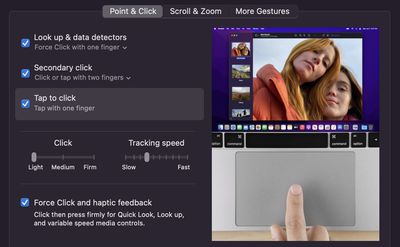
macos monterey trackpad system preferences
Since the release of macOS Monterey earlier this year, some users have reported that the "Tap to Click" trackpad gesture would intermittently fail to work. The issue appears to have affected a variety of Macs, ranging from the M1 MacBook Air with a built-in trackpad to an Intel-based iMac paired with a standalone Magic Trackpad.

Following the release of the fourth macOS 12.1 beta today, several users across the MacRumors Forums and Reddit have indicated that they are no longer experiencing issues with "Tap to Click" after updating to this version.

"Tap to Click" can be enabled in System Preferences under Trackpad > Point & Click, allowing users to tap with one finger to click.

macOS 12.1 should be publicly released before the end of the year, with a key new feature being SharePlay, which will allow users to watch movies and TV shows, listen to music, and share their screen with friends and family on FaceTime calls. SharePlay is already available on iOS 15.1, iPadOS 15.1, and tvOS 15.1.

Related Forum: macOS Monterey

Popular Stories

iPhone 18 Pro Deep Red Feature

iPhone 18 Pro Launching Later This Year With These 12 New Features

Wednesday March 18, 2026 7:39 am PDT by
While the iPhone 18 Pro and iPhone 18 Pro Max are not expected to launch for another six months or so, there are already plenty of rumors about the devices. It was initially reported that the iPhone 18 Pro models would have fully under-screen Face ID, with only a front camera visible in the top-left corner of the screen. However, the latest rumors indicate that only one Face ID component...
Apple Logo Sketch Feature

Apple Has Now Unveiled Eight New Products This Month

Tuesday March 17, 2026 9:25 am PDT by
Apple has unveiled a whopping eight new products so far this March, including an iPhone 17e, iPad Air models with the M4 chip, MacBook Air models with the M5 chip, MacBook Pro models with M5 Pro and M5 Max chips, the all-new MacBook Neo, an updated Studio Display, a higher-end Studio Display XDR, and now the AirPods Max 2 this week. iPhone 17e features the same overall design as the iPhone...
ios 26 4 yellow

Here Are Apple's Release Notes for iOS 26.4

Wednesday March 18, 2026 11:56 am PDT by
Apple provided developers and public beta testers with the release candidate versions of iOS 26.4 and iPadOS 26.4, which means we're going to see a public launch as soon as next week. The RC versions of the software include Apple's official release notes, giving us final details on what's included in the update. Apple Music - Playlist Playground (beta) generates a playlist from your...

Top Rated Comments

Westside guy Avatar
56 months ago

tap-to-click, the feature for the people that like accidental input.
I've been using it for roughly two decades - accidental clicks have never been an issue.
Score: 14 Votes (Like | Disagree)
8CoreWhore Avatar
56 months ago
Finally...

Attachment Image
Score: 6 Votes (Like | Disagree)
56 months ago
To be clear, the "tap to click" problem appeared to have been part of a wider problem with the trackpad. Below is the report I sent to Apple last week. I haven't downloaded the latest beta yet, but I hope it fixes all the problems I described below, not just tap-to-click.

--

• Tap to click with one finger: erratic, sometimes need to tap 2-3 attempts for the tap to register.

• Scrolling up or down with two fingers: Seems to be fine.

• Swipe between full-screen apps with four fingers: When swiping to the *right*, it frequently swipes to the *left* screen instead, or starts to swipe to the right but suddenly bounces back to the original screen. When swiping *left*, however, it acts correctly every time. This indicates that swiping to the left with 4 fingers is correct, but swiping to the right sometimes registers as swiping to the left.

• When swiping down with 4 fingers for App Exposé, it frequently bounces back to desktop mid-way through the action. When swiping *up* with 4 fingers for Mission Control, it often takes 2-3 tries to reverse back to the desktop. This indicates that swiping *up* with 4 fingers seems to register correctly, but swiping *down* with 4 fingers actually registers as a swipe *up* some of the time.

• Pinch with thumb and three fingers for Launchpad: Will often end with Mission Control instead (again, incorrectly registering as a 4-finger swipe *up*).
Score: 5 Votes (Like | Disagree)
BWhaler Avatar
56 months ago
Memory leaks? ProMotion? MagSafe charging?
Score: 4 Votes (Like | Disagree)
56 months ago
Hooray!

How many missed clicks I’ve had with Monterey … and using press to click actually drains the the trackpad‘s battery much faster.
Score: 4 Votes (Like | Disagree)
56 months ago
It’s not just tap-to-click that’s the problem. It’s all the trackpad gestures:

https://discussions.apple.com/thread/253320997
Score: 3 Votes (Like | Disagree)