Apple Reveals 'Scale to Fit' Setting to Prevent a Mac App's Menu Bar Items From Being Hidden Under Notch - MacRumors
Skip to Content

Apple Reveals 'Scale to Fit' Setting to Prevent a Mac App's Menu Bar Items From Being Hidden Under Notch

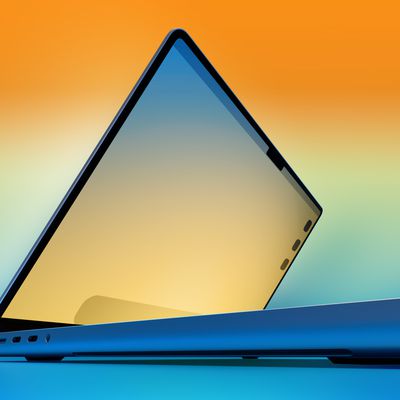
Apple today shared a new support document that explains how users can ensure that an app's menu bar items do not appear hidden behind the notch, or the "camera housing" as Apple calls it, on the new 14-inch and 16-inch MacBook Pro models.
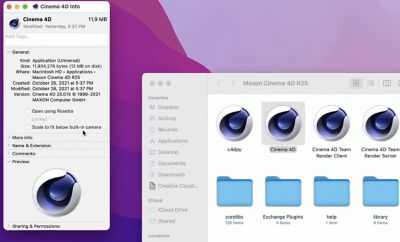
scale to fit notch setting macos
In the support document, Apple says users can turn on "scale to fit below built-in camera" for an app to adjust the active area of the display, ensuring that the app's menu bar items appear below the notch and are always visible.

Menu bar items appearing hidden behind the notch was demonstrated by Quinn Nelson, host of the YouTube channel Snazzy Labs.

To turn on "scale to fit below built-in camera" for an app on the new MacBook Pro models, open the Finder app and click on Applications in the sidebar. Then, right click on the desired app and select "Get Info." In the Info window that opens, check off the "scale to fit below built-in camera" box and the display will automatically adjust when the app is open.

The setting was demonstrated in a tweet by Joseph Angelo Todaro, a design advocate for Sketch.


Apple notes that developers can update their app to work better with the notch, in which case the "scale to fit below built-in camera" setting no longer appears.

Related Roundup: MacBook Pro
Buyer's Guide: MacBook Pro (Buy Now)
Related Forum: MacBook Pro

Popular Stories

iphone x flexible oled display

Apple Plans Wider Color Gamut for Future MacBook Pro, iMac, and iPad Pro

Monday June 29, 2026 6:35 am PDT by
Apple plans to adopt OLED panels capable of displaying a much wider range of colors, according to a new report from research firm TrendForce. The new panels would cover 95% of the BT.2020 color standard, which describes a far broader spectrum of colors than the DCI-P3 standard Apple's screens currently target. In practice, that means deeper, more accurate reds, greens, and blues. Reaching...
macbook pro orange

M6 MacBook Pro Coming in Late 2026, Redesigned M7 Model Launching in 1H 2027

Wednesday July 1, 2026 2:12 pm PDT by
Apple plans to release an updated 14-inch MacBook Pro with an M6 chip in late 2026, and then follow it with a revamped M7 model in the first half of 2027, reports Bloomberg. Apple apparently finished work on a 14-inch MacBook Pro with an M6 chip "months ago," and the device is expected to launch before the end of the year. Apple's M6 chip cycle will be shorter than prior chip cycles because...
TMRS 201 MacBook Ultra Thumb

The MacRumors Show: Goodbye MacBook Pro? MacBook Ultra Is Coming

Friday July 10, 2026 9:12 am PDT by
On this week's episode of The MacRumors Show, we discuss the future of Apple's increasingly tangled high-end MacBook lineup, including the entry-level MacBook Pro and the rumored "MacBook Ultra." Subscribe to The MacRumors Show YouTube channel for more videos Apple's chip roadmap for the Mac is reportedly set to take an unusual turn over the next year. The company is said to be skipping the...

Top Rated Comments

62 months ago

Did you notice that “scale to fit” restores the bezels of the previous generation MBP on the left and right side as well (not just the top of the screen)? This is how it maintains the aspect ratio. It is literally scaling down the whole screen
Yep. This is literally the worst possible solution.
Score: 34 Votes (Like | Disagree)
62 months ago
Lol, a terrible solution to a problem we didn't had before. Nice job.
Score: 22 Votes (Like | Disagree)
62 months ago
The video shows the entire screen shrinking at the same aspect ratio, bizarre. I would have expected the menubar to simply slide down the same number of pixels as the notch is tall, making it the same total aspect ratio as previous MBPs

This is going to be annoying for pixel critical work that designers (and artists, etc) do, as it's no longer a perfect 2x multiple PPI (for the default scale resolution, at least). Scaling the entire screen down a bit means you're no longer integer scaling the display.
Score: 21 Votes (Like | Disagree)
Superhappytree Avatar
62 months ago
When you have to have settings, dark modes and apps to appease the notch and yet you have floods of people on here defending it as “great design, well done Apple”.

It’s a massive design fail that interferes with UX and UI.
Score: 19 Votes (Like | Disagree)
62 months ago
Why not just give an option for the system to ignore the notch area, and simply put the menu bar below the notch…

Essentially maintaining the scale but just making the screen shorter?
Score: 18 Votes (Like | Disagree)
macpot Avatar
62 months ago
Notch gonna lie, that is amazing!

It makes every one happy, bezel lovers will find themself at home now.
Score: 17 Votes (Like | Disagree)