Apple's MagSafe Battery Pack Unlocks Long Rumored Reverse Charging Feature
Apple's MagSafe Battery Pack designed for the iPhone 12 models has a unique feature that's long been rumored but never introduced in an Apple product -- reverse wireless charging.
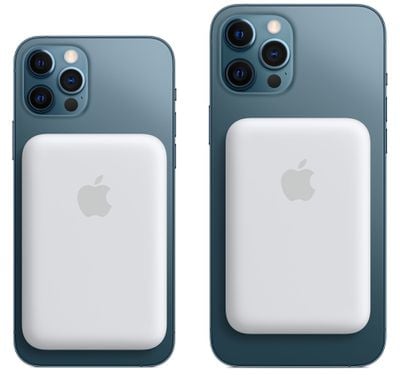
When attached to an iPhone that's charging via Lightning, the iPhone can deliver power to the MagSafe Battery Pack, which is the first instance of an iPhone being able to route power to an accessory device.
We've long heard rumors of reverse wireless charging capabilities for the iPhone, a feature that's been talked about as a possibility for both the iPhone 11 and the iPhone 12. Apple hasn't actually implemented reverse wireless charging until now, and the way that it works with the MagSafe Battery Pack is limited in scope.
With the MagSafe Battery Pack, the iPhone has to be plugged in for the charging feature to work, but it's certainly a step in the right direction and hints at more expansive reverse wireless charging capabilities in the future. Given the MagSafe Battery Pack's reverse wireless charging feature, it seems technically possible that an iPhone 12 could deliver power to the AirPods or AirPods Pro, but Apple has not yet implemented this feature.
Apple has suggested that MagSafe Battery Pack users might want to use the iPhone passthrough charging feature when the iPhone is connected to a power source like wired CarPlay and is able to charge both accessories.
Popular Stories
Apple today announced it will be permanently closing three retail stores in the U.S. in June, including Apple Trumbull in Trumbull, Connecticut, Apple North County in Escondido, California, and Apple Towson Town Center in Towson, Maryland.
Apple Towson Town Center in Maryland
Apple issued the following statement to MacRumors:At Apple, we are constantly striving to deliver exceptional service...
Apple has released a minor iOS 26.4.1 update for the iPhone 11 and newer. While the release notes for the update only mention unspecified "bug fixes," we have since learned about two specific changes that are included in it.
First, 9to5Mac spotted an Apple Developer Forums thread suggesting that iOS 26.4.1 fixes an iOS 26.4 bug that affected iCloud syncing in some apps.
Second, an...
As we wait for WWDC to kick off next Monday, Apple today announced the winners of its annual Apple Design Awards, recognizing apps and games for their innovation, ingenuity, and technical achievement.
The 2025 Apple Design Award winners are listed below, with one app and one game selected per category:
Delight and Fun - CapWords (App) and Balatro (Game)
Innovation - Play (App) and PBJ -...
Popular Stories
Apple today announced it will be permanently closing three retail stores in the U.S. in June, including Apple Trumbull in Trumbull, Connecticut, Apple North County in Escondido, California, and Apple Towson Town Center in Towson, Maryland.
Apple Towson Town Center in Maryland
Apple issued the following statement to MacRumors:At Apple, we are constantly striving to deliver exceptional service...
Apple has released a minor iOS 26.4.1 update for the iPhone 11 and newer. While the release notes for the update only mention unspecified "bug fixes," we have since learned about two specific changes that are included in it.
First, 9to5Mac spotted an Apple Developer Forums thread suggesting that iOS 26.4.1 fixes an iOS 26.4 bug that affected iCloud syncing in some apps.
Second, an...
As we wait for WWDC to kick off next Monday, Apple today announced the winners of its annual Apple Design Awards, recognizing apps and games for their innovation, ingenuity, and technical achievement.
The 2025 Apple Design Award winners are listed below, with one app and one game selected per category:
Delight and Fun - CapWords (App) and Balatro (Game)
Innovation - Play (App) and PBJ -...























