iOS 15 Can Automatically Add and Remove Widgets to a Smart Stack - MacRumors
Skip to Content

iOS 15 Can Automatically Add and Remove Widgets to a Smart Stack

On iOS 14, Smart Stacks for widgets allow users to stack different widgets on top of each other and then allow iOS to display the most relevant widget depending on the time of day, location, and more. On iOS 15, Apple is taking Smart Stacks even further with Widget Suggestions, which automatically add and remove widgets in a Smart Stack depending on context.
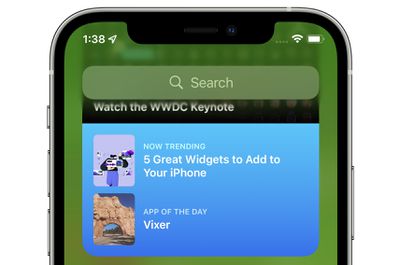
app store widget
For example, if a user has an existing Smart Stack which includes the Weather and Reminders widget, iOS 15 may add a Calendar widget to the stack if the user has an upcoming meeting. Then, after the meeting, iOS 15 will remove the widget from the Smart Stack, reverting it to the stack that the user had set up with Weather and Reminders. Apple says it hopes this new feature, which can be disabled on a per Smart Stack basis, will allow users to discover new and helpful widgets.

iOS 15 and iPadOS 15 introduces new widgets for Find My, Game Center, App Store Today, Sleep, Mail, and more. Developers interested in learning more about widget suggestions and how they can be implemented into their app can check out this WWDC session.

Related Forum: iOS 15

Popular Stories

Apple Watch Ultra 2 Black Titanium

watchOS 27 Will Add These New Features to Your Apple Watch

Sunday May 24, 2026 11:53 am PDT by
Apple will unveil watchOS 27 during its WWDC 2026 keynote on Monday, June 8, and a handful of new features have been rumored already. The first developer beta of watchOS 27 should be available immediately following the keynote, and a public beta typically follows in July. The update should be released to all users with a compatible Apple Watch model in September. Below, we recap watchOS...
Four iPhone 18 Pro Colors Mock Feature

iPhone 18 Pro Launching Later This Year With These 10 New Features

Tuesday May 26, 2026 6:32 am PDT by
While the iPhone 18 Pro and iPhone 18 Pro Max are not launching until September, there are already plenty of rumors about the devices. It was initially reported that the iPhone 18 Pro models would have fully under-screen Face ID, with only a front camera visible in the top-left corner of the screen. However, the latest rumors indicate that only one Face ID component will be moved under the...
iPhone 15 General Feature Green

Apple Preparing 'Most Significant Overhaul in the iPhone's History'

Friday May 22, 2026 1:36 pm PDT by
Apple reportedly plans to unveil its first foldable iPhone in September this year — it may be named "iPhone Ultra" — and expectations are high. In his Power On newsletter, Bloomberg's Mark Gurman said the foldable iPhone will be "the most significant overhaul in the iPhone's history." "iPhone 4, iPhone 6 and iPhone X were clearly a big deal, but this is a whole new design," he said....

Top Rated Comments

65 months ago
I hate this stuff. A good UI is predictable and boring.
Score: 3 Votes (Like | Disagree)
bchery21 Avatar
65 months ago

Hmm. Sounds like an okay idea to me, as long as I can disable it if I don't like the behavior. I was disappointed to not hear that the widgets will be interactive (checking items off a todo list, for example), but maybe that will still happen?
I hope so, especially with the example you gave. Checking something off the Reminders widget instead of bringing you into the app would be welcomed especially since that's how it use to behave.
Score: 2 Votes (Like | Disagree)
cmaier Avatar
65 months ago
A trend in Apple's UX designs lately - try and guess what will appear when you swipe the smart stack! Try and guess where the text box is to type a new address into safari! Try and guess where the keys are on the TouchBar!
Score: 2 Votes (Like | Disagree)
TheYayAreaLiving 🎗️ Avatar
65 months ago
I have to admit. The widgets are cool
Score: 2 Votes (Like | Disagree)
65 months ago

For iOS it’s kind of annoying. I just wish you could tell the system what to auto show and what not to. In CarPlay my wife’s calendar appts show up on the dashboard. I don’t care. However, I love the garage button that disappears when I leave home. That one is rock solid.
I find it incredible that hiding calendars is still not working as expected. I now get the invites from my partner’s calendar. And their appointments show up in widgets and Maps. Why Apple?! Why?
Score: 1 Votes (Like | Disagree)
QuarterSwede Avatar
65 months ago

A trend in Apple's UX designs lately - try and guess what will appear when you swipe the smart stack! Try and guess where the text box is to type a new address into safari! Try and guess where the keys are on the TouchBar!
For iOS it’s kind of annoying. I just wish you could tell the system what to auto show and what not to. In CarPlay my wife’s calendar appts show up on the dashboard. I don’t care. However, I love the garage button that disappears when I leave home. That one is rock solid.
Score: 1 Votes (Like | Disagree)