Spotify Launches New Design for Desktop App and Web Player
Spotify today announced that it has overhauled its desktop app and web player with an "improved look and feel" that offers design parity and also makes both the app and the web experience easier to use.
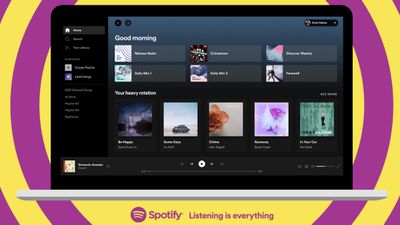
According to Spotify, it took "months" of tests, research, and user feedback to develop the new, cleaner design that's simpler while also offering all of the useful features from the desktop app.
Using the desktop app and then switching to the web player will feel like a seamless experience now that the two share the same general design. There's a redesigned Home experience, search has been relocated to the left side of the navigation page, and listener profile pages feature top artists and tracks. Users can now start a radio session for any song or artist using the "..." menu.
It's easier than ever to edit and customize playlists, and there's a new embedded search bar for quickly locating new songs and podcast episodes to add. With a new dropdown menu in the top-right corner, Spotify desktop app users can edit Queue and view Recently played.
Spotify users on Mac can download the new Spotify app for desktop from the Spotify website or use Spotify in the browser through open.spotify.com.

Popular Stories
Spotify today announced plans to adopt Apple's HTTP Live Streaming (HLS) technology for video podcasts, a move that will allow creators to distribute video shows across both platforms without changing their existing setup.
Apple introduced an enhanced HLS-based video podcast experience for the iPhone, iPad, Apple Vision Pro, and the web at the end of March. The upgrade significantly improves ...
Last year, Apple launched CarPlay Ultra, the long-awaited next-generation version of its CarPlay software system for vehicles. Nearly a year later, CarPlay Ultra is still limited to Aston Martin's latest luxury vehicles, but that should change fairly soon.
In May 2025, Apple said many other vehicle brands planned to offer CarPlay Ultra, including Hyundai, Kia, and Genesis.
CarPlay Ultra...
Bloomberg's Mark Gurman today revealed another iOS 27 change: notifications will slide in from the left side of the screen instead of from the top.
In addition, accessing Notification Center on iOS 27 will require swiping down on the top-left corner of the screen. If you swipe down on the Dynamic Island area, a new "Search or Ask" interface tied to the revamped Siri will appear, instead of...