'Controlly' App Turns a Game Controller Into a Remote Control for Macs

Controlly, a new app available in the Mac App Store, is designed to turn a gaming controller into a full-featured remote control that can be used with a Mac.
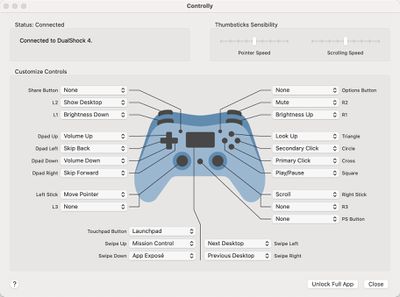
controlly app
With the app installed and a gaming controller connected, the different keys on the controller can be mapped to various functions such as displaying the desktop, adjusting screen brightness, tweaking volume, controlling media playback, accessing Launch Pad, launching Mission Control, and more.

There's even an option to use the controller in lieu of a mouse with controls for moving the mouse pointer, clicking, right clicking, and scrolling. You can essentially set any function on the Mac to be performed with a click of a controller button, which is handy if you want an alternate input method. There's also an option to create custom shortcuts that can be launched with a controller.

Note that to use the app, you must enable the Accessibility feature that allows apps to control your computer. This is available in System Preferences, and the app setup will walk you through it. Without the control option enabled, Controlly does not work.
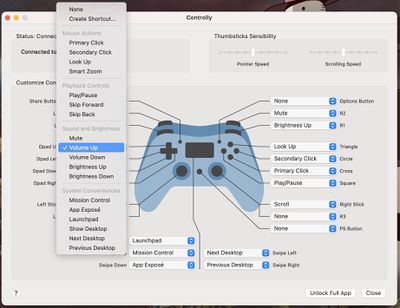
controlly key mapping options
Most wireless controllers should be able to work with Controlly after being paired via Bluetooth to a Mac. We tested with the PlayStation 4 DualShock controller and the app worked flawlessly, with the controller able to perform all of the appropriate mapped actions.


Controlly can be downloaded for free and used for seven days to test it out, but after that, there's a one-time $3.99 in-app purchase to unlock full functionality. [Direct Link]

Popular Stories

iOS 26

iOS 26.2 Coming Soon With These 8 New Features on Your iPhone

Thursday December 11, 2025 8:49 am PST by
Apple seeded the second iOS 26.2 Release Candidate to developers earlier this week, meaning the update will be released to the general public very soon. Apple confirmed iOS 26.2 would be released in December, but it did not provide a specific date. We expect the update to be released by early next week. iOS 26.2 includes a handful of new features and changes on the iPhone, such as a new...
AirPods Pro Firmware Feature

Apple Releases New Firmware for AirPods Pro 2 and AirPods Pro 3

Thursday December 11, 2025 11:28 am PST by
Apple today released new firmware designed for the AirPods Pro 3 and the prior-generation AirPods Pro 2. The AirPods Pro 3 firmware is 8B30, up from 8B25, while the AirPods Pro 2 firmware is 8B28, up from 8B21. There's no word on what's include in the updated firmware, but the AirPods Pro 2 and AirPods Pro 3 are getting expanded support for Live Translation in the European Union in iOS...
iOS 26

iOS 26.4 and iOS 27 Features Revealed in New Leak

Friday December 12, 2025 10:56 am PST by
Macworld's Filipe Espósito today revealed a handful of features that Apple is allegedly planning for iOS 26.4, iOS 27, and even iOS 28. The report said the features are referenced within the code for a leaked internal build of iOS 26 that is not meant to be seen by the public. However, it appears that Espósito and/or his sources managed to gain access to it, providing us with a sneak peek...
Google maps feaure

Google Maps Quietly Added This Long-Overdue Feature for Drivers

Wednesday December 10, 2025 2:52 am PST by
Google Maps on iOS quietly gained a new feature recently that automatically recognizes where you've parked your vehicle and saves the location for you. Announced on LinkedIn by Rio Akasaka, Google Maps' senior product manager, the new feature auto-detects your parked location even if you don't use the parking pin function, saves it for up to 48 hours, and then automatically removes it once...
iOS 26

Apple Releases iOS 26.2 With Alarms for Reminders, Lock Screen Changes, Enhanced Safety Alerts and More

Friday December 12, 2025 10:10 am PST by
Apple today released iOS 26.2, the second major update to the iOS 26 operating system that came out in September, iOS 26.2 comes a little over a month after iOS 26.1 launched. ‌iOS 26‌.2 is compatible with the ‌iPhone‌ 11 series and later, as well as the second-generation ‌iPhone‌ SE. The new software can be downloaded on eligible iPhones over-the-air by going to Settings >...
Foldable iPhone 2023 Feature 1

Apple to Make More Foldable iPhones Than Expected [Updated]

Tuesday December 9, 2025 9:59 am PST by
Apple has ordered 22 million OLED panels from Samsung Display for the first foldable iPhone, signaling a significantly larger production target than the display industry had previously anticipated, ET News reports. In the now-seemingly deleted report, ET News claimed that Samsung plans to mass-produce 11 million inward-folding OLED displays for Apple next year, as well as 11 million...
AirTag 2 Mock Feature

Apple AirTag 2: Four New Features Found in iOS 26 Code

Thursday December 11, 2025 10:31 am PST by
The AirTag 2 will include a handful of new features that will improve tracking capabilities, according to a new report from Macworld. The site says that it was able to access an internal build of iOS 26, which includes references to multiple unreleased products. Here's what's supposedly coming: An improved pairing process, though no details were provided. AirTag pairing is already...
iOS 26

15 New Things Your iPhone Can Do in iOS 26.2

Friday December 5, 2025 9:40 am PST by
Apple is about to release iOS 26.2, the second major point update for iPhones since iOS 26 was rolled out in September, and there are at least 15 notable changes and improvements worth checking out. We've rounded them up below. Apple is expected to roll out iOS 26.2 to compatible devices sometime between December 8 and December 16. When the update drops, you can check Apple's servers for the ...
macOS Tahoe 26 Thumb

Apple Releases macOS Tahoe 26.2 With Edge Light

Friday December 12, 2025 10:08 am PST by
Apple today released macOS Tahoe 26.2, the second major update to the macOS Tahoe operating system that came out in September. macOS Tahoe 26.2 comes five weeks after Apple released macOS Tahoe 26.1. Mac users can download the macOS Tahoe update by using the Software Update section of System Settings. macOS Tahoe 26.2 includes Edge Light, a feature that illuminates your face with soft...

Top Rated Comments

Unggoy Murderer Avatar
63 months ago

NO. We do not need apps to turn every device into every other device.
Perhaps others see value in things you don’t...? Using a controller might be a decent ergonomic choice for people with large hands, or perhaps folks with disabilities or dexterity issues.

No harm in getting more out of something.
Score: 23 Votes (Like | Disagree)
MrGimper Avatar
63 months ago

NO. We do not need apps to turn every device into every other device.
I love these posts which sound like someone is holding a gun to your head and forcing you to use/purchase it :rolleyes:
Score: 21 Votes (Like | Disagree)
nathan_reilly Avatar
63 months ago

NO. We do not need apps to turn every device into every other device.
I think this is so misguided. You might not need it but someone else could really benefit from it. And does it hurt you that it exists now? Or are you like imagining this developer could have solved some important (to you) problem instead of this unimportant (to you) problem? My god.
Score: 8 Votes (Like | Disagree)
Wowfunhappy Avatar
63 months ago

NO. We do not need apps to turn every device into every other device.
I would, um, say that's precisely what we need. :)

I do wish they were Preference Panes instead of apps though, from an UI/aesthetic standpoint. But you can't sell those in the App Store...
Score: 6 Votes (Like | Disagree)
System Of A Down Avatar
63 months ago

NO. We do not need apps to turn every device into every other device.
oh ok.

we'll just tell the developers to take the app of the store because you said we don't need it. smart! /sarcasm
Score: 5 Votes (Like | Disagree)
Sharewaredemon Avatar
63 months ago

Perhaps others see value in things you don’t...? Using a controller might be a decent ergonomic choice for people with large hands, or perhaps folks with disabilities or dexterity issues.

No harm in getting more out of something.
Yep, or simply being able to do a few things with your computer using the controller that's already in your hands after you finish playing a game, when you might not be physically close to your computer, or it's not somewhere ergonomic for the trackpad and keyboard.
Score: 5 Votes (Like | Disagree)