

M1 Macs Support WiFi 6, MacBook Air Has Updated Function Keys - MacRumors
Skip to Content

M1 Macs Support WiFi 6, MacBook Air Has Updated Function Keys

The M1 MacBook Air, 13-inch MacBook Pro, and Mac mini are the first of Apple's Macs to support WiFi 6, or 802.11ax. WiFi 6 support started rolling out in Apple devices with the March 2020 launch of the iPad Pro, but Apple did not include the feature in Macs refreshed earlier in the year.
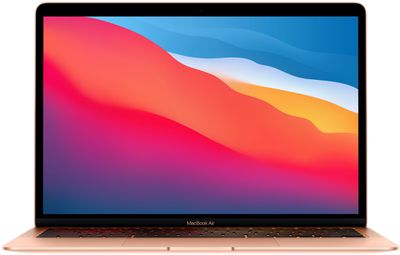
m1 macbook air
WiFi 6 brings faster speeds, expanded network capacity, lower latency, and improved power efficiency, plus it is ideal for homes where there are many WiFi-connected smart home products in use. With more and more routers starting to offer WiFi 6 performance, the update is a welcome change to the Mac lineup.

None of the Macs refreshed today got major design changes, but the ‌MacBook Air‌ features an updated row of function keys that gains Spotlight search instead of Launchpad, and a dictation key and a Do Not Disturb key in place of the function keys that used to be available for adjusting keyboard brightness.
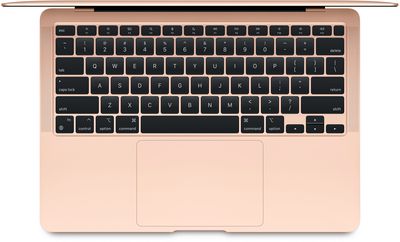
m1 macbook air keyboard
The Fn key at the bottom of the keyboard has also been updated to serve as an emoji key for bringing up emoji on the ‌MacBook Air‌.

Aside from these function key updates, the ‌M1‌ ‌MacBook Air‌ uses the same scissor switch keyboard that Apple added to the 2020 ‌MacBook Air‌ earlier this year. The scissor switch keyboard is more reliable than the prior-generation Butterfly Keyboard and not prone to failure due to exposure to crumbs and other small particulates.

The new ‌M1‌ Macs are available for purchase as of today from Apple's online store, and the first orders are set to arrive to customers on November 17.


Related Roundups: MacBook Air, Mac mini
Related Forums: MacBook Pro, MacBook Air, Mac mini

Popular Stories

iOS 26

iOS 26.4 Adds Two New Features to CarPlay

Tuesday March 24, 2026 1:55 pm PDT by
iOS 26.4 was released today, and it includes a couple of new features for CarPlay: an Ambient Music widget and support for voice-based chatbot apps. To update your iPhone 11 or newer to iOS 26.4, open the Settings app and tap on General → Software Update. CarPlay will automatically offer the new features so long as the iPhone connected to your vehicle is running iOS 26.4 or later....
Apple Business hero

Apple Unveils 'Apple Business' All-in-One Platform

Tuesday March 24, 2026 8:53 am PDT by
Apple today announced Apple Business, a new all-in-one platform that unifies device management, productivity tools, and customer outreach features. The service is designed to be a consolidated replacement for several of Apple's existing business-focused offerings, including Apple Business Essentials, Apple Business Manager, and Apple Business Connect. It provides organizations with a single...
AirPods Pro Firmware Feature

Apple Releases New Firmware for AirPods Pro 3, AirPods Pro 2 and AirPods 4

Tuesday March 24, 2026 12:31 pm PDT by
Apple today released new firmware for the AirPods Pro 2, AirPods Pro 3, and the AirPods 4. The firmware has a version number of 8B39, up from 8B34 on the AirPods Pro 3, 8B28 on the AirPods Pro 2, and 8B21 on the AirPods 4. There is no word on what's included in the firmware, but Apple has a support document with limited notes. Most updates are limited to bug fixes and performance...

Top Rated Comments

70 months ago
Still way better than a touch bar
Score: 34 Votes (Like | Disagree)
70 months ago
So how do you adjust the keyboard brightness now?
Score: 21 Votes (Like | Disagree)
70 months ago

Is the touch bar really worth the extra cash?
No! The touch bar is worth absolutely nothing, it's just plain annoying. Often wish my MacBook Pro had regular keys...
Score: 16 Votes (Like | Disagree)
70 months ago
The only times I use my touchbar are when I'm trying to type a number and get mistaken. So I put it to sleep. Or I mute it. Or who knows what.
Score: 16 Votes (Like | Disagree)
70 months ago
Wow, keyboard brightness keys are of utmost importance to me!
Score: 14 Votes (Like | Disagree)
JimmyBanks6 Avatar
70 months ago
How do you adjust keyboard brightness in that case?
Score: 14 Votes (Like | Disagree)















