Apple Releases Second Betas of iOS 14.2 and iPadOS 14.2 to Developers With Music Recognition Toggle for Control Center - MacRumors
Skip to Content

Apple Releases Second Betas of iOS 14.2 and iPadOS 14.2 to Developers With Music Recognition Toggle for Control Center

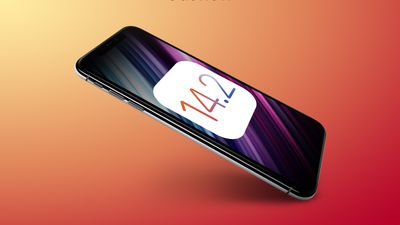
Apple today seeded the second betas of upcoming iOS 14.2 and iPadOS 14.2 updates to developers, two weeks after seeding the first betas and a little over two weeks after releasing the iOS 14 and iPadOS 14 updates.
iOS 14
iOS and iPadOS 14.2 can be downloaded through the Apple Developer Center or over the air after the proper developer profile has been installed.

The iOS 14.2 update brings a new Music Recognition control for the Control Center, which enhances the integration of the Apple-owned Shazam app in the iOS operating system. Music Recognition lets you discover music playing around you and it can recognize music playing in apps even when you're wearing AirPods.
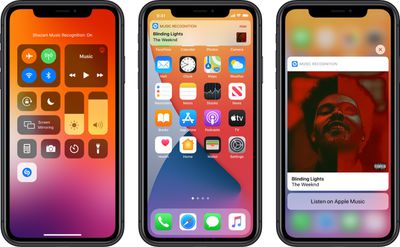
musicrecognitioncontrol
The Shazam Music Recognition feature can be added to Control Center through the Control Center options in the Settings app. To use the feature, open up Control Center and then tap on the Shazam icon to initiate a single recognition. While Apple devices have been able to use Shazam through Siri or the Shazam app for some time, the Control Center option makes it easier to get to the music recognition tool.


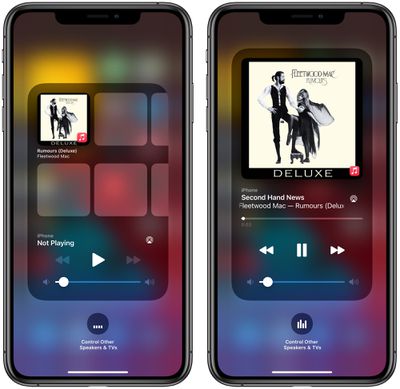
The new update also includes a redesigned Now Playing widget for the Control Center, which lists recently played albums that you might want to tap into and listen to when you have no music playing. There's also a redesigned interface for AirPlay, making it easier to play music across multiple ‌AirPlay‌ 2-enabled devices in the home.

applemusicsuggestions
For those who have low vision, Apple added a "People Detection" feature in the Magnifier app that uses the camera to let iPhone users know how far away other people are, which can be useful for social distancing purposes.
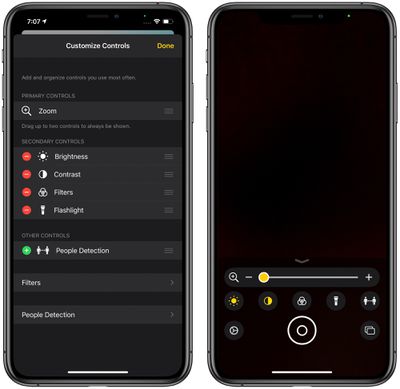
magnifierpeopledetection
The new iOS 14.2 beta will likely be in testing for some time as Apple works on releasing new iPhones, with the new iPhones expected to debut sometime in October.


Related Forum: iOS 14

Popular Stories

8 CarPlay Features in iOS 27 Feature

Which iOS 27 CarPlay Features Actually Work in Your Car?

Thursday September 17, 2026 4:17 am PDT by
In iOS 27, available now, CarPlay gets its biggest update in years, but some features depend on what type of car you have rather than your iPhone model. Some of the biggest additions won't do anything in the vast majority of vehicles on the road today. Here's how the new features pan out. Works in Any CarPlay Vehicle Custom widgets: In iOS 27, CarPlay is no longer limited to Apple's handful ...
Apple Watch New Charging Puck

Here's Why a New Apple Watch Charging Puck Was Just Released

Wednesday September 16, 2026 8:53 am PDT by
The new Apple Watch Series 12 and Apple Watch Ultra 4 have hardware changes that allow for faster charging, but you will need to use the new version of the Apple Watch Magnetic Fast Charger included in the box in order to achieve this boost. If you need extra ones for your own charging stands or travel or so forth, Apple released the new version of the charger on its online store last week, with...
ios272anniversary

iOS 27.2 Could Save Your Marriage

Wednesday September 16, 2026 1:32 pm PDT by
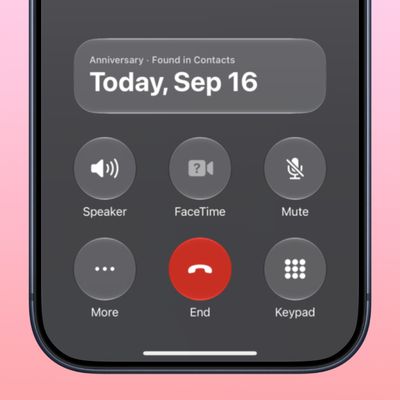
The iOS 27.2 beta that Apple released today adds a feature that reminds you it's your anniversary when you call someone, as long as you've added the date in the Contacts app. On the date of your anniversary, when you go to call the person, you'll see a reminder that it's an important day so you don't forget to say something. The anniversary alert uses Call Context, a feature Apple added in...

Top Rated Comments

sniffies Avatar
78 months ago
I hope it enables OxyMeter for Apple Watch
Score: 9 Votes (Like | Disagree)
Ingo Brocksom Avatar
78 months ago

It's alive :) 14.2 beta 2


Waiting for the public Beta 14.2 beta 2 👌
Score: 3 Votes (Like | Disagree)
78 months ago
It's alive :) 14.2 beta 2


Attachment Image
Score: 3 Votes (Like | Disagree)
78 months ago

I hope it enables OxyMeter for Apple Watch

I updated to 14.2 before my Apple Watch series 6 arrived, so I have yet to try the awesome new features. I hope Beta 2 merges the blood oxygen level feature from stable release candidate to the beta releases. 🤞🏻

Did the re enable the blood o2 in the apple watch app?
Looks like that's there:
https://forums.macrumors.com/threads/ios-14-2-beta-2-bug-fixes-changes-and-improvements.2257729/post-28965927
Score: 3 Votes (Like | Disagree)
78 months ago

I hope it enables OxyMeter for Apple Watch
I updated to 14.2 before my Apple Watch series 6 arrived, so I have yet to try the awesome new features. I hope Beta 2 merges the blood oxygen level feature from stable release candidate to the beta releases. 🤞🏻
Score: 3 Votes (Like | Disagree)
GtrDude Avatar
78 months ago
Still more completely useless Apple updates.
How about fixing some of the existing bugs?
Apple needs to:
1. redesign the notification center. It's ridiculous.
2. add haptic feedback to the keyboard, and make it possible to customize different intensities to your heart's content. It's crazy that you have no feedback whatsoever if you're typing and have the phone on mute.Those who are concerned with battery can just turn it off.
3. make it possible to adjust volume for independent apps and settings and not this general thing they're doing, forcing you to do it while the thing is being played, such as separate volume control for keyboard volume, music volume, ring volume, system volume.
4. add suggestions from the address book when you're dialing a phone number. Common now Apple.
5. make it possible to customize the texting app in every conceivable way. Font size, bubble size shape color.
6. make it possible to schedule a message to be sent at a certain time/date.
7. make it possible to move the icons anywhere you want to.
8. Use an OS-wide clipboard and make it not expire. You should be able to copy text now and paste it tomorrow if you want to.
9. Give us an option to NOT go to the next email but back to inbox after deleting an email.


Hope it fixes the laggy keyboard typing!
It doesn't. Not on my phone at least. Xs-Max.
Nor does it fix the dimming of the screen where you have to turn it off and on again to get it to its correct brightness.
Score: 2 Votes (Like | Disagree)