

Some iPhone 11 Users Complain of Display With Odd Green Tint - MacRumors
Skip to Content

Some iPhone 11 Users Complain of Display With Odd Green Tint

Some iPhone 11, 11 Pro, and 11 Pro Max owners have been noticing an unusual green tint to their iPhone displays when first unlocking the device, based on complaints shared on Reddit and the MacRumors forums.
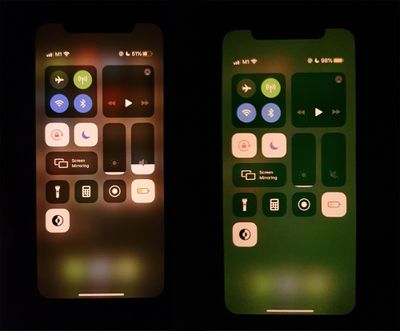
iphonegreentint

Image of green tint appearing briefly on the right, from MacRumors reader Oceannn

It's not clear what's going on, but almost all of the affected users say that the green tint is visible just for a few seconds after unlocking an iPhone. Some users have seen it at night with Dark Mode and Night Shift enabled, while others say it occurs when brightness is at the lowest possible setting. A MacRumors reader describes the problem:

About 25% of the time when I unlock my launch day iPhone 11 Pro the screen looks all washed out with a green tint. After about 3 seconds it flashes back to normal. Anyone ever have this happen or know if this is a problem on iPhone 11s? I should probably do a restore / set up as new but I'm trying to avoid that if possible.

According to some users, the weird tint has been popping up since the iOS 13.4.1 update, which suggests that it may be a software issue. Some people were able to get the tint issue to cease after restarting, but others were not.

iPhone 11, 11 Pro, and 11 Pro Max models appear to be primarily affected, but there have also been some complaints from iPhone X users. iOS 13.4.1, iOS 13.5, and iOS 13.5.1 all seem to have the issue, based on reports from users.

If this is indeed a software problem, Apple may be able to address the issue in a future iOS update. iOS 13.5.5 is in testing right now, and it's not clear if that fixes the bug as of yet.


Popular Stories

Apple Event Logo

Apple to Launch These 15+ New Products Later This Year

Friday March 27, 2026 2:03 pm PDT by
March has been an incredibly busy month for Apple, with the company unveiling more than 10 new products and accessories. We said hello to the MacBook Neo at the start of the month, and we bid farewell to the Mac Pro at the end of it. Nevertheless, there is still a lot more to come this year. Beyond the usual annual updates to iPhones and Apple Watches, Apple's all-new smart home hub is...
iOS 26

iOS 26.4 Adds Two New Features to CarPlay

Tuesday March 24, 2026 1:55 pm PDT by
iOS 26.4 was released today, and it includes a couple of new features for CarPlay: an Ambient Music widget and support for voice-based chatbot apps. To update your iPhone 11 or newer to iOS 26.4, open the Settings app and tap on General → Software Update. CarPlay will automatically offer the new features so long as the iPhone connected to your vehicle is running iOS 26.4 or later....
Mac Pro Feature Teal

Apple Confirms Mac Pro Is Dead, No Future Models Planned

Thursday March 26, 2026 2:04 pm PDT by
Apple has discontinued the Mac Pro and has removed the machine from its website, reports 9to5Mac. Apple said it does not plan to design a new version of the Mac Pro, and no new model will be coming in the future. The Mac Pro was last updated in 2023, which was when Apple added an M2 Ultra Apple silicon chip, but the chassis has not been refreshed since 2019. Apple redesigned the Mac Pro to...

Top Rated Comments

76 months ago
‘‘iPhone 11, 11 Pro, and 11 Pro Max models appear to be primarily affected, but there have also been some complaints from iPhone X users. No non-OLED iPhones appear to be impacted.‘‘

find the mistake ...
Score: 21 Votes (Like | Disagree)
76 months ago
Folks, here is what is going on. Apple has NEVER heard of an issue with screen color changing temperature. The Senior Advisor I spoke to said she has been working on iOS for over 20 years and if there was an issue, she would have heard about it by now because the iPhone 11 has been out for nearly a year and Apple has talked to each and every iPhone 11 customer and talks to well over 1 billion customers an hour. So, she was able to officially confirm that this is not a wide-spread problem and is unique to my device. To troubleshoot, she said one would need to download the official screen temperature OS from Apple. To do this, you remove your screen and plug it into a computer. Then you place your screen in restore mode, which will trigger a download of a fresh copy of the screen temperature OS. After you've done the fresh installation, DO NOT restore your screen temperature from backup. If the issue persists, you will need to collect some logs and send them to engineering. To do this, you'll need to remove your screen, plug the screen into the computer, run a Sysdiagnose, with Mail logging enabled, and submit the compressed log files to Apple. Engineering will reply in 24-48 hours.
Score: 19 Votes (Like | Disagree)
dwhittington Avatar
76 months ago
Oh, is that why I keep getting the front and back of my iPhone confused?
Score: 15 Votes (Like | Disagree)
Mr Magoo Avatar
76 months ago

The X is OLED, I'm not seeing it.
11 is not oled. Just the Pro.
Score: 14 Votes (Like | Disagree)
Dormammu Avatar
76 months ago
Glad I’m not the only one. Hopefully software can fix this quickly.
Score: 10 Votes (Like | Disagree)
76 months ago
Some iPhone 11 Users Complain of Display With Odd Green Tint
So, is there a green tint that wouldn’t be considered odd?
Score: 7 Votes (Like | Disagree)















