PSA: iPhone SE's Haptic Touch Doesn't Work With Notifications and It's Not a Bug - MacRumors
Skip to Content

PSA: iPhone SE's Haptic Touch Doesn't Work With Notifications and It's Not a Bug

Customers who have purchased the new 2020 iPhone SE have found a surprising missing feature - Haptic Touch does not work with notifications.

On the 2020 iPhone SE, long pressing on a notification in the Notification Center or on the Lock screen does not appear to bring up rich notification options to allow iPhone SE users to interact with incoming content.
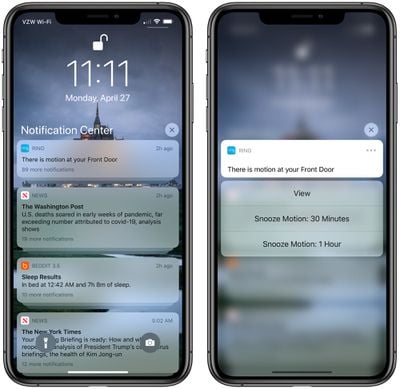
richnotificationsiphone11pro

Rich notifications accessed with ‌Haptic Touch‌ on an iPhone 11 Pro

There have been complaints about the missing feature on Reddit and the MacRumors forums. From Reddit:

I received my SE yesterday and very quickly realized that Haptic Touch is not supported on notifications. I am not seeing this reported anywhere, haven't seen one review mentioning it, no video I watched mentioned it. Haptic Touch works for peek and pop, and on icons on the home screen but if you are on the lock screen or Notification Center and try to long press an email to archive, or a text to quick reply you are out of luck.

On the 6S-XS 3D Touch was the solution, with the XR and 11 series Haptic Touch was the replacement, but this is the first non 3D Touch phone to be released where all the features of Haptic Touch are not fully baked into the OS

With Haptic Touch-enabled devices like the iPhone 11 and 11 Pro, long pressing on a notification in the Notification Center or the Lock screen brings up interactive options based on the app sending the notification. An Apple News notification, for example, brings up options for reading the full story, sharing a story, or saving for later, while an email app might offer options to reply and delete an incoming message without needing to open the app.

In our testing, we were not able to long press on a notification to view these interactive options, as the long press functionality did not work. We also tried on an iPhone 8, which the iPhone SE is based on, but we were able to get the rich notifications to work on that device, which has 3D Touch.

While iPhone SE users cannot long press on notifications on the Lock screen or in the Notification Center, there does appear to be a ‌Haptic Touch‌ option when pressing on an incoming notification when the iPhone is in use.

A Reddit user called Apple Support and was told there was no software update planned to fix the behavior, but Apple Support can be unreliable when it comes to information about new hardware releases.

Update: According to TechCrunch's Matthew Panzarino, the lack of ‌Haptic Touch‌ for notifications on the iPhone SE is not a bug and the feature is working as Apple intended.

Update 2: MacRumors forum members have pointed out that it's possible to slide to the left on a notification and tap on the "View" option as a workaround for the missing ‌Haptic Touch‌ feature.
Related Forum: iPhone

Popular Stories

macworld iphone 18 pro colors

iPhone 18 Pro's Four Rumored Colors Revealed, Including 'Dark Cherry'

Friday April 17, 2026 3:50 am PDT by
A source said to be familiar with Apple's supply chain today revealed the color options Apple is planning for the iPhone 18 Pro, iPhone 18 Pro Max, and the upcoming foldable iPhone. Image via Macworld. The information comes from Macworld, which says the signature new color for this year's Pro models will be Dark Cherry, a deep wine-like red. While other sources had previously reported on a...


ipad mini 7 feature red and blue

OLED iPad Mini: Release Date, Pricing, and What to Expect

Wednesday April 15, 2026 8:15 am PDT by
According to the latest rumors, Apple is close to launching its next-generation iPad mini. So what should we expect from the successor to the iPad mini 7 that Apple released over a year ago? Read on to find out. Processor and Performance Apple is working on a next-generation version of the iPad mini (codename J510/J511) that features the A19 Pro chip, according to information found in code...
apple design award 2025

Apple Announces 2025 Design Award Winners Ahead of WWDC 2025

Tuesday June 3, 2025 10:14 am PDT by
As we wait for WWDC to kick off next Monday, Apple today announced the winners of its annual Apple Design Awards, recognizing apps and games for their innovation, ingenuity, and technical achievement. The 2025 Apple Design Award winners are listed below, with one app and one game selected per category: Delight and Fun - CapWords (App) and Balatro (Game) Innovation - Play (App) and PBJ -...

Top Rated Comments

whyamihere Avatar
78 months ago
Well ya didn't expect to get ALLL the iOS functionality for $399 did ya?!? ;)
Score: 39 Votes (Like | Disagree)
jclardy Avatar
78 months ago
This better be a bug, as a dev having to “inform” users of the various interactions (3D touch, Haptic Touch, drag down) on notifications sucks...and then having a random brand new device not support it at all makes it even worse.

My guess is the SE has a modified iPhone 8 version of iOS, which is expecting 3D touch to access these things.
Score: 23 Votes (Like | Disagree)
macduke Avatar
78 months ago
People are saying this is a bug, but it works this same way on the old iPhone SE. It's Apple segmenting software features, even though it leads to an inconsistent UI and user frustration. It's not even a big thing, it's a little thing, and it's annoying that they've decided to do this. Hopefully they reverse course.
Score: 14 Votes (Like | Disagree)
78 months ago
I would say it has to be a bug otherwise it's purely a we are holding back features on the cheaper phone.....
Score: 14 Votes (Like | Disagree)
dontwalkhand Avatar
78 months ago
I am hoping this is just a bug. Though I will be honest, I don't think I ever used this feature on my 11 Pro.
Score: 9 Votes (Like | Disagree)
zorinlynx Avatar
78 months ago
This is most likely a bug. There's some apps like Duo that require this functionality to work!
Score: 8 Votes (Like | Disagree)