Blackmagic Releases New eGPU Firmware With Pro Display XDR Support
Blackmagic eGPU and Blackmagic eGPU Pro users who also own a Pro Display XDR can today download a new version 1.2 firmware update that's designed to introduce support for the Apple Pro Display XDR.
The update is available via the Latest Downloads section of the Blackmagic website, and it allows the Pro Display XDR to be used as a display when connected to a Mac with TB3 or with a Blackmagic eGPU.
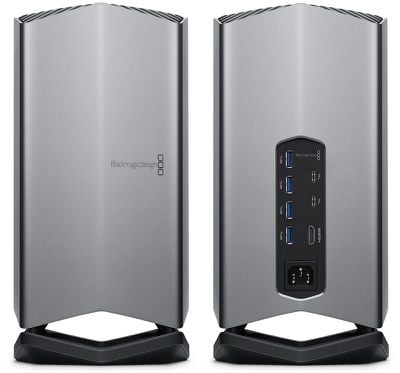
Apple support documents for the Blackmagic eGPU and reports from Pro Display XDR owners have suggested that the devices were already compatible with one another prior to this firmware update, but it should still be installed as it may further improve compatibility.
The Blackmagic eGPU and eGPU Pro can allow the Pro Display XDR to work with Thunderbolt 3 Macs that do not officially support Apple's new 6K display.
Apple has been offering the Blackmagic eGPU since mid-2018, when it launched alongside the 2018 MacBook Pro models. The base eGPU features a Radeon Pro 580, while the Pro model is equipped with a Radeon RX Vega 56.
Popular Stories
Apple today announced it will be permanently closing three retail stores in the U.S. in June, including Apple Trumbull in Trumbull, Connecticut, Apple North County in Escondido, California, and Apple Towson Town Center in Towson, Maryland.
Apple Towson Town Center in Maryland
Apple issued the following statement to MacRumors:At Apple, we are constantly striving to deliver exceptional service...
Apple has released a minor iOS 26.4.1 update for the iPhone 11 and newer. While the release notes for the update only mention unspecified "bug fixes," we have since learned about two specific changes that are included in it.
First, 9to5Mac spotted an Apple Developer Forums thread suggesting that iOS 26.4.1 fixes an iOS 26.4 bug that affected iCloud syncing in some apps.
Second, an...
As we wait for WWDC to kick off next Monday, Apple today announced the winners of its annual Apple Design Awards, recognizing apps and games for their innovation, ingenuity, and technical achievement.
The 2025 Apple Design Award winners are listed below, with one app and one game selected per category:
Delight and Fun - CapWords (App) and Balatro (Game)
Innovation - Play (App) and PBJ -...
Popular Stories
Apple today announced it will be permanently closing three retail stores in the U.S. in June, including Apple Trumbull in Trumbull, Connecticut, Apple North County in Escondido, California, and Apple Towson Town Center in Towson, Maryland.
Apple Towson Town Center in Maryland
Apple issued the following statement to MacRumors:At Apple, we are constantly striving to deliver exceptional service...
Apple has released a minor iOS 26.4.1 update for the iPhone 11 and newer. While the release notes for the update only mention unspecified "bug fixes," we have since learned about two specific changes that are included in it.
First, 9to5Mac spotted an Apple Developer Forums thread suggesting that iOS 26.4.1 fixes an iOS 26.4 bug that affected iCloud syncing in some apps.
Second, an...
As we wait for WWDC to kick off next Monday, Apple today announced the winners of its annual Apple Design Awards, recognizing apps and games for their innovation, ingenuity, and technical achievement.
The 2025 Apple Design Award winners are listed below, with one app and one game selected per category:
Delight and Fun - CapWords (App) and Balatro (Game)
Innovation - Play (App) and PBJ -...























