Popular to-do app Things reached version 3.11 today on iPad and iPhone, bringing a big update to its Quick Find feature and some other notable improvements.
things ios quickfind
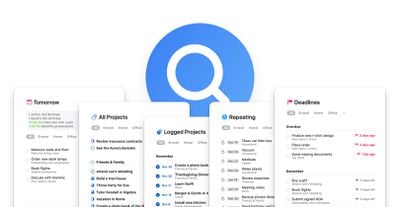
The Quick Find bar is used to quickly switch between lists, find to-dos, and search for tags. That functionality has been expanded and now includes the ability to generate lists for specific types of data.

For example, typing "Deadlines" generates a list of all upcoming (or passed) deadlines. Likewise, typing the keyword "Repeating" brings up all repeating to-dos in one convenient place.

Meanwhile, "Tomorrow" brings up a list for planning your next day, "All Projects" provides an overview of all your goals, and "Logged Projects" offers an overview of past achievements.

While not technically a list, typing "Settings" or "Preferences" into the Quick Find bar offers another way to get to the app's settings screen. Also, to make Quick Find easier to access in longer lists, you can now just tap a list's title to bring it up, instead of having to scroll all the way to the top. Tapping it will also now show recently-viewed lists for convenient access.

Additionally in this update, you can now see the date when an item was created or completed, using a new Get Info option. On Mac, you can now hold down the Command key when clicking a link to open it in the background. And on larger iPad Pro models, the sidebar width has been increased to accommodate longer project titles.

Things 3.11 for ‌iPad‌ is priced at $19.99 [Direct Link] while the ‌iPhone‌ version (which includes Apple watch support) is priced at $9.99. [Direct Link] A 15-day trial of Things for Mac is available on the Cultured Code website.


Top Rated Comments

sfwalter Avatar
81 months ago
I'm still waiting for saved searches. For example show me the tasks in a particular project with a certain tag without having to type in a search query every time.
Score: 2 Votes (Like | Disagree)
orbital~debris Avatar
81 months ago
Fantastic, wonderful software!

Absolutely worth every penny.

Frequent improvements, too.
Score: 2 Votes (Like | Disagree)
81 months ago

Great app! Just needs attachment support...
Add location based alerts! That’s the biggest thing I miss from OmniFocus.
Score: 2 Votes (Like | Disagree)
81 months ago
OK this is insane. The searches can't be saved? Every time I want filter lists for deadlines, I have to search and then type d-e-a-d until it autocompletes? Same for "tomorrow" and "all"??? These are default lists in every other app (that can be easily turned on or off).

Been using Things for a decade (since the alpha), and they'e such a ridiculously frustrating developer. They could absolutely sweep the floor with every other To Do app if they just added a few key features but they arrogantly insist on ignoring their users' begging and pleading.

That said, Things 3 is still my preferred personal list app by default because of the Someday functionality (thank god they didn't rename that list in v3).

Meanwhile, Wunderlist is still my preferred productivity app to get work done (3-pane view, starred items, 3-pane view, list sharing, 3-pane view, file attachment, 3-pane view, comments, 3-pane view, multi-platform support, 3-pane view, web app, 3-pane view, less wasted space, 3-pane view).

If only we could have the best of both!
Score: 2 Votes (Like | Disagree)
BWhaler Avatar
81 months ago
Clever new features. Fine additions to an already great product which is the best in the marker (IMHO.)

For me, the best thing about Things is every few years, they charge real fees for meaningful upgrades. No subscriptions. It’s not an upgrade fee for basically two new features and bug fixes that should have been done anyway—-Adobe and Intuit I’m looking at you. And it’s not too cheap where you worry the company is selling your data or may go out of business with your critical information.

Things and the business model behind it is how software should be.


Great app! Just needs attachment support...
My speculative guess is this will be part of a paid upgrade. (Which I don’t mind because we’ve had years of great updates and the software is so good I want them to stay in business and make lots of money to stay motivated.)

But who knows...
Score: 2 Votes (Like | Disagree)
81 months ago

Any thoughts about Things vs. Microsoft To Do?
Things for personal use, Wunderlist for work.

To Do is has almost reached parity with Wunderlist since M$ bought them but if you read the reviews in the App Store, they're not quite there yet. On that note, Wunderlist has received a ton of updates in the past few months (no doubt due to migrating users to To Do), so it's still very much activity developed. Meanwhile, Cultured Code is sunsetting Things v2 in January.

Where Things 3 beats Wunderlist/To Do:
[LIST=1]
* Someday functionality
* Next (aka "Anytime" SMDH) functionality
* Tonight (great for breaking up the Today view)
* Tags
* Headings
* "Delicious" UI

Where Wunderlist/To Do beat Things 3:
[LIST=1]
* Cost
* 3-Pane View (MUCH less clicking and animated nonsense)
* Starred items
* List sharing
* File attachments
* Comments
* Multi-platform
* Web app
* Subtasks are positioned above notes, so you can write down a bunch of running notes from a client calls and meeting without burying the subtasks that you pull from them at the bottom
* Things 3 comically wastes space and cartoonishly inflates font size (with no way to adjust settings)

Things 3 is a powerful GTD LIST app.

Wunderlist/To Do is structured perfectly for working on PROJECTS but sorely lacks GTD (Next and Someday lists that will automatically move move items to those list vs manually faking it with folders).

Also, Cultured Code are the slowest developers in the world. They lost half their user base between Things 2 and Things 3, and initially broke a ton of features that they've mostly brought back. Just like Apple, they always "know better." If you're a fan of Jony Ive, you'll probably love Things. If you weren't a fan, you might get annoyed with Things.

Top contenders to both are TickTick and ToDoist but neither are better than Things 3 + Wunderlist for me.
Score: 1 Votes (Like | Disagree)

Popular Stories

iphone 16 apple intelligence

Apple Aiming to Release 'Breakthrough' New iPhone Accessory

Wednesday February 18, 2026 12:43 pm PST by
Apple is looking for a "breakthrough" with its push into wearable AI devices, including an "AirTag-sized pendant," according to Bloomberg's Mark Gurman. In a report this week, he said the pendant is reminiscent of the failed Humane AI Pin, but it would be an iPhone accessory rather than a standalone product. The pendant would feature an "always-on" camera and a microphone for Siri voice...
Apple Watch 15 Tips Every Owner Needs to Know Feature

Apple Watch: 15 Tips Every Owner Needs to Know

Thursday February 19, 2026 7:38 am PST by
Apple Watch is now eleven generations in, and packed with useful features that are easy to miss at first glance. To help you get more out of your new device, we've rounded up 15 practical tips you might not have discovered yet, including a few that long-time users often overlook. Bounce Between Two Apps On your Apple Watch, double-press the Digital Crown to see a deck of all currently...
Dynamic Island iPhone 18 Pro Feature

10 Reasons to Wait for Apple's iPhone 18 Pro

Wednesday February 18, 2026 5:12 am PST by
Apple's iPhone development roadmap runs several years into the future and the company is continually working with suppliers on several successive iPhone models at the same time, which is why we often get rumored features months ahead of launch. The iPhone 18 series is no different, and we already have a good idea of what to expect for the iPhone 18 Pro and iPhone 18 Pro Max. One thing worth...
iphone 17 pro green

iPhone 17 Pro Max Curiously Becomes Most Traded-In Smartphone

Wednesday February 18, 2026 9:13 am PST by
New trade-in data indicates that Apple's iPhone 17 Pro Max has rapidly become the single most traded-in smartphone. According to a new report from SellCell, Apple's latest flagship iPhone has quickly risen to the top of the independent trade-in market, accounting for 11.5% of all devices appearing in the top-20 trade-in rankings just months after release. The analysis is based on SellCell...
Multicolored Low Cost A18 Pro MacBook Feature

Low-Cost MacBook Expected on March 4 in These Colors

Wednesday February 18, 2026 5:42 am PST by
Apple will announce its rumored low-cost MacBook at its event on March 4, with the device coming in a selection of bold color options, according to a known leaker. Earlier this week, Apple announced a "special Apple Experience" for the media in New York, London, and Shanghai, taking place on March 4, 2026 at 9:00am ET. Posting on Weibo, the leaker known as "Instant Digital" said that the...