

Apple Seeds Second Beta of Upcoming tvOS 13 Update - MacRumors
Skip to Content

Apple Seeds Second Beta of Upcoming tvOS 13 Update

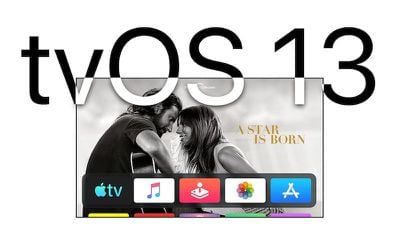
Apple today seeded the second beta of an upcoming tvOS 13 update to developers, two weeks after first unveiling the tvOS 13 software at the Worldwide Developers Conference.

Designed for the fourth and fifth-generation Apple TV, the new tvOS 13 developer beta can be downloaded onto the ‌Apple TV‌ via a profile that's installed using Xcode.
tvos13
tvOS 13 introduces an updated Home screen aimed at making it easier to discover new content. Apps are now able to play full-screen video previews right on the Home screen, similar to Netflix.

Multi-user support is available for the first time, letting more than one profile exist on the ‌Apple TV‌ so each family member can have their own customized ‌Apple TV‌ interface with separate recommendations, music playlists, and Watch Now lists.

Switching between profiles can be done with the new Control Center, which offers up profiles, the time and date, search, a Now Playing widget, AirPlay controls, and a sleep option.

tvOS 13 gets the ‌Apple TV‌ ready for Apple Arcade, Apple's new gaming service that's coming to the ‌Apple TV‌, iOS, iPadOS, and macOS later this year. ‌Apple Arcade‌ will offer unlimited access to more than 100 new and exclusive games, for one subscription fee.

As part of the ‌Apple Arcade‌ preparations, Apple has implemented support for the Xbox Wireless Bluetooth Controller and the PlayStation DualShock 4 Controller, both of which can be connected to an ‌Apple TV‌ over Bluetooth.

There are new under the sea themed screensavers created in partnership with the BBC Natural History Unit, which also created "Blue Planet."

tvOS 13 is available to registered developers at this time, but Apple plans to release a public beta in July. The software will see a public launch this fall.

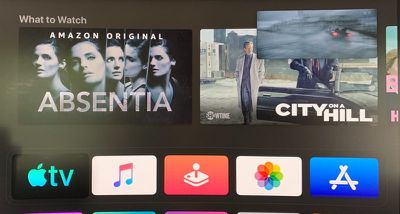
What's new in tvOS 13 beta 2: The second beta of tvOS 13 introduces support for Picture-in-Picture. This feature lets you continue to watch TV shows or movies while using a different app, adjusting settings, or otherwise navigating through the tvOS 13 operating system.

tvos13pictureinpicture

Related Roundup: Apple TV
Buyer's Guide: Apple TV (Don't Buy)

Popular Stories

General visionOS watchOS and tvOS Betas Feature Redux

Apple Releases Second watchOS 26.6, tvOS 26.6 and visionOS 26.6 Betas

Monday June 15, 2026 10:06 am PDT by
Apple today provided developers with the second betas of upcoming watchOS 26.6, tvOS 26.6, and visionOS 26.6 betas for testing purposes. The software comes three weeks after Apple seeded the first betas. The software updates are available through the Settings app on each device, and because these are developer betas, a free developer account is required. There's no word on what's in the...

Apple TV 2025 Thumb 2 Sans Text

tvOS 27: Apple Music Gains Hi-Res Lossless Audio on Apple TV 4K

Wednesday June 10, 2026 1:44 am PDT by
Apple Music is bringing Hi-Res Lossless Audio to tvOS 27, in addition to standard Lossless Audio. Apple says subscribers with compatible external speaker outputs will be able to enjoy their favorite songs in the highest audio quality and experience studio-quality sound directly through their Apple TV 4K. As of tvOS 26, Apple TV 4K supports Apple Music Lossless audio up to 24-bit/48 kHz,...
Apple TV Remote Icon

iOS 27 Lets You Add Apple TV Remote to Your iPhone's Home Screen

Thursday June 11, 2026 11:51 am PDT by
Starting with iOS 27, the virtual Apple TV remote can be added to the iPhone's Home Screen again, rather than being limited to Control Center. To do so, swipe down on the Home Screen and search for "remote." Next, tap and hold on the Remote app and drag it to your Home Screen. Alternatively, you can find it in the App Library. Apple used to offer an Apple TV Remote app in the App Store, but...

Top Rated Comments

Gizmotoy Avatar
92 months ago
Apps are now able to play full-screen video previews right on the Home screen, similar to Netflix.
The rest sounds great, but I hope we can disable this. Not too excited to have Netflix’s most infuriating feature imposed on my Home screen.
Score: 7 Votes (Like | Disagree)
Focusx0131 Avatar
92 months ago
Picture-in-Picture is a welcome long overdue feature! Can’t wait till September!
Score: 5 Votes (Like | Disagree)
aesc80 Avatar
92 months ago
How’s beta 2 for those who dared?? Is it usable??
It's usable but there are times where the box just doesn't respond to the iOS app controller. Other than that, it's a massive improvement from beta 1.
Score: 2 Votes (Like | Disagree)
BWhaler Avatar
92 months ago
Really looking forward to this. PiP is a nice surprise.
Score: 2 Votes (Like | Disagree)
GIZBUG Avatar
92 months ago
updating.... my appletv4k
Thanks for the update!
Score: 2 Votes (Like | Disagree)
-Ray- Avatar
92 months ago
AppleTV has been extremely buggy in B1. Hopefully its smoother in this iteration.
Score: 2 Votes (Like | Disagree)







































