iFixit Begins Selling 2018 Mac Mini RAM Upgrade Kit, Save Up to $275 Versus Apple - MacRumors
Skip to Content

iFixit Begins Selling 2018 Mac Mini RAM Upgrade Kit, Save Up to $275 Versus Apple

by

Unlike the previous 2014 model, the 2018 Mac mini has user-upgradeable RAM. The repair experts at iFixit are now selling a do-it-yourself RAM upgrade kit for the 2018 Mac mini that can save you hundreds of dollars.
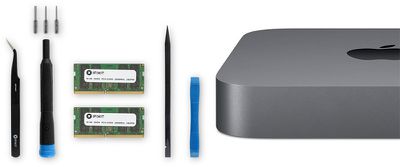
mac mini ram kit
The upgrade kit includes 16GB or 32GB of 2,666MHz DDR4 RAM, the same type of memory Apple uses in the 2018 Mac mini, along with all of the tools and bits needed to complete the upgrade: an iFixit opening tool, a spudger, angled tweezers, a precision bit driver, and three types of 4mm Torx precision bits.

2018 Mac mini models are equipped with 8GB of RAM by default, but they can be configured with 16GB or 32GB of RAM on Apple's online store for an extra $200 or $600 respectively. By comparison, iFixit charges $164.99 for its 16GB kit and $324.99 for its 32GB kit, reflecting savings of $35 and $275 respectively.

Three things to keep in mind:

  • This is iFixit-branded RAM that matches Apple's specifications.

  • If you ever need in-warranty service on your 2018 Mac mini, and Apple detects that you opened up the computer, the Genius Bar may deny service. However, iFixit says this is illegal in the United States under the Magnuson-Moss Warranty Act.

  • There is a risk of damaging the Mac mini if the upgrade is not completed carefully.

Those interested in proceeding can follow iFixit's 2018 Mac mini RAM replacement guide.

iFixit also sells the 16GB RAM modules individually for $159.99 each.
Related Roundup: Mac mini
Tag: iFixit
Buyer's Guide: Mac Mini (Caution)
Related Forum: Mac mini

Top Rated Comments

compuguy1088 Avatar
97 months ago
I can’t see risking the warranty (not to mention the time cost) for the $35 savings on the 16 GB upgrade. The 32 is more compelling.

Wouldn't this be illegal under the Magnuson–Moss Warranty Act ('https://en.wikipedia.org/wiki/Magnuson%E2%80%93Moss_Warranty_Act')?
Score: 8 Votes (Like | Disagree)
ZebraDude Avatar
97 months ago
Ok, I'll bite: what's a "professor fan"?
When the fan gets "tenure" it becomes a Professor fan...
Score: 6 Votes (Like | Disagree)
97 months ago
I can’t see risking the warranty (not to mention the time cost) for the $35 savings on the 16 GB upgrade. The 32 is more compelling.
Au contraire! $35 will buy six bottles of really....


Replace the memory before you drink the savings. /s
Score: 6 Votes (Like | Disagree)
97 months ago
Unlike the previous 2014 model, the 2018 Mac mini has user-upgradeable RAM ('https://www.macrumors.com/2018/11/08/2018-mac-mini-ram-upgrade-process/'). The repair experts at iFixit are now selling a do-it-yourself RAM upgrade kit for the 2018 Mac mini ('https://www.ifixit.com/Store/Mac/Mac-mini-Late-2018-Memory-Maxxer-RAM-Upgrade-Kit/IF171-050-2') that can save you hundreds of dollars.
User Replaceable?
I do not consider the RAM user replaceable, as you have to almost completely disassemble your Mac.
What I consider user replaceable RAM is where you can easily upgrade it without voiding the warranty, or otherwise risking your Mac (Like the 2012 Mac Mini and the 2017 iMac)
Score: 5 Votes (Like | Disagree)
QCassidy352 Avatar
97 months ago
I can’t see risking the warranty (not to mention the time cost) for the $35 savings on the 16 GB upgrade. The 32 is more compelling.
Score: 5 Votes (Like | Disagree)
lolwuut Avatar
97 months ago
It seems some people think Apple is out there squeezing profit margins by automatically denying service to any system that has upgraded memory. This would be a lose-lose for everyone, and would, in essence, be a decision focused around igniting rage in the most vocal minority for virtually no gain. Your average bear is smarter than this, and so is Apple.

While opening machines with exclusively non-serviceable parts is one thing, it's important to remember that the Mac Mini memory configuration is designed to be upgraded.

To clarify: If you damage your machine while working inside of it, that damage isn't covered, and we can all agree that it shouldn't be. If your 3rd party memory fails, that isn't covered, and we can all agree that it shouldn't be. Aside from that, there are zero issues to be wary of.

You may want to keep your old memory around as a test stick, as it's great for proving that your memory isn't the problem. The act of opening your system and servicing it doesn't void your warranty, and there are no breakable seals you'll encounter, just be careful in there and you'll be totally fine.

Source: ACMT ('https://support.apple.com/en-us/HT205332')
Score: 4 Votes (Like | Disagree)

Popular Stories

mac mini cyber

Base Mac Mini Sold Out From Apple Online Store

Wednesday April 22, 2026 2:59 pm PDT by
Apple appears to be sold out of the base Mac mini, and the machine is listed as “Currently Unavailable” from the Apple Online Store. The base Mac mini is the model with an M4 chip, 256GB of storage, and 16GB RAM. M4 Mac mini models with upgraded storage are still in stock, as are Mac mini models that are equipped with the M4 Pro chip. Configurations with 24GB RAM are also still...
mac studio purple

Apple Says Mac Studio and Mac Mini Will Be in Short Supply for Months

Thursday April 30, 2026 2:59 pm PDT by
During today's earnings call for the second fiscal quarter of 2026, Apple CEO Tim Cook said that the Mac mini and Mac Studio could be hard to get for months to come. "We think, looking forward, that the Mac mini and Mac Studio may take several months to reach supply demand balance," Cook said. Apple underestimated demand for the Mac mini and the Mac Studio. "Both of these are amazing...
astropad main image

MacRumors Giveaway: Win a Mac Mini to Run AI Agents With Astropad's 'Workbench' App

Friday May 1, 2026 10:09 am PDT by
For this week's giveaway, we've teamed up with Astropad to offer MacRumors readers a chance to win a Mac mini to use with Astropad's new Workbench app. For those unfamiliar with Astropad, it is the company behind Astropad Studio and Luna Display. Astropad Studio lets you use an iPad as a drawing tablet connected to a Mac and Luna Display turns an iPad into a secondary display for a Mac, so...