Fantastical 2 for iPhone and Apple Watch Gains Support for Siri Shortcuts, New Watch Faces - MacRumors
Skip to Content

Fantastical 2 for iPhone and Apple Watch Gains Support for Siri Shortcuts, New Watch Faces

by

Popular calendar app Fantastical 2 for the iPhone, iPad, and Apple Watch, was today updated to version 2.10, introducing full support for the recent iOS 12 and watchOS 5 updates.
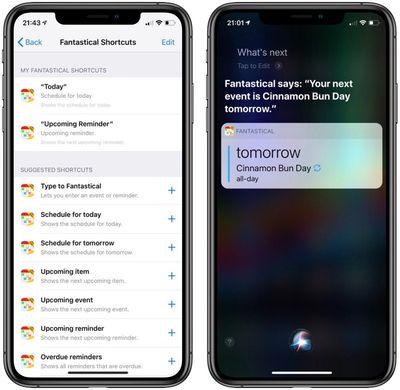
fantasticalshortcuts
Starting today, Fantastical 2 offers Siri Shortcuts that are designed to let you add new calendar events, view upcoming events and reminders, and more. Some examples of Fantastical Shortcut options:

  • Set a phrase such as "Hey Fantastical" to automatically open Fantastical to quickly begin creating a new event or reminder using Fantastical's parser
  • Show upcoming events or reminders as part of a custom shortcut using the Shortcuts app
  • Jump to a specific reminders list by creating a button on the home screen with the Shortcuts app

All of the available Fantastical Shortcuts can be viewed in the Settings app under Siri & Search > Fantastical after updating to the latest version.

With support for interactive notifications, Fantastical 2 will allow you to snooze alerts for events and reminders right from your iOS notifications list.

On the Apple Watch, Fantastical 2 will work with the Siri watch face, letting you get Fantastical 2 Siri suggestions for upcoming events and reminders on your wrist.

It also supports the new Infograph watch faces with Fantastical 2 complications. There are two complication styles available for the Infograph face and one available for the Infograph Modular face. Complications can be customized in the Fantastical app by going to Settings > Apple Watch.

Fantastical 2.10 now requires users to be running iOS 11 or later on iOS devices and watchOS 4 or later on the Apple Watch.

Fantastical 2 for iPhone and Apple Watch can be downloaded from the App Store for $2.99. [Direct Link]

Fantastical 2 for iPad can be downloaded from the App Store for $4.99. [Direct Link]

Top Rated Comments

n-evo Avatar
97 months ago
The default Calendar apps on iOS and macOS are free and support natural input in more than those 5-6 languages Fantastical has been stuck on for a while now. That’s pretty cool too.
Score: 1 Votes (Like | Disagree)

Popular Stories

iPhone 18 Pro Deep Red Feature

iPhone 18 Pro Launching Later This Year With These 12 New Features

Wednesday March 18, 2026 7:39 am PDT by
While the iPhone 18 Pro and iPhone 18 Pro Max are not expected to launch for another six months or so, there are already plenty of rumors about the devices. It was initially reported that the iPhone 18 Pro models would have fully under-screen Face ID, with only a front camera visible in the top-left corner of the screen. However, the latest rumors indicate that only one Face ID component...
ios 26 4 yellow

Here Are Apple's Release Notes for iOS 26.4

Wednesday March 18, 2026 11:56 am PDT by
Apple provided developers and public beta testers with the release candidate versions of iOS 26.4 and iPadOS 26.4, which means we're going to see a public launch as soon as next week. The RC versions of the software include Apple's official release notes, giving us final details on what's included in the update. Apple Music - Playlist Playground (beta) generates a playlist from your...
Apple Logo Sketch Feature

Apple Has Now Unveiled Eight New Products This Month

Tuesday March 17, 2026 9:25 am PDT by
Apple has unveiled a whopping eight new products so far this March, including an iPhone 17e, iPad Air models with the M4 chip, MacBook Air models with the M5 chip, MacBook Pro models with M5 Pro and M5 Max chips, an updated Studio Display, a higher-end Studio Display XDR, and now the AirPods Max 2 this week. iPhone 17e features the same overall design as the iPhone 16e, but it gains Apple's...