

Apple Releases tvOS 12 With New Aerial Screensavers, Zero Sign-On, Dolby Atmos Support and More - MacRumors
Skip to Content

Apple Releases tvOS 12 With New Aerial Screensavers, Zero Sign-On, Dolby Atmos Support and More

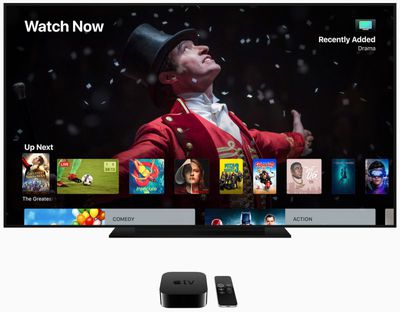
Apple today released tvOS 12, the latest operating system designed for the fourth and fifth-generation Apple TV models. tvOS 12 comes after a months-long beta testing period that saw Apple release a total of 10 tvOS 12 betas ahead of the golden master version of the software.

Like all tvOS updates, tvOS 12 is minor in scale, but it does bring some new feature improvements to the tvOS operating system.

tvOS 12 can be downloaded over the air through the Settings app on the Apple TV by going to System --> Software Update. Apple TV owners who have automatic software updates turned on will be upgraded to tvOS 12 automatically.
apple tv tvos 12
tvOS 12 introduces long-awaited support for higher-quality Dolby Atmos sound, and Apple has been adding Dolby Atmos support to some of its iTunes content. With the launch of tvOS 12, iTunes is home to the largest collection of movies that offer Dolby Atmos support.

iTunes customers who have previously purchased movies that gain Dolby Atmos support will see free upgrades to their titles to add the new feature, much like Apple upgraded HD movies with the rollout of support for 4K content.

Building on single sign-on, a new zero sign-on feature further simplifies the cable authentication process. With zero sign-on, the Apple TV can detect a user's broadband network and automatically sign them into supported apps they receive through an accompanying cable subscription.

Zero sign-on will be available for Charter Communications customers this fall and will expand to additional cable providers in the future.

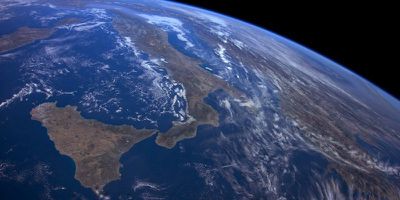
In tvOS 12, Aerial screensavers include location information for the first time, and there are new screensavers captured in collaboration with the International Space Station.
tvos12aerialscreensaver
Other tvOS-related improvements include AutoFill passwords from iPhone, an Apple TV Remote automatically added to Control Center on the iPhone or iPad, and Apple TV support on Home control systems like Control4, Crestron, and Savant.

For more information on everything that's new in tvOS 12, make sure to check out our tvOS 12 roundup.


Related Roundup: Apple TV
Buyer's Guide: Apple TV (Don't Buy)

Popular Stories

General visionOS watchOS and tvOS Betas Feature Redux

Apple Releases Second watchOS 26.6, tvOS 26.6 and visionOS 26.6 Betas

Monday June 15, 2026 10:06 am PDT by
Apple today provided developers with the second betas of upcoming watchOS 26.6, tvOS 26.6, and visionOS 26.6 betas for testing purposes. The software comes three weeks after Apple seeded the first betas. The software updates are available through the Settings app on each device, and because these are developer betas, a free developer account is required. There's no word on what's in the...
Apple TV Remote Icon

iOS 27 Lets You Add Apple TV Remote to Your iPhone's Home Screen

Thursday June 11, 2026 11:51 am PDT by
Starting with iOS 27, the virtual Apple TV remote can be added to the iPhone's Home Screen again, rather than being limited to Control Center. To do so, swipe down on the Home Screen and search for "remote." Next, tap and hold on the Remote app and drag it to your Home Screen. Alternatively, you can find it in the App Library. Apple used to offer an Apple TV Remote app in the App Store, but...
tvOS 27 Feature

Apple Seeds tvOS 27 Beta 2 to Developers

Monday June 22, 2026 10:06 am PDT by
Apple today seeded the second beta of tvOS 27 to developers for testing purposes, with the update coming two weeks after Apple released the first beta following the WWDC keynote. The beta can be downloaded and installed through the Settings app on the Apple TV. A free developer account is required. tvOS 27 has few new features compared to the other 27 software updates, but it does add a...

Top Rated Comments

102 months ago
Installed it on AppleTV 4K. Here in the U.S. No NASA screensavers.. exact same ones as in iOS 11 except that now you can scroll through them by swiping left and right.

Anyone install iOS 12 and get the NASA screensavers installed with it??
Score: 2 Votes (Like | Disagree)
102 months ago
My bloody screensavers are still looping the same 5 over and over and over and over. I thought this update was going to fix this screensaver problem.

If you change your video settings to sdr and hdr you get different screensavers showing up.

I have only ever seen about 7 different screensavers all looping over and over and over again.

So annoying
Score: 1 Votes (Like | Disagree)
102 months ago
I actually called an Apple Rep today regarding this issue and she said that it might be due to the just released update and will need hours if not days for the screensavers to download. In any case, since I was using all the betas I'm doing a clean install to test if it shows up.
Careful. If you do a clean install you will lose all the screensavers that you have already downloaded. When you do a reset you basically start off with about 5-6 screensavers and then a new one downloads each day. So, it will take a week or so to end up with all the screensavers. They don't just all download when you first install.
Score: 1 Votes (Like | Disagree)
ipedro Avatar
102 months ago
Did you get any of the new screensavers?
I did. I see downtown LA and a snowcapped mountains. I don't recall ever seeing these. It also shows a short caption at the beginning.

EDIT: I just saw a space station video flying over China.


Attachment Image
Score: 1 Votes (Like | Disagree)
102 months ago
I beg to differ.. My LG OLED55b7 has a built-in DV+Atmos decoder(of course not the best speakers) and as you can see on this pics, I have Atmos on my ATV4K NF app


Attachment Image

Attachment Image
Score: 1 Votes (Like | Disagree)
102 months ago
Installed it on AppleTV 4K. Here in the U.S. No NASA screensavers.. exact same ones as in iOS 11 except that now you can scroll through them by swiping left and right.

Anyone install iOS 12 and get the NASA screensavers installed with it??
I actually called an Apple Rep today regarding this issue and she said that it might be due to the just released update and will need hours if not days for the screensavers to download. In any case, since I was using all the betas I'm doing a clean install to test if it shows up.
Score: 1 Votes (Like | Disagree)









































