

Things 3 for iPad Gets Major Update With Support for External Keyboards, Shortcuts and More - MacRumors
Skip to Content

Things 3 for iPad Gets Major Update With Support for External Keyboards, Shortcuts and More

by

Cultured Code today released a major 3.6 update to its popular Things 3 app, introducing a slew of new features for the iPad.

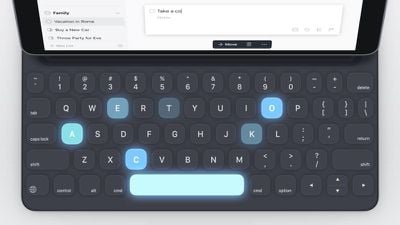
The company says the goal with this update is to make Things 3 for the iPad truly desktop-class with full support for external keyboards and keyboard shortcuts to make the Things 3 experience when connected to a keyboard as easy as the touch-only experience.
things3foripad
To achieve this goal, Cultured Code has added support for selecting items in Things from the keyboard, mirroring how Things 3 works on the Mac.

Before you can use a shortcut, you need a persistent selection in the list that you can target. So that's exactly what we've built for Things 3.6. To see what we mean, just open the app and tap the down arrow; you'll see the first to-do selected.

Now you can move the selection around with the arrow keys, or hold down shift and use the arrows to select more to-dos. Yes, it works just like the Mac!

Things 3 supports a wide range of keyboard shortcuts for a selection, such as inserting a new to-do, opening a to-do, moving items up or down a list, duplicating or copying items, setting a date, marking an item complete, and more. Popovers in the app are also fully accessible from the keyboard.

Type Travel, a Things 3 navigation feature for the Mac, is also now available on the iPad. To use it, type where in the app you need to go, such as projects or a specific to-do, and then it automatically opens up.

Other new features include support for dragging and dropping to-dos into the Things sidebar to move them to other lists, the ability to apply tags and deadlines to multiple to-dos at once (also available on iPhone), and there's now an option to use undo and redo on iPad.

Things 3 for iPad can be downloaded from the App Store for $19.99. [Direct Link]

Things 3 for iPhone can also be downloaded from the App Store for $9.99. [Direct Link]

Top Rated Comments

BWhaler Avatar
106 months ago
Things is rapidly becoming the benchmark for how apps should work, particularly on the iPad. Yes, not perfect, but a good combination of power and simplicity.

Apple should study Things and improve it’s first party apps accordingly. Reminders, Calendars, Podcast app, itunes, et al., are rapidly becoming more and more like Microsoft apps from the 90’s.

A hearty congratulations to the Things teams. I am a paying customer for Mac, iPhone, and iPad apps, and will continue to be so and pay more in the future as long as this rate of innovation continues, the quality stays high, and there are no subscriptions. A 100 bucks every 24 months or so is the best money I csan spend on a tool I use all day long, 6-7 days per week.
Score: 5 Votes (Like | Disagree)
106 months ago
I love the interface of Things and would go back the second they'd introduce shared todo's and lists. We run a family business and need to be able to share and manage tasks together. Thus using Wunderlist at the moment which is ok but not nearly as neat and efficient as Things is.
Score: 4 Votes (Like | Disagree)
drumcat Avatar
106 months ago
Wow... hey everyone, we can do keyboards!

That's news? Things has been a steaming mess for a while... right about when they went to internal service on sync. The pricing is absurd. You know what does shared to-do lists for free?

Reminders. ¯\_(ツ)_/¯
Score: 3 Votes (Like | Disagree)
Chopper9 Avatar
106 months ago
I love the interface of Things and would go back the second they'd introduce shared todo's and lists. We run a family business and need to be able to share and manage tasks together. Thus using Wunderlist at the moment which is ok but not nearly as neat and efficient as Things is.
How they omit something so basic and so widely used is a head scratcher.
Score: 3 Votes (Like | Disagree)
106 months ago
Things is great. I’ve had it on my iPhone for ages.

I do think their pricing model let’s them down really though, charging for different devices seperaty across iPhone, Mac and iPad.
Score: 2 Votes (Like | Disagree)
106 months ago
I love Things. I've been using it on iPhone and iPad and Mac since version 3 came out last year.

But why can they not implement attachment support? This is the most glaring omission from an otherwise stellar task manager. Sometimes you need to attach a document or a photo to either save time or reference for the future. I work around it by using Notes of Bear, but life would be so much simpler if they would simply add the ability to attach files.
Thanks for the heads-up, attachment is another feature we use extensively while doing team task management in Wunderlist. So that's definitely another feature that Things will have to implement before I jump back...
Score: 1 Votes (Like | Disagree)

Popular Stories

iphone 16 teal

'Siri AI' Lawsuit Update: Apple to Pay Owners of These iPhone Models

Thursday July 9, 2026 7:08 am PDT by
In May, Apple agreed to pay $250 million to settle a U.S. class action lawsuit over Siri AI's delayed launch, and eligible iPhone users could receive up to a $95 payout. This week, the California court overseeing the case held a hearing regarding preliminary approval of the settlement, but the judge has not yet issued a ruling. It will likely be at least a few more months before eligible...
Apple TV Thumb 3

Everything Coming in the 2026 Apple TV 4K

Wednesday July 8, 2026 4:51 pm PDT by
The Apple TV 4K hasn't been updated since 2022, and it's due for a refresh. An update is planned for 2026, but Apple is likely going to wait to launch it after Siri AI launches in iOS 27. Design Apple TV design updates don't happen often, and that's not changing. The next Apple TV is going to have the same squircle shape as the current model, and it'll continue to be made from a black...
apple wallet drivers license feature iPhone 15 pro

Apple Says iPhone Driver's Licenses Will Expand to These 6 U.S. States

Thursday July 9, 2026 7:29 am PDT by
In select U.S. states, residents can add their driver's license or state ID to the Apple Wallet app on the iPhone and Apple Watch, and then use it to display proof of identity or age at select airports and businesses, and in select apps. To set up the feature, open the Wallet app on the iPhone and tap on the plus sign in the top-right corner. Next, tap on Driver's License and ID Cards,...












































