

Skip to Content

iDevices Launches HomeKit-Compatible Wireless 'Instant Switch'

by

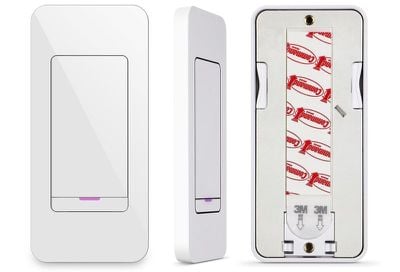
iDevices today announced the launch of the latest product in its smart home lineup, the iDevices Instant Switch. The Instant Switch is a simple wireless wall switch that's designed to attach to a surface using adhesive, so there's no tricky installation required.

The Instant Switch, which was first announced at CES 2017, is designed to work with existing iDevices HomeKit products using a Bluetooth connection, providing an additional method of control. According to iDevices, the Instant Switch can be paired to a hard-wired iDevices Wall or Dimmer Switch to create a three or four-way control configuration, for example.
idevicesinstantswitch2
You can attach the Instant Switch to a wall or another surface using a 3M Command Strip, and it can be placed anywhere in the home. iDevices recommends using it in hard-to-reach locations, because no drilling or rewiring is required. A built-in user-replaceable battery is included, so power isn't needed.
idevicesinstantswitch
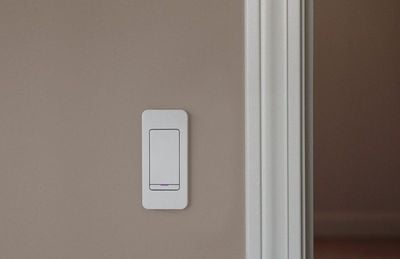
If you don't want to use adhesive, the Instant Switch can also be fitted to any standard rocker faceplate because it's been designed to mimic a permanently installed light switch.

The new iDevices Instant Switch can be purchased from the iDevices website or Amazon.com for $34.95 starting today.

Top Rated Comments

105 months ago
I think it's a stretch to say it's Homekit compatible. It only works with other iDevice homekit devices over BT.
Score: 5 Votes (Like | Disagree)
VforVelveta Avatar
105 months ago
I think this article needs to be clarified that the switch itself is not Homekit compatible. All it can do is control other iDevices stuff, e.g. it can't be used in Homekit automations to control other things and won't appear in the Home app.

If you want something like this that actually is HK compatible, I think the Logitech pop buttons are the closest thing to it.
Score: 5 Votes (Like | Disagree)
bmustaf Avatar
105 months ago
As mentioned above, this *ISN'T* HomeKit compatible, actually. Maybe, on a technicality.

But this, again (after the Twelve South iPhone case "total protection" on a case that has plenty of cutouts thing earlier this week) is an example of the practice of trying to pass off totally unvetted press releases from advertisers or companies in the ecosystem as actual "content" or "news".

It hurts MR's credibility. Please reconsider this practice, or at least label this as "THIS COMES STRAIGHT FROM THE MARKETING/PR AGENCY OF THIS COMPANY, AND IS ESSENTIALLY AN AD!" or something. This isn't actual content from MR, it's a repost of a press release/product release sheet. Gross.
Score: 4 Votes (Like | Disagree)
105 months ago
I think it's a stretch to say it's Homekit compatible. It only works with other iDevice homekit devices over BT.
Not a stretch, it simply is not homekit compatible. Though in theory, it could be, provided you have an apple TV or homepod that is always on. ( My apple TV is cut off from power when not in use via a central switch to all the AV components ).
Score: 1 Votes (Like | Disagree)
wesley96 Avatar
105 months ago
And while my Lutron switches, the iDevices switch, and the ‘dumb’ rocker switch all look different on the face, they all have one thing in common. They can all be installed in a gang box. Unlike the Hue Tap.
Well, not in his country’s standard gang box. So all those switches you mentioned are no-go as far as he is concerned and Tap is actually better in this aspect that it can be installed on any surface. Different needs and situations.

...anyways, so I understand that the switch shown in the article controls iDevices stuff which are HK compatible, but the switch itself is NOT compatible with HK? That’s disappointing. I liked the pricing, but then this limitation makes it a deal breaker.
Score: 1 Votes (Like | Disagree)
105 months ago
Hue Dimmer or Tap are a decent option for Homekit actions even if you don’t use Hue lights. Yes, you will need a Hue Hub, but even with that included it is a good value if you need more than 3 switches.
As for the need for an Apple TV/HomePod/ iDevice on your network. Well that’s HomeKit for you. Your end point device will have the same limitations as the switches.
Score: 1 Votes (Like | Disagree)

Popular Stories

Apple Event Logo

Apple Released Seven New Products Today

Wednesday March 11, 2026 7:05 am PDT by
Starting today, the seven new Apple products that were announced last week are available at Apple Stores and beginning to arrive to customers. The colorful MacBook Neo and all of the other new products are on display at most Apple Store locations around the world starting today. Apple Stores have inventory of the new products for both walk-in customers and Apple Store pickup, but...


Apple 50 Years of Thinking Different

Apple Announces 50th Anniversary Plans

Thursday March 12, 2026 6:10 am PDT by
Apple today announced that it will celebrate the company's 50th anniversary over the coming weeks, but it has yet to reveal any specific plans. Apple was founded on April 1, 1976, so the company will turn 50 on April 1, 2026. "While Apple is known for looking forward, this milestone offers a special moment to reflect on the journey that has brought the company here, to celebrate the...
iphone fold text

iPhone Fold to Feature iPad-Style Multitasking and Layouts

Wednesday March 11, 2026 1:31 pm PDT by
The upcoming foldable iPhone that Apple plans to debut this September will operate like a cross between an iPhone and an iPad, reports Bloomberg. When the device is opened up, the UI will have an iPad-like layout that supports multitasking with two apps side-by-side. No iPhone to date has supported running multiple apps on the display at the same time, beyond simple picture-in-picture mode...






































