This week, Microsoft took the unusual step of pushing out a redesigned version of OneNote for Mac and iOS ahead of its release on Windows and Android. The update to the note-taking platform introduces a new interface that aims to enhance usability for users of assistive technologies, simplify navigation controls, and create consistency across devices, according to the company.

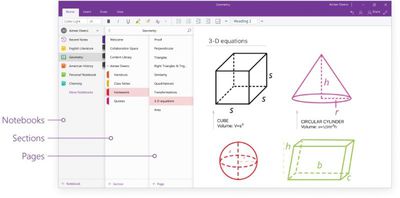
Microsoft said it has listened to user feedback to learn how it could improve the navigational layout of the note-taking apps, especially for larger digital notebooks with more sections. As a result, the new interface places all navigation panes in one collapsible area on the left-hand side of the app, instead of having menus for notebooks and sections/pages on either side of the window.
Redesigning OneNote 1

This allows users to easily switch between their notes and dramatically improves usability with assistive technologies. With the new consolidated and simplified design, screen readers can easily navigate through the app to help those with disabilities. In addition, content is front and center—helping students to focus and avoid distractions.

To switch to any other page or section, users can click its name in the navigation panes, or Control-click the name of any page or section and then choose from more options. To open a different notebook, users can click the Show Notebooks button and select it in the list, while options for creating new notebooks/sections/pages now appear at the bottom of the associated navigation panes. On Mac, each pane can also be resized by moving the mouse pointer over the vertical edge and click-dragging it.
Redesigning OneNote
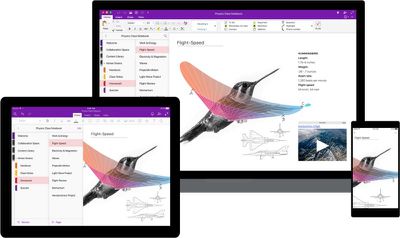
The new design philosophy also brings greater interface consistency across Mac, iPhone, and iPad, enabling users to transition between devices quickly and easily, which Microsoft hopes will benefit those with visual impairments and also help in learning environments where device variety is increasingly common.

OneNote for Mac is freely available on the Mac App Store [Direct Link]; likewise OneNote for iOS is a free download on the App Store [Direct Link] The overhauled interface has also been applied to Microsoft's web app. Windows and Android versions are expected to roll out in the coming weeks.


Tag: OneNote

Top Rated Comments

Mobster1983 Avatar
112 months ago
Nice. Just graduated from Law School on Sunday. Used OneNote for all three years. Figures they would release an update right when my usage pretty much stops. lol.
Score: 5 Votes (Like | Disagree)
marvz Avatar
112 months ago
Looks way better and easier to use but before I really make the switch from Evernote they need to make their freaking web clipper usable.
Score: 4 Votes (Like | Disagree)
Santabean2000 Avatar
112 months ago
Pretty sweet for a free app. I always find syncing slow though...

iCloud, Google Drive, DropBox - all much, much faster.
Score: 3 Votes (Like | Disagree)
H.Finch Avatar
112 months ago
This is the most used app on my Mac... which is weird since I'm a designer and pretty much live in CC...
Its the best thing to come out of MS since... forever I think.

But having a huge navigation on the left side... sort of feels off to me... Where my eyes start to read, I want my content to be. The Nav is a secondairy item of importance and should be on the right I think.
Score: 2 Votes (Like | Disagree)
odedia Avatar
112 months ago
What about local network onenotes?

It's available on windows but not Mac.

Cloud-based notes are worthless in a corporate environment. I cannot collaborate with my colleagues being the only one on the team with a mac.
Score: 2 Votes (Like | Disagree)
DEMinSoCAL Avatar
112 months ago
Nice. Just graduated from Law School on Sunday. Used OneNote for all three years. Figures they would release an update right when my usage pretty much stops. lol.
Congratulations on your accomplishment! :)
Score: 1 Votes (Like | Disagree)

Popular Stories

iOS 26

iOS 26.4 and iOS 27 Features Revealed in New Leak

Friday December 12, 2025 10:56 am PST by
Macworld's Filipe Espósito today revealed a handful of features that Apple is allegedly planning for iOS 26.4, iOS 27, and even iOS 28. The report said the features are referenced within the code for a leaked internal build of iOS 26 that is not meant to be seen by the public. However, it appears that Espósito and/or his sources managed to gain access to it, providing us with a sneak peek...
iOS 26

iOS 26.2 Coming Soon With These 8 New Features on Your iPhone

Thursday December 11, 2025 8:49 am PST by
Apple seeded the second iOS 26.2 Release Candidate to developers earlier this week, meaning the update will be released to the general public very soon. Apple confirmed iOS 26.2 would be released in December, but it did not provide a specific date. We expect the update to be released by early next week. iOS 26.2 includes a handful of new features and changes on the iPhone, such as a new...
iOS 26

Apple Releases iOS 26.2 With Alarms for Reminders, Lock Screen Changes, Enhanced Safety Alerts and More

Friday December 12, 2025 10:10 am PST by
Apple today released iOS 26.2, the second major update to the iOS 26 operating system that came out in September, iOS 26.2 comes a little over a month after iOS 26.1 launched. ‌iOS 26‌.2 is compatible with the ‌iPhone‌ 11 series and later, as well as the second-generation ‌iPhone‌ SE. The new software can be downloaded on eligible iPhones over-the-air by going to Settings >...
AirPods Pro Firmware Feature

Apple Releases New Firmware for AirPods Pro 2 and AirPods Pro 3

Thursday December 11, 2025 11:28 am PST by
Apple today released new firmware designed for the AirPods Pro 3 and the prior-generation AirPods Pro 2. The AirPods Pro 3 firmware is 8B30, up from 8B25, while the AirPods Pro 2 firmware is 8B28, up from 8B21. There's no word on what's include in the updated firmware, but the AirPods Pro 2 and AirPods Pro 3 are getting expanded support for Live Translation in the European Union in iOS...
macOS Tahoe 26 Thumb

Apple Releases macOS Tahoe 26.2 With Edge Light

Friday December 12, 2025 10:08 am PST by
Apple today released macOS Tahoe 26.2, the second major update to the macOS Tahoe operating system that came out in September. macOS Tahoe 26.2 comes five weeks after Apple released macOS Tahoe 26.1. Mac users can download the macOS Tahoe update by using the Software Update section of System Settings. macOS Tahoe 26.2 includes Edge Light, a feature that illuminates your face with soft...
AirTag 2 Mock Feature

Apple AirTag 2: Four New Features Found in iOS 26 Code

Thursday December 11, 2025 10:31 am PST by
The AirTag 2 will include a handful of new features that will improve tracking capabilities, according to a new report from Macworld. The site says that it was able to access an internal build of iOS 26, which includes references to multiple unreleased products. Here's what's supposedly coming: An improved pairing process, though no details were provided. AirTag pairing is already...
ipados 26 1 slide over

Apple Releases iPadOS 26.2 With Multitasking Improvements

Friday December 12, 2025 10:09 am PST by
Apple today released iPadOS 26.2, the second major update to the iPadOS 26 operating system released in September. iPadOS 26.2 comes a month after iPadOS 26.1. The new software can be downloaded on eligible iPads over-the-air by going to Settings > General > Software Update. iPadOS 26.2 continues with the multitasking improvements that were added with iPadOS 26.1. You can now drag and...
bug security vulnerability issue fix larry

Update Now: iOS 26.2 Fixes 20+ Security Vulnerabilities

Friday December 12, 2025 11:11 am PST by
Apple today released iOS 26.2, iPadOS 26.2, and macOS 26.2, all of which introduce new features, bug fixes, and security improvements. Apple says that the updates address over 20 vulnerabilities, including two bugs that are known to have been actively exploited. There are a pair of WebKit vulnerabilities that could allow maliciously crafted web content to execute code or cause memory...