Skip to Content

Readdle's PDF Expert for Mac Gains Improved Search, New Toolbar Layout

by

Readdle today updated its popular PDF Expert app for the Mac to version 2.2, overhauling the app and adding new features to make editing and annotating PDFs even easier than before.

New editing tools automatically detect the font, size, and opacity of the original text in a PDF document, so PDFs can be edited more like regular text documents for a much quicker editing experience.
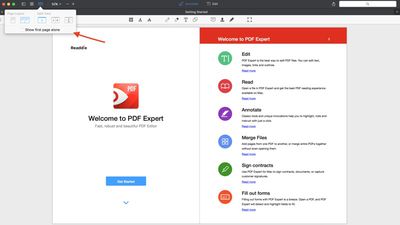
pdfexperttoolbar
Readdle has also introduced a new toolbar layout that's specialized for tasks like going over a contract or reading an article, with options for viewing several pages of a single document, comparing two documents, and more.

To make searching faster, version 2.2 of PDF Editor includes search indexing, plus the ability to search all opened files and save history has been added.
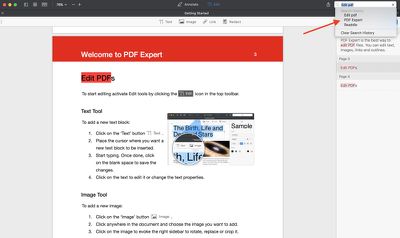
pdfexpertsearch
PDF Expert for Mac can be downloaded from the Mac App Store for $59.99. [Direct Link] A non Mac App Store version is also available from the PDF Expert website.


Tag: Readdle

Top Rated Comments

117 months ago
PDF Expert is one of those apps that's worth every penny. It's so much better than Mac's Preview and much less costly that Adobe Acrobat. The features are awesome and with this new update, it does just about everything I need it to. Creating forms would be nice but I don't have to do that too often and I would certainly pay an upgrade fee for it. It's a full replacement for Acrobat at that point.
Score: 1 Votes (Like | Disagree)
117 months ago
Don
Just bought PDF Expert 3 months ago. The $50 upgrade cost seems really, really steep.

I really like the version I have, but there's no way to justify spending $100 over the course of a few months to keep it up to date. They have sales on it with some regularity, and there's likely to be more savings than the measly $10 they're giving to existing customers.
Don't know how they compare, but pdfPenPro has been very good for me. Customer service is excellent and I ditched Adobe Reader already for years, because printing anything was taking forever. UI isn't good either.

BTW: For those who need unlocking google guapdf.= guaranteed unlock. Responsive developer.
Score: 1 Votes (Like | Disagree)

Popular Stories

MacBook Neo Feature Pastel 1

First MacBook Neo Benchmarks Are In: Here's How It Compares to the M1 MacBook Air

Thursday March 5, 2026 4:07 pm PST by
Benchmarks for the new MacBook Neo surfaced today, and unsurprisingly, CPU performance is almost identical to the iPhone 16 Pro. The MacBook Neo uses the same 6-core A18 Pro chip that was first introduced in the iPhone 16 Pro, but it has one fewer GPU core. The MacBook Neo earned a single-core score of 3461 and a multi-core score of 8668, along with a Metal score of 31286. Here's how the...
imac video apple feature

Apple Unveils Seven New Products

Friday March 6, 2026 11:48 am PST by
Apple this week unveiled seven products, including an iPhone 17e, an iPad Air with the M4 chip, updated MacBook Air and MacBook Pro models, a new Studio Display, a higher-end Studio Display XDR, and an all-new MacBook Neo that starts at just $599. iPhone 17e features the same overall design as the iPhone 16e, but it gains Apple's A19 chip, MagSafe for magnetic wireless charging and magnetic...
Apple MacBook Pro M4 hero

Apple Planning 'MacBook Ultra' With Touchscreen and Higher Price

Sunday March 8, 2026 8:05 am PDT by
Apple is planning to launch an all-new "MacBook Ultra" model this year, featuring an OLED display, touchscreen, and a higher price point, Bloomberg's Mark Gurman reports. Gurman revealed the information in his latest "Power On" newsletter. While Apple has been widely expected to launch new M6-series MacBook Pro models with OLED displays, touchscreen functionality, and a new, thinner design...