


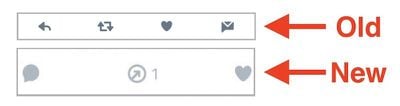
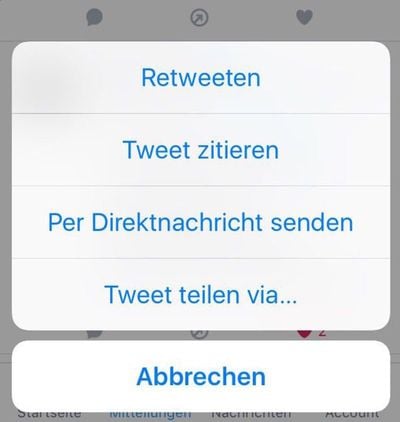
twitterlogoTwitter has confirmed to TechCrunch that the social network is performing a small scale test for some of its iOS users, changing the popular "retweet" icon into an new "share" button. "Retweet" and "quote tweet" are now simply options to pick from within the "share" menu.

Additionally, the arrow that currently indicates a prompt to reply to a tweet has been overhauled into a small speech bubble icon. The change to the reply button is purely cosmetic and doesn't functionally alter how the feature works, but the "share" option is introducing a few new choices into the sub-menu.

In addition to the expected "retweet" and "quote tweet" buttons, when users click on "share," they are discovering new "send by direct message" and "share tweet" options. Currently in the iOS Twitter app, send by direct message is a one-tap option below each tweet represented by a small envelope, which has now been removed.

"Share tweet" lets users spread a tweet to other platforms. In its current state on the iOS app, it can be found by tapping a small, easily missable down arrow in the top right corner of the screen, after clicking on the tweet to expand it and get more information. Both the current and potentially new options bring up Apple's usual share card.
twitter-ios-change
In its confirmation to TechCrunch, Twitter said that its purpose for the test is "to see how it changed behavior on the site," seemingly hoping to make it easier for users to send links to friends and family members with the new share options, boosting engagement in the process.

“We’re testing new icons on Tweets to evaluate how this impacts the way that people use Twitter,” a spokesperson said in an email.

Another reason for the change is rumored to be Twitter's acquiescence to "more established social media norms" that have been popularized by other social networks, with Twitter hoping that "share" is more recognizable and understandable by new users than Twitter-specific lingo like "retweet." In the new tests, "retweet" still exists, it's just buried under a newly named button. So if this part of Twitter's decision is true, it's still not clear why "retweet" would exist in any form within the app.
twitter-share-button

The new share button includes four options: retweet, quote tweet, send by direct message, and share tweet

This would also fall in line with the company's decision to change "stars" and "favorites" to "likes" and "hearts," two terms Facebook users are undoubtedly familiar with at this point. The move to a speech bubble from the curved "reply" arrow might also make it easier for new users to navigate the app, thanks to its similarity to app icons like iMessages. As with the sharing option, this has the potential to boost user engagement, which Twitter has been having trouble with this year.

It’s the same reason Twitter would change the reply arrow to a speech bubble: Twitter is looking for more understandable iconography, and having too many arrows was, again, confusing to anyone less familiar with Twitter beyond very regular, existing users. Having a speech bubble icon may also prove to remind people to react more frequently, boosting engagement — a key metric that Twitter, as an ad-based service, needs to grow (especially since user growth has largely been flat).

The details of how long the test might go on for were left unspecified, but one Twitter insider also mentioned that there are "a bunch" of tests being performed at the company, so it's impossible to say which change will become a permanent mainstay for its users. Twitter has been rolling out updates to compete with the growing popularity of Snapchat and Instagram, most recently adding in live video to its mobile apps earlier this week.


Tag: Twitter

Top Rated Comments

BrettArchibald Avatar
117 months ago
Oh look, yet ANOTHER share icon to go along with all the other share icons, that all look nothing like each other...

Score: 13 Votes (Like | Disagree)
H3LL5P4WN Avatar
117 months ago
I want to like the new official Twitter app, especially with darkmode now, but Tweetbot is still topdawg. No ads, a timeline that's actually in chronological order, no interjecting "In Case You Missed It..."

I'm not opposed to these things, but in their current state, they're confusing and detrimental to the Twitter experience.
Score: 6 Votes (Like | Disagree)
naeS1Sean Avatar
117 months ago
Imma Retweeten'...

That's what the button should say...
[doublepost=1481910594][/doublepost]
Wow I know like five German words now. Retweeten per direktnachricht senden! Abbrechen!
Louder!!
Score: 4 Votes (Like | Disagree)
TMRJIJ Avatar
117 months ago
Oh look, yet ANOTHER share icon to go along with all the other share icons, that all look nothing like each other...

The circular ones make me think the content I shared is coming back to me.
Score: 3 Votes (Like | Disagree)
Hastings101 Avatar
117 months ago
Wow I know like five German words now. Retweeten per direktnachricht senden! Abbrechen!
Score: 2 Votes (Like | Disagree)
sshambles Avatar
117 months ago
I want to like the new official Twitter app, especially with darkmode now, but Tweetbot is still topdawg. No ads, a timeline that's actually in chronological order, no interjecting "In Case You Missed It..."

I'm not opposed to these things, but in their current state, they're confusing and detrimental to the Twitter experience.
Everything you said there, absolutely correct. The official app was okay for a time, but they keep messing with it and when every 7th tweet is an advertisement or something else, no thanks. I know they've got to make money somehow, but by destroying the user experience... that's how they'd lose me.
Score: 2 Votes (Like | Disagree)

Popular Stories

iOS 26

iOS 26.4 and iOS 27 Features Revealed in New Leak

Friday December 12, 2025 10:56 am PST by
Macworld's Filipe Espósito today revealed a handful of features that Apple is allegedly planning for iOS 26.4, iOS 27, and even iOS 28. The report said the features are referenced within the code for a leaked internal build of iOS 26 that is not meant to be seen by the public. However, it appears that Espósito and/or his sources managed to gain access to it, providing us with a sneak peek...
iOS 26

iOS 26.2 Coming Soon With These 8 New Features on Your iPhone

Thursday December 11, 2025 8:49 am PST by
Apple seeded the second iOS 26.2 Release Candidate to developers earlier this week, meaning the update will be released to the general public very soon. Apple confirmed iOS 26.2 would be released in December, but it did not provide a specific date. We expect the update to be released by early next week. iOS 26.2 includes a handful of new features and changes on the iPhone, such as a new...
iOS 26

Apple Releases iOS 26.2 With Alarms for Reminders, Lock Screen Changes, Enhanced Safety Alerts and More

Friday December 12, 2025 10:10 am PST by
Apple today released iOS 26.2, the second major update to the iOS 26 operating system that came out in September, iOS 26.2 comes a little over a month after iOS 26.1 launched. ‌iOS 26‌.2 is compatible with the ‌iPhone‌ 11 series and later, as well as the second-generation ‌iPhone‌ SE. The new software can be downloaded on eligible iPhones over-the-air by going to Settings >...
AirPods Pro Firmware Feature

Apple Releases New Firmware for AirPods Pro 2 and AirPods Pro 3

Thursday December 11, 2025 11:28 am PST by
Apple today released new firmware designed for the AirPods Pro 3 and the prior-generation AirPods Pro 2. The AirPods Pro 3 firmware is 8B30, up from 8B25, while the AirPods Pro 2 firmware is 8B28, up from 8B21. There's no word on what's include in the updated firmware, but the AirPods Pro 2 and AirPods Pro 3 are getting expanded support for Live Translation in the European Union in iOS...
macOS Tahoe 26 Thumb

Apple Releases macOS Tahoe 26.2 With Edge Light

Friday December 12, 2025 10:08 am PST by
Apple today released macOS Tahoe 26.2, the second major update to the macOS Tahoe operating system that came out in September. macOS Tahoe 26.2 comes five weeks after Apple released macOS Tahoe 26.1. Mac users can download the macOS Tahoe update by using the Software Update section of System Settings. macOS Tahoe 26.2 includes Edge Light, a feature that illuminates your face with soft...
AirTag 2 Mock Feature

Apple AirTag 2: Four New Features Found in iOS 26 Code

Thursday December 11, 2025 10:31 am PST by
The AirTag 2 will include a handful of new features that will improve tracking capabilities, according to a new report from Macworld. The site says that it was able to access an internal build of iOS 26, which includes references to multiple unreleased products. Here's what's supposedly coming: An improved pairing process, though no details were provided. AirTag pairing is already...
ipados 26 1 slide over

Apple Releases iPadOS 26.2 With Multitasking Improvements

Friday December 12, 2025 10:09 am PST by
Apple today released iPadOS 26.2, the second major update to the iPadOS 26 operating system released in September. iPadOS 26.2 comes a month after iPadOS 26.1. The new software can be downloaded on eligible iPads over-the-air by going to Settings > General > Software Update. iPadOS 26.2 continues with the multitasking improvements that were added with iPadOS 26.1. You can now drag and...
bug security vulnerability issue fix larry

Update Now: iOS 26.2 Fixes 20+ Security Vulnerabilities

Friday December 12, 2025 11:11 am PST by
Apple today released iOS 26.2, iPadOS 26.2, and macOS 26.2, all of which introduce new features, bug fixes, and security improvements. Apple says that the updates address over 20 vulnerabilities, including two bugs that are known to have been actively exploited. There are a pair of WebKit vulnerabilities that could allow maliciously crafted web content to execute code or cause memory...










