

Dropbox for iOS is being updated today with iOS 10 support and new features to improve the file storage and sharing experience.
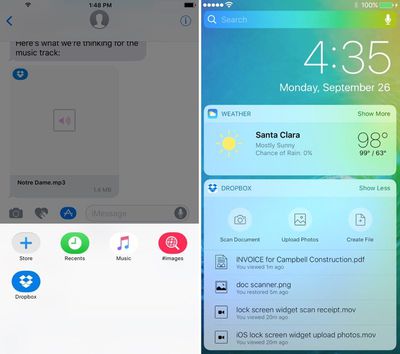
With Messages integration, Dropbox users can select Dropbox files from within the Messages app and share them with friends and colleagues, alleviating the need to open the Dropbox app and copy a link. A new Dropbox widget can be added to the lock screen, providing easier access to tools for creating, viewing, and uploading files.
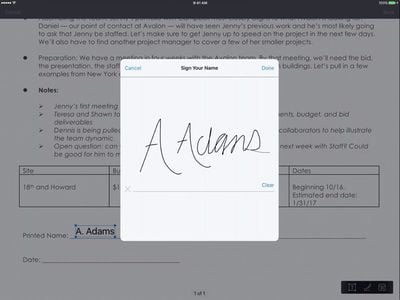
There's a new tool in the Dropbox for signing PDFs, and there are options for getting notified when a file has been updated by a colleague so it can be refreshed with a tap.
Dropbox now includes support for picture-in-picture, a feature designed to let iPad users watch videos while performing other tasks. Split-screen support for compatible iPads is also coming in the near future, but won't be included in today's update.
Dropbox can be downloaded from the App Store for free. [Direct Link]












































![Apple Pulls Keynote, Pages and Numbers From App Store [Update: Back]](https://images.macrumors.com/t/Okb7kitB_gNr6qe5Pex9nQIysD8=/112x112/article-new/2026/01/Apple-Creator-Studio-iWork-suite.jpg)


Top Rated Comments
I use Dropbox for some things, iCloud for others, and neither has given me enough trouble to switch totally in either direction.
If someone sends me a PDF with a signature on it, it means nothing unless a) the document is immutable and b) it can be shown that the signature was added by an identifiable individual and certification authority.
It's always been a bit of a mystery to me why Apple don't offer a true digital signing service for documents (PDF, Pages, Numbers etc.) using a user's Apple ID. They are in a prime position to be able to do this.
As I understand it, Adobe and others offer such a service, but you have to pay to get documents signed. Wouldn't it be great if you could just take a PDF on your Mac, sign it with you signature, and have it locked and certified automatically by an Apple server (for free). A recipient of such a document could be confident of the document's legitimacy.
I actually pity Dropbox a bit. Their Mac client worked quite well until Apple blocked applications from injecting code into or attaching to Finder. Yosemite brought us the Finder Sync extension point, but it has caused nothing but problems for them and a loss of functionality for users. I believe the recent outrage over their haxies, while bad, happened with good intentions. The things that Apple can do with Finder and iCloud Drive is not open to other developers, unless they develop their own Finder.
Simple, yet powerful and reliable. Their features to upload your screenshots and so on are best in class. However, it seems that their mac app is getting relegated. They still have the "import from iPhoto" feature, after all.
[doublepost=1476212309][/doublepost]Dropbox takes their time, because all that matters to them is having a stable app and service. The app that has been relegated is the Mac app.