

Google Photos App Updated With Burst Photo Support and New Cropping Tool - MacRumors
Skip to Content

Google Photos App Updated With Burst Photo Support and New Cropping Tool

by

Google has updated its mobile photo and video cloud storage app Google Photos with a couple of new features, including burst photo support and a new cropping tool.

The 1.12.1 update means users can now make full use of the iPhone's burst mode capability by holding down on the app's on-screen shutter release button, as well as crop newly shot photos on the fly.
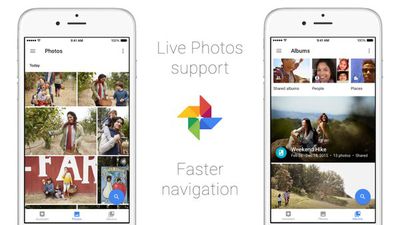
Google Photos
In addition, the company says Google Photos now loads faster, and users can expect reduced battery and cellular data usage when using the updated version on the go.

Google Photos was originally released last year to complement the company's web-based photo service. According to Google statistics, 200 million users have stored 13.7 petabytes of photos on the cloud platform, which offers unlimited storage.

The service supports videos in 1080p resolution and photos up to 16 megapixels, but recompresses images to increase upload speed. Meanwhile, users subscribed to a paid Google storage tier can upload 4K video and higher resolution photos.

Other app features include a visual search tool that can distinguish people, places and things without the use of tags, a movie, collage and animation creator, photo and video editing tools like filters and lighting adjustments, smart albums, Live Photos and Chromecast support.

Google Photos is a free download for iPhone and iPad available on the App Store. [Direct Link]

Top Rated Comments

127 months ago
For me at least, Google Photos is delivering on the promises ICPL made but has failed miserably at. Having access to my full photo library on the go was such an exciting possibility and with Google Photos I have that. I can be sitting with some friends and they mention a place I was 2 or 3 years ago. Within 10 seconds I can pull up all my pictures and videos from that place.

ICPL is flat-out unusable on anything but my iMac for my large library. Tried it on an iPad Air 2 and iPhone 6s and it was a joke. Gave it weeks to get its act together on both devices and this was after my full library upload was done, so best possible chance. Crashed constantly, and if it would even stay open it was horribly slow to do anything. Never made all my library available and never uploaded videos from devices like it promised. Forget trying to search for anything.

Tried working with apple on it and they came back and said they could submit a ticket to their engineers but that ICPL was basically still a beta and they couldn't promise anything.

But of course happily take my $10/mo, even $20 back then.

It's embarrassing how well Google photos handles 200k media when ICPL can't even function. The ICPL team needs a serious shakeup.
Score: 4 Votes (Like | Disagree)
vooke Avatar
127 months ago
Hail Google for their near infinite cloud space
Score: 4 Votes (Like | Disagree)
127 months ago
Google Photos exposes the sad that is iCloud.

I really can't see how much longer Apple can keep the BS going.

Something's gotta give eventually.

A Google branded phone supposedly coming out soon might be what finally starts the Great Exodus away from Apple.
Score: 2 Votes (Like | Disagree)
LovingTeddy Avatar
127 months ago
I've never used Google Photos. What benefit over the stock photos app does it offer?
Cross devices support , like support iOS and Android. Unlimited photo backup. You don't have to pay for the stupid iCloud storage.

iOS 10 photo app is basically clone of Google photo app minus unlimited photo back up...
Score: 2 Votes (Like | Disagree)
127 months ago
Was going to say... I was a heavy user of Flickr back in the day before it was monetized by Yahoo (had a Pro unlimited account). Their uploader was terrible, slow, and half of the time didn't work (talking mobile and PC). So I left for Google Photos. So many more features/abilities in Google Photos I couldn't go back.
Yeah, Flickr is prob the worst out of all the cloud storage I use as fail safes. Between Amazon, Google photos, one drive, and Flickr, it does the worst at getting my pictures uploaded via mobile without a ton of handholding.
Score: 1 Votes (Like | Disagree)
127 months ago
I don't see how this is any better than Flickr. 1 TB of lossless storage (though not in every file format), an app for the iPad and iPhone that gives you access to all your photos, auto upload on the apps (have to pay to get auto upload on your PC), and free.
Videos for one thing?

I liked Flickr and had it in my rotation of cloud storage, but their crappy move to put the desktop uploader behind the paywall makes their pretension at offering a free TB a joke now.

Hey, here is TB for 'free' but let's take away any real method to upload to it.

I almost deleted my account when they pulled that one.
Score: 1 Votes (Like | Disagree)

Popular Stories

imac video apple feature

Apple Released Yet Another New Product Today

Friday March 20, 2026 2:39 pm PDT by
Apple has unveiled a whopping nine new products so far this March, including an iPhone 17e, iPad Air models with the M4 chip, MacBook Air models with the M5 chip, MacBook Pro models with M5 Pro and M5 Max chips, the all-new MacBook Neo, an updated Studio Display, a higher-end Studio Display XDR, AirPods Max 2, and now the Nike Powerbeats Pro 2. iPhone 17e features the same overall design as...
HomePod mini and Apple TV Sage

New Apple TV and HomePod Mini Remain 'Ready' to Launch

Sunday March 22, 2026 6:33 am PDT by
Apple has unveiled nine new products this month, but the wait continues for the next-generation Apple TV 4K and HomePod mini models. In his Power On newsletter today, Bloomberg's Mark Gurman said new versions of the Apple TV and HomePod mini have been "ready" since last year, but he reiterated that Apple has held off on releasing them until the more personalized version of Siri and other...
iOS 26

iOS 26.4 Adds Two New Features to CarPlay

Tuesday March 24, 2026 1:55 pm PDT by
iOS 26.4 was released today, and it includes a couple of new features for CarPlay: an Ambient Music widget and support for voice-based chatbot apps. To update your iPhone 11 or newer to iOS 26.4, open the Settings app and tap on General → Software Update. CarPlay will automatically offer the new features so long as the iPhone connected to your vehicle is running iOS 26.4 or later....
















