Apple Confirms Rich Notifications Will Come to Devices Without 3D Touch

Despite only showcasing iOS 10's new rich notifications feature on an iPhone 6s and iPhone 6s Plus during WWDC, Apple has confirmed in beta notes that devices without the pressure sensing technology of the newest iPhone models will also be getting rich notifications. Still, the feature is relegated -- and "optimized" -- for the 6s and 6s Plus in the first iOS 10 beta, with full functionality coming to older-model iPhones in the future.
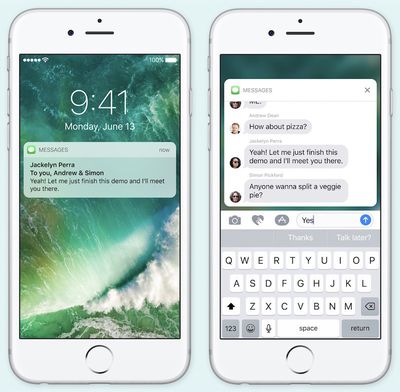
iOS 10 rich notifications

"Support for rich notifications is optimized for 3D Touch, and in iOS 10 beta 1 the feature is available only on iPhone 6s and iPhone 6s Plus. Future betas will provide access to this functionality for users of iPhone models without support for 3D Touch."

Rich notifications function as a way for users to pop into apps without needing to navigate through unlocking the iPhone and finding the app on their home screen. On the iPhone 6s and 6s Plus, a simple 3D Touch can expand a Message with a full keyboard to type out a reply, or show a live broadcast of a sporting event. With no more descriptive information in the Apple beta notes for developers, it's unclear how this feature will work on iPhone models lacking 3D Touch, although some form of long press is likely.

Similar iOS 10 tidbits have been emerging from WWDC following yesterday's keynote, including new information on iMessage Apps and the potential removal of Game Center from the public release of iOS 10 this fall.

Tag: iOS 10

Popular Stories

iOS 26

iOS 26.2 Coming Soon With These 8 New Features on Your iPhone

Thursday December 11, 2025 8:49 am PST by
Apple seeded the second iOS 26.2 Release Candidate to developers earlier this week, meaning the update will be released to the general public very soon. Apple confirmed iOS 26.2 would be released in December, but it did not provide a specific date. We expect the update to be released by early next week. iOS 26.2 includes a handful of new features and changes on the iPhone, such as a new...
AirPods Pro Firmware Feature

Apple Releases New Firmware for AirPods Pro 2 and AirPods Pro 3

Thursday December 11, 2025 11:28 am PST by
Apple today released new firmware designed for the AirPods Pro 3 and the prior-generation AirPods Pro 2. The AirPods Pro 3 firmware is 8B30, up from 8B25, while the AirPods Pro 2 firmware is 8B28, up from 8B21. There's no word on what's include in the updated firmware, but the AirPods Pro 2 and AirPods Pro 3 are getting expanded support for Live Translation in the European Union in iOS...
Google maps feaure

Google Maps Quietly Added This Long-Overdue Feature for Drivers

Wednesday December 10, 2025 2:52 am PST by
Google Maps on iOS quietly gained a new feature recently that automatically recognizes where you've parked your vehicle and saves the location for you. Announced on LinkedIn by Rio Akasaka, Google Maps' senior product manager, the new feature auto-detects your parked location even if you don't use the parking pin function, saves it for up to 48 hours, and then automatically removes it once...
iOS 26

iOS 26.4 and iOS 27 Features Revealed in New Leak

Friday December 12, 2025 10:56 am PST by
Macworld's Filipe Espósito today revealed a handful of features that Apple is allegedly planning for iOS 26.4, iOS 27, and even iOS 28. The report said the features are referenced within the code for a leaked internal build of iOS 26 that is not meant to be seen by the public. However, it appears that Espósito and/or his sources managed to gain access to it, providing us with a sneak peek...
Foldable iPhone 2023 Feature 1

Apple to Make More Foldable iPhones Than Expected [Updated]

Tuesday December 9, 2025 9:59 am PST by
Apple has ordered 22 million OLED panels from Samsung Display for the first foldable iPhone, signaling a significantly larger production target than the display industry had previously anticipated, ET News reports. In the now-seemingly deleted report, ET News claimed that Samsung plans to mass-produce 11 million inward-folding OLED displays for Apple next year, as well as 11 million...
iOS 26

Apple Releases iOS 26.2 With Alarms for Reminders, Lock Screen Changes, Enhanced Safety Alerts and More

Friday December 12, 2025 10:10 am PST by
Apple today released iOS 26.2, the second major update to the iOS 26 operating system that came out in September, iOS 26.2 comes a little over a month after iOS 26.1 launched. ‌iOS 26‌.2 is compatible with the ‌iPhone‌ 11 series and later, as well as the second-generation ‌iPhone‌ SE. The new software can be downloaded on eligible iPhones over-the-air by going to Settings >...
AirTag 2 Mock Feature

Apple AirTag 2: Four New Features Found in iOS 26 Code

Thursday December 11, 2025 10:31 am PST by
The AirTag 2 will include a handful of new features that will improve tracking capabilities, according to a new report from Macworld. The site says that it was able to access an internal build of iOS 26, which includes references to multiple unreleased products. Here's what's supposedly coming: An improved pairing process, though no details were provided. AirTag pairing is already...
iOS 26

15 New Things Your iPhone Can Do in iOS 26.2

Friday December 5, 2025 9:40 am PST by
Apple is about to release iOS 26.2, the second major point update for iPhones since iOS 26 was rolled out in September, and there are at least 15 notable changes and improvements worth checking out. We've rounded them up below. Apple is expected to roll out iOS 26.2 to compatible devices sometime between December 8 and December 16. When the update drops, you can check Apple's servers for the ...
macOS Tahoe 26 Thumb

Apple Releases macOS Tahoe 26.2 With Edge Light

Friday December 12, 2025 10:08 am PST by
Apple today released macOS Tahoe 26.2, the second major update to the macOS Tahoe operating system that came out in September. macOS Tahoe 26.2 comes five weeks after Apple released macOS Tahoe 26.1. Mac users can download the macOS Tahoe update by using the Software Update section of System Settings. macOS Tahoe 26.2 includes Edge Light, a feature that illuminates your face with soft...

Top Rated Comments

Zaft Avatar
124 months ago
iOS10 Messages is the equivalent of bloatware. I used to prefer the simplicity of Apple's default apps. Apple seems to be moving away from simplicity which is a major disappointment.
You dont have to use those features. Apple cant stay very simple when competitors are moving forward.
Score: 20 Votes (Like | Disagree)
kyleh22 Avatar
124 months ago
iOS10 Messages is the equivalent of bloatware. I used to prefer the simplicity of Apple's default apps. Apple seems to be moving away from simplicity which is a major disappointment.
Score: 16 Votes (Like | Disagree)
PortableLover Avatar
124 months ago
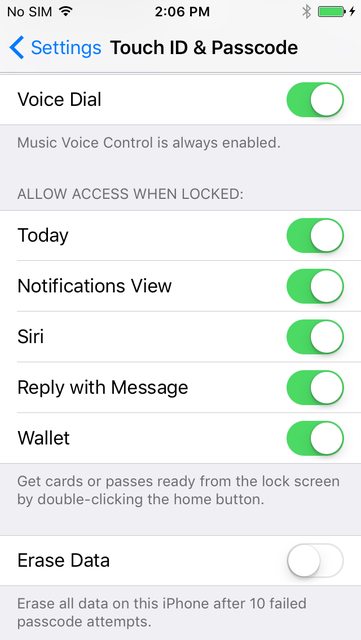
Way to disable this?? Seems bad security wise anyone can pick up your phone reply to a message? Unless it doesnt work like that?
Score: 9 Votes (Like | Disagree)
danleon950410 Avatar
124 months ago
iOS10 Messages is the equivalent of bloatware. I used to prefer the simplicity of Apple's default apps. Apple seems to be moving away from simplicity which is a major disappointment.
"Simplicity" was becoming a cancer among the majority of users, who with all the reason demanded more features. They're delivering and getting in-line with competition.

The new emoji size might nag a little, but otherwise no one is forcing you to either use the app or its new features. If your friends are anything like you, they won't either.

But not adding features is one of the most mediocre things i can think of, and the surely aren't stopping only because persons like you are obsessed with "clean,superior and simple looks" over functionality. And thank god for that
Score: 8 Votes (Like | Disagree)
Everlast66 Avatar
124 months ago
With each new version iOS is gradually turning into a mediocre operating system.

Where is the simplicity and elegance it was known for? I can't stand "features" like these Windows style X buttons to close the pop up.
Score: 7 Votes (Like | Disagree)
639051 Avatar
124 months ago
Seeing as many of you have no ability to think past those irrational thoughts that pop into your heads ... HERE are the controls for security at the lock screen. Now stop!

Score: 7 Votes (Like | Disagree)